> ## Documentation Index
> Fetch the complete documentation index at: https://docs.foundable.com/llms.txt
> Use this file to discover all available pages before exploring further.
# Your foundables
> Switch between your businesses, start a new one, change a foundable’s name, tagline or logo, and delete one you no longer need.
A [foundable](/help/glossary#foundable) is your business in Foundable: its website, its email, its team and everything Ted does for it. If you run more than one business, each one gets its own foundable, and you move between them from the top left of the screen.
 ## Switch to another foundable
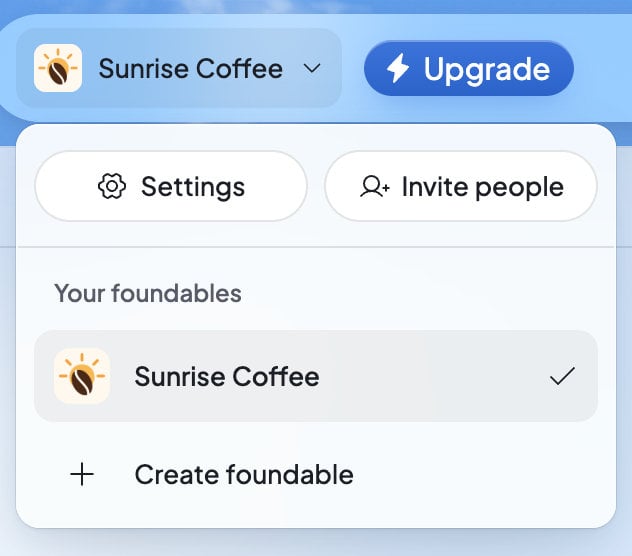
Press your foundable’s name at the top left. Under “Your foundables”, pick the one you want. A check marks the one you have open.
Tap **More**, then **Switch foundable**. The name of the one you have open shows under it.
While it changes, you’ll see “Switching foundable…”. The same menu has **Settings**, which opens the foundable’s **General** settings, and **Invite people**, for the roles that may invite.
## Start another foundable
Press your foundable’s name at the top left.
It’s at the bottom of the menu. If you have no foundable yet, it reads **Create your first foundable**.
The new foundable is called “New foundable” until it has a name. Tell Ted about the business, and he names it when he saves its plan. See [Start your business with Ted](/get-started/start-your-business).
The Free plan includes one foundable. To have more, you need a plan with room for more:
| What you see | What it means | What to do |
| - | - | - |
| “The Free plan includes one foundable. Upgrade to create another.” | You’re on Free and already have a foundable. | Choose a plan in the window that opens, “Start another foundable”. |
| “You’ve reached your plan’s foundable limit.” | Your plan has no room for another one. | Press **View plans** to pick a plan with room for more, or go back to your foundable. |
| “Your plan needs attention before you can create a foundable.” | Something about your plan needs fixing first. | Press **View plans** to see your plan and what it needs. See [Plans and credits](/account/plans-and-credits#your-plan-and-credits). |
After you buy a plan for it, the welcome window for your new plan offers **Start your new foundable**.
## Change the name or tagline
Press your foundable’s name at the top left, then **Settings**.
Type a new **Name**, or a **Tagline**: “One line about this foundable”. A foundable can’t be left without a name.
Press **Save changes**. You’ll see “Foundable details saved.”
You can also ask Ted to rename it. He shows a card with the current name, the new one and a **Rename** button. Your email address and your website’s address stay the same. Afterwards, the card offers **Change email address** if you want a new one. See [Your email address](/inbox/email-address).
## Change the logo
Your first logo is made for you once your business has a name. To change it, open **Settings**, then **General**, and press the logo.
* **Upload a logo** (or **Upload a new logo**): choose a PNG, JPEG, WebP, HEIC or SVG picture. **Crop your logo** opens. Drag it and use **Zoom** until it looks right, then press **Save**.
* **Saved logos**: the logos you’ve chosen or uploaded, and the ones Ted made. “Switch logos across your websites. Your other changes stay as they are.” The logo you use now is marked **In use**. Pick another, then press **Use this logo**. **Load earlier logos** shows older ones.
* **Remove logo**: takes the logo off.
If there’s only one thing you can do, pressing the logo does it straight away. You’ll see “Logo saved.”, or “Logo saved. Updating your site…” while your website picks up the new one.
Ted can make logos too. In the chat, he shows them as tiles you can look at, each with **Use this logo**. A logo you use joins your **Saved logos**.
| What you see | What to do |
| - | - |
| “That image couldn’t be used as a logo. Try another one.” | Choose a different picture. |
| “That image is too detailed for a logo. Try a simpler one.” | Choose a simpler picture. |
| “This browser can’t open HEIC photos. Choose a JPEG or PNG, or use Safari.” | Save the photo as a JPEG or PNG first, or switch to Safari. |
| “Couldn’t use that SVG. Export it as a PNG and try again.” | Save your logo as a PNG, then upload that. |
## Set the foundable’s time zone
**Foundable time** in General is “The local time for this foundable’s briefs and schedules.” Choose **Automatic** or a time zone, then press **Save changes**. Only the owner can change it.
It isn’t the same as **Your local time** in your own account settings. See [Your local time and Foundable time](/account/settings#your-local-time-and-foundable-time).
## Delete a foundable
Deleting a foundable is permanent. There’s no way to get it back.
Press your foundable’s name at the top left, then **Settings**.
It’s under **Danger zone**, at the bottom of General.
The window “Delete foundable?” says “Its site goes offline, its scheduled posts are cancelled and it is gone for good. This can’t be undone.” Type the foundable’s name, then press **Delete foundable**.
When you delete a foundable:
* Its website goes offline, and any checkout a customer still has open closes.
* Its scheduled posts are cancelled.
* Its mailbox, the phones linked to Ted for it, its connected social accounts and apps, and its website’s database are shut down. Then its data is erased.
* A domain you bought for it stays registered to you. It shows under **All domains**, and you can move it to another foundable. See [Manage your domains](/domains/manage-domains).
Only the owner can delete a foundable, so only the owner sees **Danger zone**. If you see “Couldn’t delete this foundable right now. Try again.”, wait a moment and try again.
To delete every foundable you own along with your account, see [Privacy and deleting your data](/account/privacy-and-deletion).
### Leave a foundable you don’t own
If you were invited to someone else’s foundable, you can leave it instead. Open **Settings**, then **Team**. Press **…** on your own row, then **Leave foundable…**. See [Invite your team](/account/team#leave-a-foundable).
## Who can do what
| Task | Who can do it |
| - | - |
| Switch between foundables | Anyone, for the foundables they belong to |
| Change the name, tagline or logo | The owner, admins and members |
| Change the time zone | The owner only |
| Delete the foundable | The owner only |
| Leave the foundable | Anyone but the owner |
## If something goes wrong
| What you see | What to do |
| - | - |
| “Your foundables could not be loaded. Try again.” | Press **Retry**. |
| “Could not create your foundable.” | Try **Create foundable** again in a moment. |
| “That foundable is no longer available.” | Pick another foundable from the switcher. |
| “Name is required.” | Type a name before you press **Save changes**. |
## FAQ
A foundable has no name until Ted saves its plan with you, or until you type one in **Settings** › **General** › **Name**.
No. Your website’s address and your email address stay as they are. After a rename in the chat, Ted’s card offers **Change email address** if you want a new one.
Yes, on a plan with room for more. The Free plan includes one. Press **Create foundable** in the switcher, and Foundable shows you the plans if yours is full.
No. Deleting a foundable can’t be undone, so take a moment before you confirm.
No. Only the owner can delete it or change its time zone. Admins and members can change its name, tagline and logo.
## Related
Everything you can change, and where to find it.
Bring in people to work on this foundable with you and Ted.
See which plans have room for more foundables.
What happens in a new foundable’s first minutes.
This documentation is built and hosted on [Mintlify](https://mintlify.com), a developer documentation platform.
## Switch to another foundable
Press your foundable’s name at the top left. Under “Your foundables”, pick the one you want. A check marks the one you have open.
Tap **More**, then **Switch foundable**. The name of the one you have open shows under it.
While it changes, you’ll see “Switching foundable…”. The same menu has **Settings**, which opens the foundable’s **General** settings, and **Invite people**, for the roles that may invite.
## Start another foundable
Press your foundable’s name at the top left.
It’s at the bottom of the menu. If you have no foundable yet, it reads **Create your first foundable**.
The new foundable is called “New foundable” until it has a name. Tell Ted about the business, and he names it when he saves its plan. See [Start your business with Ted](/get-started/start-your-business).
The Free plan includes one foundable. To have more, you need a plan with room for more:
| What you see | What it means | What to do |
| - | - | - |
| “The Free plan includes one foundable. Upgrade to create another.” | You’re on Free and already have a foundable. | Choose a plan in the window that opens, “Start another foundable”. |
| “You’ve reached your plan’s foundable limit.” | Your plan has no room for another one. | Press **View plans** to pick a plan with room for more, or go back to your foundable. |
| “Your plan needs attention before you can create a foundable.” | Something about your plan needs fixing first. | Press **View plans** to see your plan and what it needs. See [Plans and credits](/account/plans-and-credits#your-plan-and-credits). |
After you buy a plan for it, the welcome window for your new plan offers **Start your new foundable**.
## Change the name or tagline
Press your foundable’s name at the top left, then **Settings**.
Type a new **Name**, or a **Tagline**: “One line about this foundable”. A foundable can’t be left without a name.
Press **Save changes**. You’ll see “Foundable details saved.”
You can also ask Ted to rename it. He shows a card with the current name, the new one and a **Rename** button. Your email address and your website’s address stay the same. Afterwards, the card offers **Change email address** if you want a new one. See [Your email address](/inbox/email-address).
## Change the logo
Your first logo is made for you once your business has a name. To change it, open **Settings**, then **General**, and press the logo.
* **Upload a logo** (or **Upload a new logo**): choose a PNG, JPEG, WebP, HEIC or SVG picture. **Crop your logo** opens. Drag it and use **Zoom** until it looks right, then press **Save**.
* **Saved logos**: the logos you’ve chosen or uploaded, and the ones Ted made. “Switch logos across your websites. Your other changes stay as they are.” The logo you use now is marked **In use**. Pick another, then press **Use this logo**. **Load earlier logos** shows older ones.
* **Remove logo**: takes the logo off.
If there’s only one thing you can do, pressing the logo does it straight away. You’ll see “Logo saved.”, or “Logo saved. Updating your site…” while your website picks up the new one.
Ted can make logos too. In the chat, he shows them as tiles you can look at, each with **Use this logo**. A logo you use joins your **Saved logos**.
| What you see | What to do |
| - | - |
| “That image couldn’t be used as a logo. Try another one.” | Choose a different picture. |
| “That image is too detailed for a logo. Try a simpler one.” | Choose a simpler picture. |
| “This browser can’t open HEIC photos. Choose a JPEG or PNG, or use Safari.” | Save the photo as a JPEG or PNG first, or switch to Safari. |
| “Couldn’t use that SVG. Export it as a PNG and try again.” | Save your logo as a PNG, then upload that. |
## Set the foundable’s time zone
**Foundable time** in General is “The local time for this foundable’s briefs and schedules.” Choose **Automatic** or a time zone, then press **Save changes**. Only the owner can change it.
It isn’t the same as **Your local time** in your own account settings. See [Your local time and Foundable time](/account/settings#your-local-time-and-foundable-time).
## Delete a foundable
Deleting a foundable is permanent. There’s no way to get it back.
Press your foundable’s name at the top left, then **Settings**.
It’s under **Danger zone**, at the bottom of General.
The window “Delete foundable?” says “Its site goes offline, its scheduled posts are cancelled and it is gone for good. This can’t be undone.” Type the foundable’s name, then press **Delete foundable**.
When you delete a foundable:
* Its website goes offline, and any checkout a customer still has open closes.
* Its scheduled posts are cancelled.
* Its mailbox, the phones linked to Ted for it, its connected social accounts and apps, and its website’s database are shut down. Then its data is erased.
* A domain you bought for it stays registered to you. It shows under **All domains**, and you can move it to another foundable. See [Manage your domains](/domains/manage-domains).
Only the owner can delete a foundable, so only the owner sees **Danger zone**. If you see “Couldn’t delete this foundable right now. Try again.”, wait a moment and try again.
To delete every foundable you own along with your account, see [Privacy and deleting your data](/account/privacy-and-deletion).
### Leave a foundable you don’t own
If you were invited to someone else’s foundable, you can leave it instead. Open **Settings**, then **Team**. Press **…** on your own row, then **Leave foundable…**. See [Invite your team](/account/team#leave-a-foundable).
## Who can do what
| Task | Who can do it |
| - | - |
| Switch between foundables | Anyone, for the foundables they belong to |
| Change the name, tagline or logo | The owner, admins and members |
| Change the time zone | The owner only |
| Delete the foundable | The owner only |
| Leave the foundable | Anyone but the owner |
## If something goes wrong
| What you see | What to do |
| - | - |
| “Your foundables could not be loaded. Try again.” | Press **Retry**. |
| “Could not create your foundable.” | Try **Create foundable** again in a moment. |
| “That foundable is no longer available.” | Pick another foundable from the switcher. |
| “Name is required.” | Type a name before you press **Save changes**. |
## FAQ
A foundable has no name until Ted saves its plan with you, or until you type one in **Settings** › **General** › **Name**.
No. Your website’s address and your email address stay as they are. After a rename in the chat, Ted’s card offers **Change email address** if you want a new one.
Yes, on a plan with room for more. The Free plan includes one. Press **Create foundable** in the switcher, and Foundable shows you the plans if yours is full.
No. Deleting a foundable can’t be undone, so take a moment before you confirm.
No. Only the owner can delete it or change its time zone. Admins and members can change its name, tagline and logo.
## Related
Everything you can change, and where to find it.
Bring in people to work on this foundable with you and Ted.
See which plans have room for more foundables.
What happens in a new foundable’s first minutes.
This documentation is built and hosted on [Mintlify](https://mintlify.com), a developer documentation platform.