> ## Documentation Index
> Fetch the complete documentation index at: https://docs.foundable.com/llms.txt
> Use this file to discover all available pages before exploring further.
# Notifications and emails
> Choose the alerts, texts and emails Foundable sends you, see which settings aren’t used yet, and turn off the emails you don’t want.
**Notifications** in Settings is where you choose what Foundable tells you about, and how: inside the app, by text or by email. Your choices are saved to your own account.
 Open **Settings**, then **Notifications**. It’s in the Account group.
Turn a switch on or off, or pick a level from a list.
Press **Save changes**. You’ll see “Notification preferences saved.”
## Settings that aren’t used yet
These settings are saved now but not used yet: **Signal alerts**, **Quiet hours**, **Email pop-ups**, **Social pop-ups**, **Signal texts**, **Milestone updates** and **Product guidance**. The “Coming soon” card at the top of the page adds: “What you choose here is saved and applies once they arrive.”
The other three switches are for emails about your foundable: **Replies to your emails**, **Scheduled tasks** and **Daily Updates**. Turn one off, and Foundable won’t send you that email. See [Email](#email).
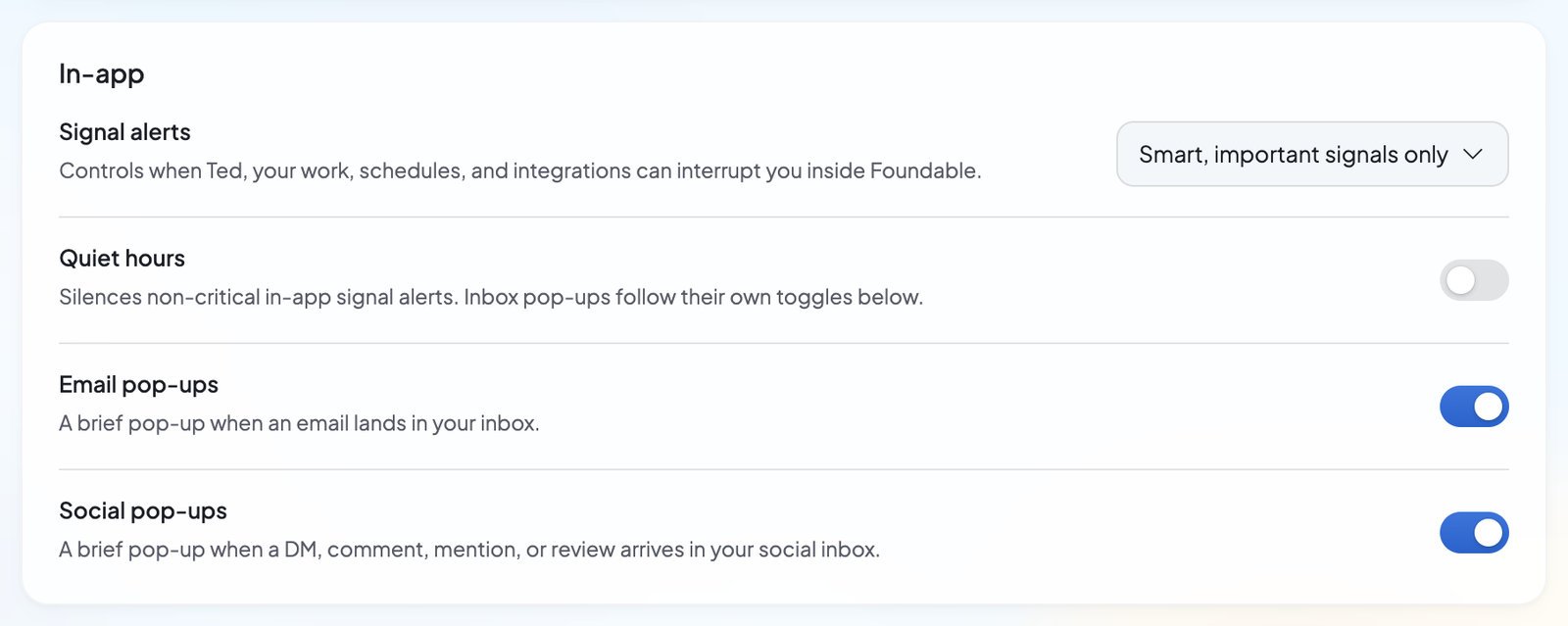
## In-app
None of these is used yet. Your choices are saved for when they arrive.
| Setting | What it’s for |
| - | - |
| **Signal alerts** | “Controls when Ted, your work, schedules, and integrations can interrupt you inside Foundable.” Pick “Smart, important signals only” (the default), “Action required, blockers and approvals” or “Critical only, safety and billing”. |
| **Quiet hours** | “Silences non-critical in-app signal alerts. Inbox pop-ups follow their own toggles below.” It’s off at first. Turn it on to set **From** and **To**. |
| **Email pop-ups** | “A brief pop-up when an email lands in your inbox.” |
| **Social pop-ups** | “A brief pop-up when a DM, comment, mention, or review arrives in your social inbox.” |
If **From** and **To** are the same, you’ll see “Choose different start and end times for quiet hours.”
## Text
**Signal texts**: “Uses your linked iMessage or SMS channel for the highest attention signals.” Pick “Critical only, safety and billing” (the default), “Action required, blockers and approvals” or “Off, no signal texts”.
Your choice is saved, but no signal texts are sent yet. To link your phone, see [Text Ted from your phone](/ted/text-ted).
## Email
These switches are for emails to the address you sign in with. Each one is on at first.
| Setting | What it’s for |
| - | - |
| **Replies to your emails** | An email when someone replies to an email from your foundable, “with their words and a way back to it.” See [Write and reply](/inbox/write-and-reply). |
| **Scheduled tasks** | An email when a scheduled task in your foundable “needs your OK, didn’t run, ran out of credits or has an update from Ted.” See [Scheduled tasks](/schedule/overview). |
| **Daily Updates** | A morning email from Ted “with what happened and the one thing to do next.” |
| **Milestone updates** | Not used yet. “A note when your foundable hits a real milestone: first sale, domain live, new subscriber.” |
| **Product guidance** | Not used yet. “Notes from Ted about your foundable: when it is ready, a next step, a nudge to publish, a check-in when you have been away.” |
### Stop an email from the email itself
Each email these switches send has a one-click unsubscribe link that turns its own switch off. The footer says why you got it, for example “You get this email because ‘Scheduled tasks’ is on in your notification settings.” After you unsubscribe from Ted’s morning email, you’ll see “You’re unsubscribed from Daily Updates. You can turn them back on in Foundable’s Settings, under Notifications.”
## Your time for notifications
Personal notifications follow **Your local time**, in **Settings** › **Account**. It’s separate from your foundable’s own clock. See [Your local time and Foundable time](/account/settings#your-local-time-and-foundable-time).
## Let Ted change them
Ask Ted in the chat, and he can suggest a change to any of these settings. He shows it on a card first, and nothing changes until you press **Confirm**. See [Let Ted change settings for you](/account/settings#let-ted-change-settings-for-you).
## FAQ
Turn off **Daily Updates** in **Settings** › **Notifications** and press **Save changes**. Or use the unsubscribe link at the bottom of the email.
**Signal texts** are saved now but not sent yet. Once they arrive, they go to the phone you’ve linked to Ted, at the level you picked.
Yes, for scheduled tasks. With **Scheduled tasks** on, you get an email when a task is ready for your OK, with a button to review it. Everything else waiting for you shows in the app. See [Approve Ted’s work](/ted/approvals).
The emails go to the address you sign in with, which you can’t change in Settings. If you need help, [contact support](/help/get-help).
## Related
The tasks Ted runs for you, and the emails about them.
Read and answer the replies people send you.
Link your phone so you can text Ted.
Everything else you can change.
This documentation is built and hosted on [Mintlify](https://mintlify.com), a developer documentation platform.
Open **Settings**, then **Notifications**. It’s in the Account group.
Turn a switch on or off, or pick a level from a list.
Press **Save changes**. You’ll see “Notification preferences saved.”
## Settings that aren’t used yet
These settings are saved now but not used yet: **Signal alerts**, **Quiet hours**, **Email pop-ups**, **Social pop-ups**, **Signal texts**, **Milestone updates** and **Product guidance**. The “Coming soon” card at the top of the page adds: “What you choose here is saved and applies once they arrive.”
The other three switches are for emails about your foundable: **Replies to your emails**, **Scheduled tasks** and **Daily Updates**. Turn one off, and Foundable won’t send you that email. See [Email](#email).
## In-app
None of these is used yet. Your choices are saved for when they arrive.
| Setting | What it’s for |
| - | - |
| **Signal alerts** | “Controls when Ted, your work, schedules, and integrations can interrupt you inside Foundable.” Pick “Smart, important signals only” (the default), “Action required, blockers and approvals” or “Critical only, safety and billing”. |
| **Quiet hours** | “Silences non-critical in-app signal alerts. Inbox pop-ups follow their own toggles below.” It’s off at first. Turn it on to set **From** and **To**. |
| **Email pop-ups** | “A brief pop-up when an email lands in your inbox.” |
| **Social pop-ups** | “A brief pop-up when a DM, comment, mention, or review arrives in your social inbox.” |
If **From** and **To** are the same, you’ll see “Choose different start and end times for quiet hours.”
## Text
**Signal texts**: “Uses your linked iMessage or SMS channel for the highest attention signals.” Pick “Critical only, safety and billing” (the default), “Action required, blockers and approvals” or “Off, no signal texts”.
Your choice is saved, but no signal texts are sent yet. To link your phone, see [Text Ted from your phone](/ted/text-ted).
## Email
These switches are for emails to the address you sign in with. Each one is on at first.
| Setting | What it’s for |
| - | - |
| **Replies to your emails** | An email when someone replies to an email from your foundable, “with their words and a way back to it.” See [Write and reply](/inbox/write-and-reply). |
| **Scheduled tasks** | An email when a scheduled task in your foundable “needs your OK, didn’t run, ran out of credits or has an update from Ted.” See [Scheduled tasks](/schedule/overview). |
| **Daily Updates** | A morning email from Ted “with what happened and the one thing to do next.” |
| **Milestone updates** | Not used yet. “A note when your foundable hits a real milestone: first sale, domain live, new subscriber.” |
| **Product guidance** | Not used yet. “Notes from Ted about your foundable: when it is ready, a next step, a nudge to publish, a check-in when you have been away.” |
### Stop an email from the email itself
Each email these switches send has a one-click unsubscribe link that turns its own switch off. The footer says why you got it, for example “You get this email because ‘Scheduled tasks’ is on in your notification settings.” After you unsubscribe from Ted’s morning email, you’ll see “You’re unsubscribed from Daily Updates. You can turn them back on in Foundable’s Settings, under Notifications.”
## Your time for notifications
Personal notifications follow **Your local time**, in **Settings** › **Account**. It’s separate from your foundable’s own clock. See [Your local time and Foundable time](/account/settings#your-local-time-and-foundable-time).
## Let Ted change them
Ask Ted in the chat, and he can suggest a change to any of these settings. He shows it on a card first, and nothing changes until you press **Confirm**. See [Let Ted change settings for you](/account/settings#let-ted-change-settings-for-you).
## FAQ
Turn off **Daily Updates** in **Settings** › **Notifications** and press **Save changes**. Or use the unsubscribe link at the bottom of the email.
**Signal texts** are saved now but not sent yet. Once they arrive, they go to the phone you’ve linked to Ted, at the level you picked.
Yes, for scheduled tasks. With **Scheduled tasks** on, you get an email when a task is ready for your OK, with a button to review it. Everything else waiting for you shows in the app. See [Approve Ted’s work](/ted/approvals).
The emails go to the address you sign in with, which you can’t change in Settings. If you need help, [contact support](/help/get-help).
## Related
The tasks Ted runs for you, and the emails about them.
Read and answer the replies people send you.
Link your phone so you can text Ted.
Everything else you can change.
This documentation is built and hosted on [Mintlify](https://mintlify.com), a developer documentation platform.