> ## Documentation Index
> Fetch the complete documentation index at: https://docs.foundable.com/llms.txt
> Use this file to discover all available pages before exploring further.
# Plans and credits
> How credits pay for Ted’s work, where they come from, what a paid plan adds, and how to upgrade, change or cancel your plan.
[Credits](/help/glossary#credit) pay for the work Ted does for you, from building your website to running your business. On the Free plan, you get free credits each day. A paid plan adds credits every month and everything that needs a plan, like inviting your team or using your own domain.
You’ll find your plan, your credits and what they were spent on in **Settings** › **Plans & credit usage**. Prices show on each plan’s card there. Ted can also tell you your plan, your credits and what plans cost. Ask him in the chat.
 ## How credits work
### What uses credits
* Ted’s work, including the pictures he makes and the searches he runs
* Building and changing your websites in Build
* Running your business in [Run](/run/overview)
* Drafting and rewriting replies in the Inbox
* Buying and renewing domains
* The AI your websites use. See [Your website’s AI](/build/website-ai).
Ted’s replies show what they used under “Credits used”. Build’s **Try to fix** and **Fix error**, and the fixes in Security, come from a daily pool of free fixes, and their receipt reads “Free”.
### Where credits come from
* **Daily free credits**: on the Free plan, every day. They don’t carry over to the next day. They refill at midnight UTC, up to a monthly cap, and once you reach it, they start again on the 1st.
* **Welcome credits**: once, as a welcome. They never expire.
* **Monthly plan credits**: every month on a paid plan. “Unused credits roll over a month.”
* **Friend joined**: when a friend joins the waitlist with your link. They never expire. See [Earn credits](/account/earn-credits).
* **From the Foundable team**: credits the team adds to your account.
Foundable spends today’s free credits first. After that, it uses the credits that would run out soonest. Everyone in a foundable spends its owner’s credits. See [Invite your team](/account/team#credits-and-your-team).
## Your plan and credits
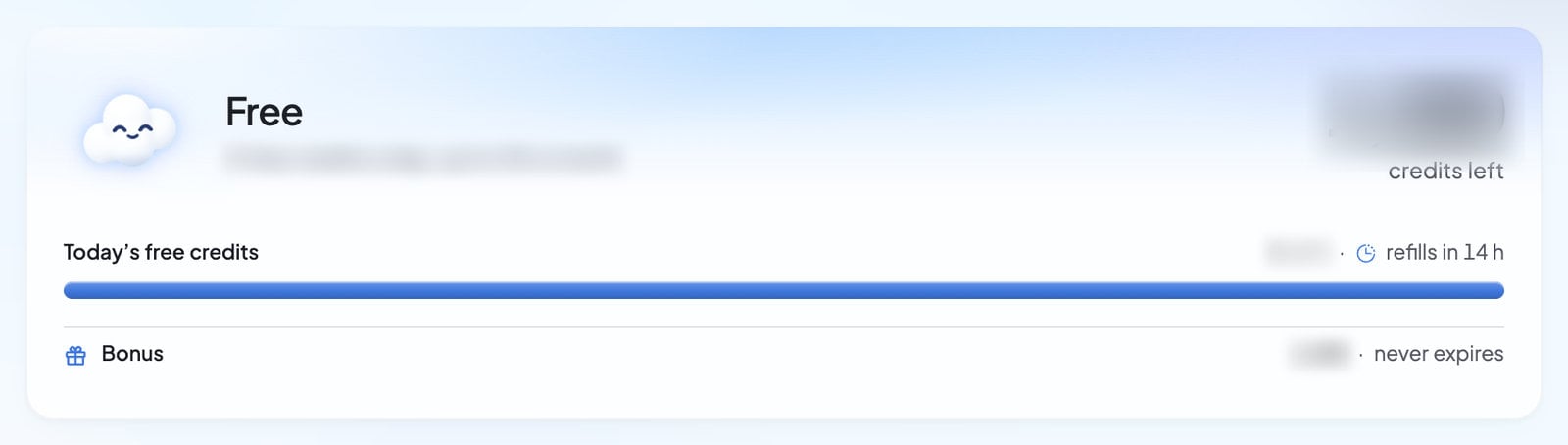
Open **Settings**, then **Plans & credit usage**. You can also press the **Available credits** card in the account menu.
The card at the top shows:
* **Your credits**: the credits you have left.
* A bar for **Today’s free credits** on Free, or **This month’s credits** on a paid plan, with how many are left and when they refill.
* Lines for **Daily**, **Carried over** and **Bonus** credits, each with the day it expires, or “never expires”.
* Your plan’s name, with “Renews”, “Ends” or “Changes to” another plan, and a date.
| What the card says | What it means | What to do |
| - | - | - |
| “Your last payment failed. Update your payment method to keep this plan.” | Stripe couldn’t take your last payment. You keep your plan for now while Stripe tries again. | Press **Manage billing** and update your payment method. |
| “Payment is required to use this plan. Update your payment method.” | The payment still didn’t go through, so the plan’s paid features are off until it does. | Press **Manage billing** and update your payment method. |
| “This plan has ended.” | Your paid plan is over, and you’re on Free. | Choose a plan again if you’d like one. |
| “Billing is on hold for this account. Contact support.” | Billing for your account is on hold. | [Contact support](/help/get-help). |
**Manage billing** opens Stripe’s billing page, where you update your payment method or cancel. It shows once you’ve paid for a plan.
### See what you spent
**Usage** shows the credits used each day, split into **Ted**, **Build**, **Run**, **Inbox**, **Domains**, **Website AI** and **Other**. Pick **7d**, **30d** or **90d** for the time range, and use **Filter by category** to see one kind of work. A quiet stretch reads “No credits used in this window.”
Press **View account activity** to open **Credit activity**: “All activity in your account’s credit pool.” Each line says what added or used credits, like “Daily free credits”, “Welcome credits”, “Monthly plan credits” or “Friend joined”. Others read “From the Foundable team”, “Removed by the Foundable team”, “Credits added”, “Refund”, or “AI on” one of your websites. Everything else reads “Credits used”.
## The plans
There’s the **Free** plan and three paid plans:
* **Standard**: “One idea, ready to run.”
* **Pro**: “More room to run.” It’s marked **Most popular**.
* **Max**: comes in more than one size, each with a different number of credits a month.
You can pay for a paid plan **Monthly** or **Yearly**. There’s no free trial.
Every paid plan includes every paid feature. What changes from plan to plan is how many credits you get each month, how many foundables you can have, and a few extras. Each plan’s card lists what it includes:
| On the plan card | What it means |
| - | - |
| Credits a month, and “Unused credits roll over a month” | Credits arrive each month. Any you don’t use carry over for one more month. |
| “Ted runs on his own” / “Gets work done while you’re away” | Run can work in **Runs on its own** mode. See [Ask first or Runs on its own](/run/ask-first-or-on-its-own). |
| “1 foundable”, or up to a number of foundables | How many businesses you can run. See [Your foundables](/account/foundables). |
| “Your own domain and email” / “No Foundable badge on your site” | Put your website and your email on your own domain, and hide the Foundable badge. See [Use your own domain](/domains/overview). |
| “Your team works with Ted” / “Invite people to build with you” | Invite people to your foundable. See [Invite your team](/account/team). |
| “Your website emails your customers” / “Confirmations, welcomes and newsletters” | Your website can email your customers, not only you. See [Your website’s emails](/build/website-emails). |
| “Priority support”, “1:1 onboarding call”, “Early access to new features” | Extras that only some plans include. A card without one says which plans have it. |
“Ted builds your websites” and “Text Ted from your phone” are on the Free plan too.
### What needs a paid plan
* Connecting your social accounts, and Ted making social posts for you
* **Runs on its own** in Run
* Hiding the Foundable badge
* Your website on your own domain, and buying a domain
* Email on your own domain
* Your website emailing your customers
* Inviting your team
* Downloading your website’s code
* Bigger files for Ted
* More foundables
Publishing your website never needs a plan.
When you reach something that needs a plan, Foundable opens the plans for you, with a heading about what you were doing, like “Invite your team” or “Use your own domain”. You’ll also see **Upgrade** after your foundable’s name, in the account menu and in Ted’s message box. It shows whenever there’s a plan you can buy.
## Buy a plan
Press **Upgrade** after your foundable’s name at the top. Or open **Settings** › **Plans & credit usage** and press **Compare plans**.
Pick **Monthly** or **Yearly**.
Press **Subscribe** on the plan you want. You’ll see “Opening checkout…”.
Foundable’s plans are sold through Link, Stripe’s merchant of record. Enter your payment details on Stripe’s checkout page.
Back in Foundable, you’ll see “Your plan is active.”, then a welcome window that lists what’s **Included in your plan**.
| What you see | What to do |
| - | - |
| “Stripe is still confirming your payment. It usually shows here within a minute; if not, reopen Settings to see your plan.” | Wait a minute, then open **Settings** again. |
| “That checkout expired. Choose the plan again to start a new one.” | Press **Subscribe** again. |
| “A checkout you started is still open or settling. Try again later, or contact support if this keeps happening.” | Wait a little, then try again. |
## Change your plan
Open **Settings** › **Plans & credit usage** and press **Compare plans**. Your plan is marked **Current plan**.
* **Upgrade**: more credits a month, or a switch to yearly billing. You confirm on Stripe’s page and pay today. The new plan starts today, and “The credits you have stay.”
* **Downgrade**: fewer credits a month, or a switch back to monthly. Foundable asks you to confirm: you keep your current plan until a date, “when this one starts. Nothing is charged today.” Until then, the new plan’s card reads “Starts” and the date. To change your mind, press the **Keep** button on your current plan’s card.
If you see “Your plan changed. Check the options and try again.” or “Your last plan change is still settling with Stripe. Try again later, or contact support if this keeps happening.”, wait a little and try again.
## Cancel your plan
Open **Settings** › **Plans & credit usage** and press **Manage billing**.
Cancel your plan on Stripe’s billing page. You can also cancel at link.com.
Your plan keeps working until the end of the time you paid for. Then you’re on Free. Plan credits you haven’t used are frozen when the plan ends, and they come back if you pay for a plan again before they run out.
For refunds, see the [Refund & Dispute Policy](https://foundable.com/refund-policy). Foundable doesn’t sell credits on their own: to get more each month, move to a plan with more.
## If a payment fails
If a payment doesn’t go through, Stripe tries again for a while, and your plan keeps working. If it’s still not paid, the plan’s paid features stop until it is. The chat may show “Billing needs attention before Ted can run.”, and the plans window may show **Billing needs attention** with **Open billing**. Either way, press **Manage billing** (or **Open billing**) and update your payment method.
## When you run out of credits
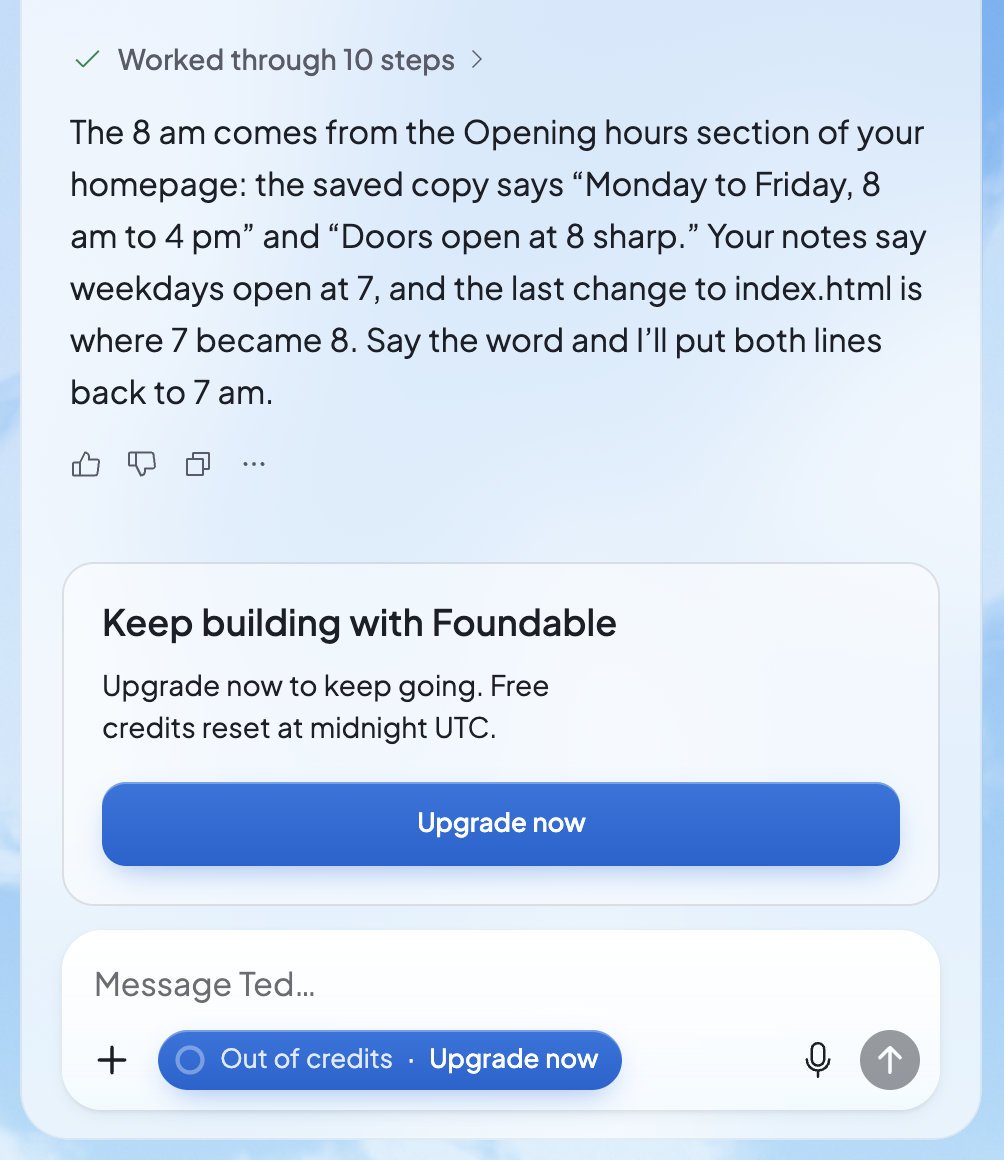
On Free, the **Upgrade** button in Ted’s message box turns blue when you’re running low. It shows the credits you have left, then “Out of credits · Upgrade now”.
At zero, a card above the message box says **Keep building with Foundable**: “More credits are needed to keep building.” It offers one button, such as **Upgrade now**, **Get more credits**, **Update payment** or **View usage**. On Free, it also says when your free credits come back. A message Ted couldn’t take stays in the box, so you can send it later.
## How credits work
### What uses credits
* Ted’s work, including the pictures he makes and the searches he runs
* Building and changing your websites in Build
* Running your business in [Run](/run/overview)
* Drafting and rewriting replies in the Inbox
* Buying and renewing domains
* The AI your websites use. See [Your website’s AI](/build/website-ai).
Ted’s replies show what they used under “Credits used”. Build’s **Try to fix** and **Fix error**, and the fixes in Security, come from a daily pool of free fixes, and their receipt reads “Free”.
### Where credits come from
* **Daily free credits**: on the Free plan, every day. They don’t carry over to the next day. They refill at midnight UTC, up to a monthly cap, and once you reach it, they start again on the 1st.
* **Welcome credits**: once, as a welcome. They never expire.
* **Monthly plan credits**: every month on a paid plan. “Unused credits roll over a month.”
* **Friend joined**: when a friend joins the waitlist with your link. They never expire. See [Earn credits](/account/earn-credits).
* **From the Foundable team**: credits the team adds to your account.
Foundable spends today’s free credits first. After that, it uses the credits that would run out soonest. Everyone in a foundable spends its owner’s credits. See [Invite your team](/account/team#credits-and-your-team).
## Your plan and credits
Open **Settings**, then **Plans & credit usage**. You can also press the **Available credits** card in the account menu.
The card at the top shows:
* **Your credits**: the credits you have left.
* A bar for **Today’s free credits** on Free, or **This month’s credits** on a paid plan, with how many are left and when they refill.
* Lines for **Daily**, **Carried over** and **Bonus** credits, each with the day it expires, or “never expires”.
* Your plan’s name, with “Renews”, “Ends” or “Changes to” another plan, and a date.
| What the card says | What it means | What to do |
| - | - | - |
| “Your last payment failed. Update your payment method to keep this plan.” | Stripe couldn’t take your last payment. You keep your plan for now while Stripe tries again. | Press **Manage billing** and update your payment method. |
| “Payment is required to use this plan. Update your payment method.” | The payment still didn’t go through, so the plan’s paid features are off until it does. | Press **Manage billing** and update your payment method. |
| “This plan has ended.” | Your paid plan is over, and you’re on Free. | Choose a plan again if you’d like one. |
| “Billing is on hold for this account. Contact support.” | Billing for your account is on hold. | [Contact support](/help/get-help). |
**Manage billing** opens Stripe’s billing page, where you update your payment method or cancel. It shows once you’ve paid for a plan.
### See what you spent
**Usage** shows the credits used each day, split into **Ted**, **Build**, **Run**, **Inbox**, **Domains**, **Website AI** and **Other**. Pick **7d**, **30d** or **90d** for the time range, and use **Filter by category** to see one kind of work. A quiet stretch reads “No credits used in this window.”
Press **View account activity** to open **Credit activity**: “All activity in your account’s credit pool.” Each line says what added or used credits, like “Daily free credits”, “Welcome credits”, “Monthly plan credits” or “Friend joined”. Others read “From the Foundable team”, “Removed by the Foundable team”, “Credits added”, “Refund”, or “AI on” one of your websites. Everything else reads “Credits used”.
## The plans
There’s the **Free** plan and three paid plans:
* **Standard**: “One idea, ready to run.”
* **Pro**: “More room to run.” It’s marked **Most popular**.
* **Max**: comes in more than one size, each with a different number of credits a month.
You can pay for a paid plan **Monthly** or **Yearly**. There’s no free trial.
Every paid plan includes every paid feature. What changes from plan to plan is how many credits you get each month, how many foundables you can have, and a few extras. Each plan’s card lists what it includes:
| On the plan card | What it means |
| - | - |
| Credits a month, and “Unused credits roll over a month” | Credits arrive each month. Any you don’t use carry over for one more month. |
| “Ted runs on his own” / “Gets work done while you’re away” | Run can work in **Runs on its own** mode. See [Ask first or Runs on its own](/run/ask-first-or-on-its-own). |
| “1 foundable”, or up to a number of foundables | How many businesses you can run. See [Your foundables](/account/foundables). |
| “Your own domain and email” / “No Foundable badge on your site” | Put your website and your email on your own domain, and hide the Foundable badge. See [Use your own domain](/domains/overview). |
| “Your team works with Ted” / “Invite people to build with you” | Invite people to your foundable. See [Invite your team](/account/team). |
| “Your website emails your customers” / “Confirmations, welcomes and newsletters” | Your website can email your customers, not only you. See [Your website’s emails](/build/website-emails). |
| “Priority support”, “1:1 onboarding call”, “Early access to new features” | Extras that only some plans include. A card without one says which plans have it. |
“Ted builds your websites” and “Text Ted from your phone” are on the Free plan too.
### What needs a paid plan
* Connecting your social accounts, and Ted making social posts for you
* **Runs on its own** in Run
* Hiding the Foundable badge
* Your website on your own domain, and buying a domain
* Email on your own domain
* Your website emailing your customers
* Inviting your team
* Downloading your website’s code
* Bigger files for Ted
* More foundables
Publishing your website never needs a plan.
When you reach something that needs a plan, Foundable opens the plans for you, with a heading about what you were doing, like “Invite your team” or “Use your own domain”. You’ll also see **Upgrade** after your foundable’s name, in the account menu and in Ted’s message box. It shows whenever there’s a plan you can buy.
## Buy a plan
Press **Upgrade** after your foundable’s name at the top. Or open **Settings** › **Plans & credit usage** and press **Compare plans**.
Pick **Monthly** or **Yearly**.
Press **Subscribe** on the plan you want. You’ll see “Opening checkout…”.
Foundable’s plans are sold through Link, Stripe’s merchant of record. Enter your payment details on Stripe’s checkout page.
Back in Foundable, you’ll see “Your plan is active.”, then a welcome window that lists what’s **Included in your plan**.
| What you see | What to do |
| - | - |
| “Stripe is still confirming your payment. It usually shows here within a minute; if not, reopen Settings to see your plan.” | Wait a minute, then open **Settings** again. |
| “That checkout expired. Choose the plan again to start a new one.” | Press **Subscribe** again. |
| “A checkout you started is still open or settling. Try again later, or contact support if this keeps happening.” | Wait a little, then try again. |
## Change your plan
Open **Settings** › **Plans & credit usage** and press **Compare plans**. Your plan is marked **Current plan**.
* **Upgrade**: more credits a month, or a switch to yearly billing. You confirm on Stripe’s page and pay today. The new plan starts today, and “The credits you have stay.”
* **Downgrade**: fewer credits a month, or a switch back to monthly. Foundable asks you to confirm: you keep your current plan until a date, “when this one starts. Nothing is charged today.” Until then, the new plan’s card reads “Starts” and the date. To change your mind, press the **Keep** button on your current plan’s card.
If you see “Your plan changed. Check the options and try again.” or “Your last plan change is still settling with Stripe. Try again later, or contact support if this keeps happening.”, wait a little and try again.
## Cancel your plan
Open **Settings** › **Plans & credit usage** and press **Manage billing**.
Cancel your plan on Stripe’s billing page. You can also cancel at link.com.
Your plan keeps working until the end of the time you paid for. Then you’re on Free. Plan credits you haven’t used are frozen when the plan ends, and they come back if you pay for a plan again before they run out.
For refunds, see the [Refund & Dispute Policy](https://foundable.com/refund-policy). Foundable doesn’t sell credits on their own: to get more each month, move to a plan with more.
## If a payment fails
If a payment doesn’t go through, Stripe tries again for a while, and your plan keeps working. If it’s still not paid, the plan’s paid features stop until it is. The chat may show “Billing needs attention before Ted can run.”, and the plans window may show **Billing needs attention** with **Open billing**. Either way, press **Manage billing** (or **Open billing**) and update your payment method.
## When you run out of credits
On Free, the **Upgrade** button in Ted’s message box turns blue when you’re running low. It shows the credits you have left, then “Out of credits · Upgrade now”.
At zero, a card above the message box says **Keep building with Foundable**: “More credits are needed to keep building.” It offers one button, such as **Upgrade now**, **Get more credits**, **Update payment** or **View usage**. On Free, it also says when your free credits come back. A message Ted couldn’t take stays in the box, so you can send it later.
 | What you see | What happens |
| - | - |
| In the chat: “You’re out of credits. See your plan in Settings to keep talking to Ted.” | When you have credits again, the chat says “You have credits again, so Ted can pick up where he left off.” |
| In the chat: “Ted stopped here: this turn reached its credit limit. Send a follow-up to continue.” | One reply reached its limit. Send another message, and Ted carries on. |
| In Build: “Paused — out of credits” | Press **Get credits**, then **Continue**. Your first website’s build never pauses for credits. |
| In Run: “You’re out of credits. See your plan in Settings to start Run.” | Run can’t start until you have credits. A run that’s already on ends when they run out. |
| In Schedule: “You’re out of credits. See your plan in Settings to run this task.” | The task is skipped until you have credits again. |
| In the Inbox: “Not enough credits to draft a reply.” | Ted can draft again once you have credits. |
## Who handles the plan
Your plan and credits belong to your account, and only you can change your plan. In a foundable you own, your credits pay for all the work, whoever asks Ted for it.
## FAQ
Each plan’s price shows on its card when you press **Compare plans** or **Upgrade**. You can also ask Ted in the chat.
It depends on the kind. Daily free credits last until the end of the day. Plan credits carry over for one month. Welcome credits and credits you earn from friends never expire.
No. You can stay on the Free plan, which gives you free credits each day, and choose a paid plan when you’re ready.
Yes. Open **Compare plans**, pick **Yearly** and choose your plan. Switching to yearly is an upgrade, so you confirm it on Stripe’s page and pay today.
Your plan keeps working until the end of the time you paid for. For anything about refunds, see the [Refund & Dispute Policy](https://foundable.com/refund-policy).
No. Everyone in your foundable uses the owner’s credits.
## Related
Invite friends and earn credits that never expire.
Every paid plan lets you bring in your team.
Choose how much Ted does without asking.
Questions about billing? The Foundable team can help.
This documentation is built and hosted on [Mintlify](https://mintlify.com), a developer documentation platform.
| What you see | What happens |
| - | - |
| In the chat: “You’re out of credits. See your plan in Settings to keep talking to Ted.” | When you have credits again, the chat says “You have credits again, so Ted can pick up where he left off.” |
| In the chat: “Ted stopped here: this turn reached its credit limit. Send a follow-up to continue.” | One reply reached its limit. Send another message, and Ted carries on. |
| In Build: “Paused — out of credits” | Press **Get credits**, then **Continue**. Your first website’s build never pauses for credits. |
| In Run: “You’re out of credits. See your plan in Settings to start Run.” | Run can’t start until you have credits. A run that’s already on ends when they run out. |
| In Schedule: “You’re out of credits. See your plan in Settings to run this task.” | The task is skipped until you have credits again. |
| In the Inbox: “Not enough credits to draft a reply.” | Ted can draft again once you have credits. |
## Who handles the plan
Your plan and credits belong to your account, and only you can change your plan. In a foundable you own, your credits pay for all the work, whoever asks Ted for it.
## FAQ
Each plan’s price shows on its card when you press **Compare plans** or **Upgrade**. You can also ask Ted in the chat.
It depends on the kind. Daily free credits last until the end of the day. Plan credits carry over for one month. Welcome credits and credits you earn from friends never expire.
No. You can stay on the Free plan, which gives you free credits each day, and choose a paid plan when you’re ready.
Yes. Open **Compare plans**, pick **Yearly** and choose your plan. Switching to yearly is an upgrade, so you confirm it on Stripe’s page and pay today.
Your plan keeps working until the end of the time you paid for. For anything about refunds, see the [Refund & Dispute Policy](https://foundable.com/refund-policy).
No. Everyone in your foundable uses the owner’s credits.
## Related
Invite friends and earn credits that never expire.
Every paid plan lets you bring in your team.
Choose how much Ted does without asking.
Questions about billing? The Foundable team can help.
This documentation is built and hosted on [Mintlify](https://mintlify.com), a developer documentation platform.