> ## Documentation Index
> Fetch the complete documentation index at: https://docs.foundable.com/llms.txt
> Use this file to discover all available pages before exploring further.
# Settings
> Change your foundable’s name and logo, your team, your plan and your own account. See what each part of Settings does and how to open it.
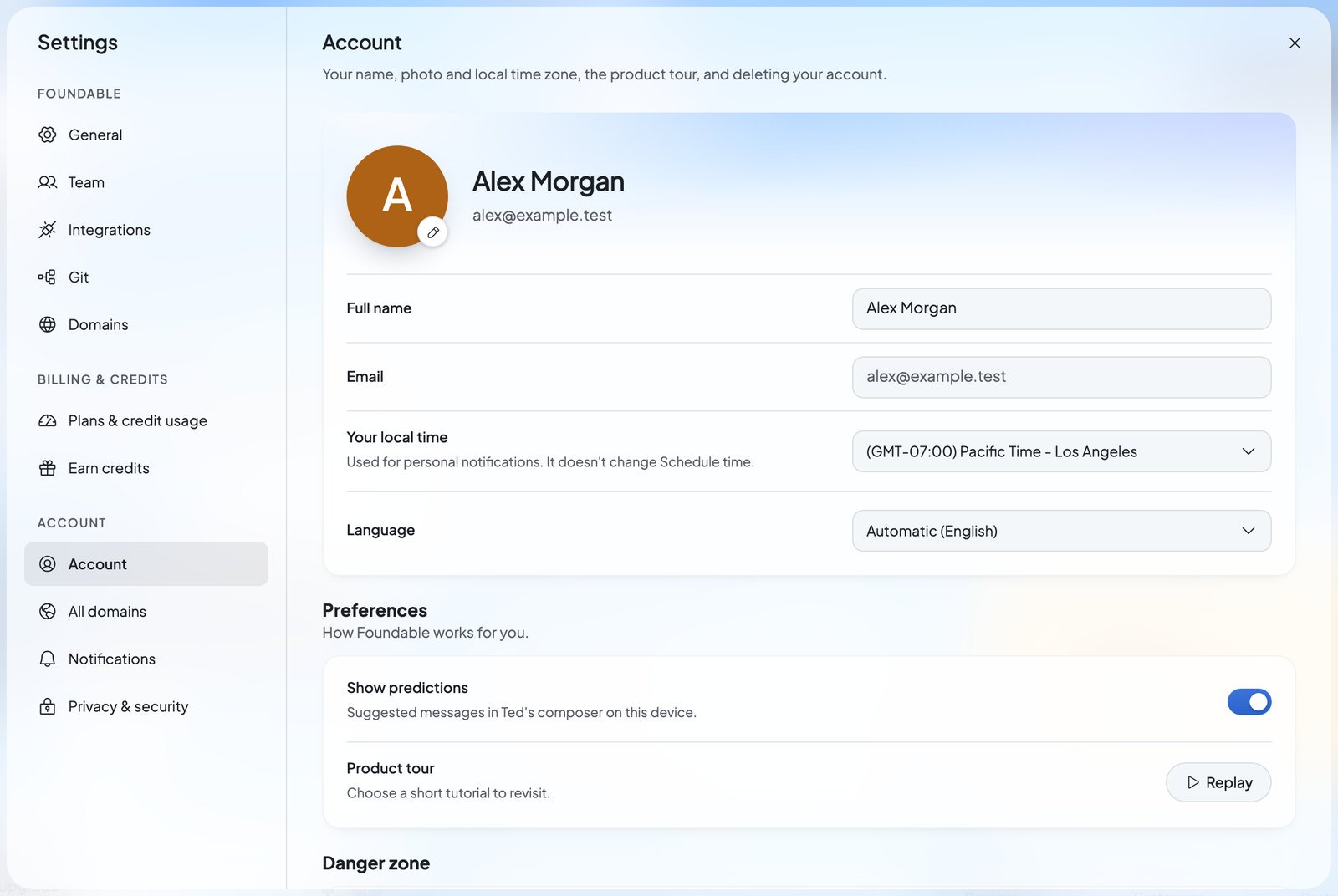
Settings is where you change the details behind your business and your own account. That includes your foundable’s name and logo, who works with you, your plan and [credits](/help/glossary#credit), and the emails you get. It opens in a window on top of the page you’re on.
Ted can change some settings for you too, but only after you say yes.
 ## Open Settings
* Press your initial or photo at the top right to open the account menu, then choose **Settings**. Settings opens on **Account**.
* Or press your foundable’s name at the top left, then **Settings**. Settings opens on **General**.
* Tap **More** at the bottom of the screen, then **Settings** under Account.
* Settings opens on a list of its sections. Tap one to open it, and tap **Settings** at the top to return to the list. Each window in Settings opens as a sheet from the bottom of the screen.
## What’s in Settings
Settings has three groups. Each section shows a short line under its heading that says what it’s for.
### Foundable
These sections are about the [foundable](/help/glossary#foundable) you have open.
| Section | What it’s for |
| - | - |
| **General** | “The foundable’s name, logo, tagline and time zone, and deleting the foundable.” See [Your foundables](/account/foundables). |
| **Team** | “Who runs this foundable with Ted, and what they can do.” See [Invite your team](/account/team). |
| **Integrations** | “Connect the tools you use to run your foundable.” See [Connect your apps](/account/integrations). |
| **Git** | “Connect GitHub so your code lives in repositories you own.” See [GitHub](/build/github). |
| **Domains** | “Buy a domain for your site, or connect one you already own.” See [Use your own domain](/domains/overview). |
### Billing & credits
| Section | What it’s for |
| - | - |
| **Plans & credit usage** | “Your plan, the credits left and what they were spent on, and billing.” See [Plans and credits](/account/plans-and-credits). |
| **Earn credits** | “Invite friends to the Foundable waitlist and earn free credits.” See [Earn credits](/account/earn-credits). |
### Account
These sections are yours, whichever foundable you have open.
| Section | What it’s for |
| - | - |
| **Account** | “Your name, photo and local time zone, the product tour, and deleting your account.” See [Your account](#your-account) below. |
| **All domains** | “Every domain across your foundables.” See [Manage your domains](/domains/manage-domains). |
| **Notifications** | Choose the alerts, texts and emails you’ll get. See [Notifications and emails](/account/notifications). |
| **Privacy & security** | “Get a copy of your data, delete it, and read the policies that govern it.” See [Privacy and deleting your data](/account/privacy-and-deletion). |
## Your account
**Account** holds what’s about you, not your business.
| Setting | What it does |
| - | - |
| **Photo** | Press your picture for **Change photo**: **Upload a photo** or **Remove photo**. Drag and zoom it in **Crop your photo**, then press **Save**. |
| **Full name** | Your name. The field reads “Add your name” until you fill it in. |
| **Email** | The address you sign in with. Settings shows it, but you can’t change it here. |
| **Your local time** | “Used for personal notifications. It doesn’t change Schedule time.” |
| **Language** | The language Foundable shows you. See [Language, light and dark](#language-light-and-dark). |
| **Show predictions** | “Suggested messages in Ted’s composer on this device.” |
| **Product tour** | Press **Replay** to open the Tutorial hub and pick a short tour to watch again. |
Under **Danger zone**, **Delete account** deletes your account and every foundable you own. See [Privacy and deleting your data](/account/privacy-and-deletion).
### Your local time and Foundable time
There are two clocks, and they do different jobs:
* **Your local time**, in Account, is yours. It’s used for your personal notifications, and it doesn’t change the time Schedule uses.
* **Foundable time**, in General, belongs to the business: “The local time for this foundable’s briefs and schedules.” Only the owner can change it.
## Language, light and dark
## Open Settings
* Press your initial or photo at the top right to open the account menu, then choose **Settings**. Settings opens on **Account**.
* Or press your foundable’s name at the top left, then **Settings**. Settings opens on **General**.
* Tap **More** at the bottom of the screen, then **Settings** under Account.
* Settings opens on a list of its sections. Tap one to open it, and tap **Settings** at the top to return to the list. Each window in Settings opens as a sheet from the bottom of the screen.
## What’s in Settings
Settings has three groups. Each section shows a short line under its heading that says what it’s for.
### Foundable
These sections are about the [foundable](/help/glossary#foundable) you have open.
| Section | What it’s for |
| - | - |
| **General** | “The foundable’s name, logo, tagline and time zone, and deleting the foundable.” See [Your foundables](/account/foundables). |
| **Team** | “Who runs this foundable with Ted, and what they can do.” See [Invite your team](/account/team). |
| **Integrations** | “Connect the tools you use to run your foundable.” See [Connect your apps](/account/integrations). |
| **Git** | “Connect GitHub so your code lives in repositories you own.” See [GitHub](/build/github). |
| **Domains** | “Buy a domain for your site, or connect one you already own.” See [Use your own domain](/domains/overview). |
### Billing & credits
| Section | What it’s for |
| - | - |
| **Plans & credit usage** | “Your plan, the credits left and what they were spent on, and billing.” See [Plans and credits](/account/plans-and-credits). |
| **Earn credits** | “Invite friends to the Foundable waitlist and earn free credits.” See [Earn credits](/account/earn-credits). |
### Account
These sections are yours, whichever foundable you have open.
| Section | What it’s for |
| - | - |
| **Account** | “Your name, photo and local time zone, the product tour, and deleting your account.” See [Your account](#your-account) below. |
| **All domains** | “Every domain across your foundables.” See [Manage your domains](/domains/manage-domains). |
| **Notifications** | Choose the alerts, texts and emails you’ll get. See [Notifications and emails](/account/notifications). |
| **Privacy & security** | “Get a copy of your data, delete it, and read the policies that govern it.” See [Privacy and deleting your data](/account/privacy-and-deletion). |
## Your account
**Account** holds what’s about you, not your business.
| Setting | What it does |
| - | - |
| **Photo** | Press your picture for **Change photo**: **Upload a photo** or **Remove photo**. Drag and zoom it in **Crop your photo**, then press **Save**. |
| **Full name** | Your name. The field reads “Add your name” until you fill it in. |
| **Email** | The address you sign in with. Settings shows it, but you can’t change it here. |
| **Your local time** | “Used for personal notifications. It doesn’t change Schedule time.” |
| **Language** | The language Foundable shows you. See [Language, light and dark](#language-light-and-dark). |
| **Show predictions** | “Suggested messages in Ted’s composer on this device.” |
| **Product tour** | Press **Replay** to open the Tutorial hub and pick a short tour to watch again. |
Under **Danger zone**, **Delete account** deletes your account and every foundable you own. See [Privacy and deleting your data](/account/privacy-and-deletion).
### Your local time and Foundable time
There are two clocks, and they do different jobs:
* **Your local time**, in Account, is yours. It’s used for your personal notifications, and it doesn’t change the time Schedule uses.
* **Foundable time**, in General, belongs to the business: “The local time for this foundable’s briefs and schedules.” Only the owner can change it.
## Language, light and dark
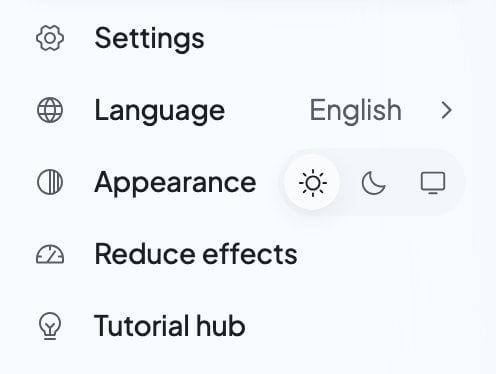 * **Language**: choose it in **Account**, or from **Language** in the account menu. The first choice, **Automatic**, shows in brackets the language it’s using now. After it, every language Foundable comes in is listed by its own name. Your choice is saved to your account, and the page reloads in that language.
* **Appearance**: in the account menu, choose **Light**, **Dark** or **System** (which follows your device). This choice is for this device only. Foundable shows Light until you pick one.
* **Reduce effects**: in the account menu, it holds decorative motion still on this device.
On a phone, you’ll find **Language**, **Appearance** and **Reduce effects** under Account in **More**.
## Save your changes
**General**, **Account** and **Notifications** share one **Save changes** bar. It shows only while you have a change that isn’t saved yet. Your logo and photo save on their own when you press **Save** after cropping.
| What you see | What it means | What to do |
| - | - | - |
| “Foundable details saved.”, “Profile saved.” or “Notification preferences saved.” | Your change is saved. | Nothing. You’re done. |
| “Updated elsewhere — reloaded” | Someone saved this part of Settings first, maybe you in another window. The form now shows their version. | Look it over and make your change again if you still need it. |
| “Some values were not accepted. Check them and try again.” | Something you typed can’t be saved as it is. | Check what you entered, then save again. |
| “Could not save. Try again.” or “Saving is temporarily unavailable. Try again.” | The save didn’t go through. | Wait a moment, then press **Save changes** again. |
| “Couldn’t load these settings.” or “Settings aren’t available right now” | Settings couldn’t open this section. | Close Settings and open it again a little later. |
| “No foundable yet” | You don’t have a foundable, so there’s nothing to edit in General. | Create one. See [Your foundables](/account/foundables). |
## Who can change what
Everyone in your foundable can open Settings. What they can change depends on their role:
| Setting | Who can change it |
| - | - |
| Foundable name, tagline and logo | The owner, admins and members |
| Foundable time, and deleting the foundable | The owner only |
| Inviting and removing members and viewers | The owner and admins |
| Admins, and anyone’s role | The owner only |
| Connecting tools in **Integrations** | The owner and admins |
| The plan and billing | The owner |
| Your own **Account** and **Notifications** | Each person, for themselves |
Someone with view-only access can look at a foundable’s settings but can’t change them. Where a control isn’t yours to use, the app says “Only the owner or an admin” or “Only the owner”. To learn about roles, see [Invite your team](/account/team#roles).
## Let Ted change settings for you
Ask Ted in the chat, and he can suggest a change for you. It can be your foundable’s name, tagline or time zone, your own name or time zone, any **Notifications** setting, or this device’s appearance.
He shows the change on a card titled **Change your settings** or **Change your foundable’s settings**. It says “Nothing changes until you confirm. You can change it back in Settings.” Press **Confirm** to make the change, or **Decline** to leave everything as it is. Saying yes in your next message works too.
## FAQ
Open **Settings**, then **Account**. Change **Full name** and press **Save changes**. For your picture, press it and choose **Upload a photo**.
Not in Settings. **Account** shows the email from your sign-in, but you can’t edit it there. If you need help with it, [contact support](/help/get-help).
Open the account menu (your initial or photo at the top right), then pick **Dark** next to **Appearance**. It changes this device only.
Only the owner can change **Foundable time** or delete the foundable. Admins and members can still change the name, tagline and logo.
Open the account menu and choose **Log out**. On a phone, it’s at the bottom of **More**. Logging out also clears any unsent chat messages this browser was keeping.
Open **Settings**, then **Account**, and press **Replay** next to **Product tour**. Or choose **Tutorial hub** in the account menu.
## Related
Switch, create, rename and delete your foundables.
Bring in people to work with you and Ted.
See your credits, change your plan and manage billing.
Choose the alerts, texts and emails you get.
This documentation is built and hosted on [Mintlify](https://mintlify.com), a developer documentation platform.
* **Language**: choose it in **Account**, or from **Language** in the account menu. The first choice, **Automatic**, shows in brackets the language it’s using now. After it, every language Foundable comes in is listed by its own name. Your choice is saved to your account, and the page reloads in that language.
* **Appearance**: in the account menu, choose **Light**, **Dark** or **System** (which follows your device). This choice is for this device only. Foundable shows Light until you pick one.
* **Reduce effects**: in the account menu, it holds decorative motion still on this device.
On a phone, you’ll find **Language**, **Appearance** and **Reduce effects** under Account in **More**.
## Save your changes
**General**, **Account** and **Notifications** share one **Save changes** bar. It shows only while you have a change that isn’t saved yet. Your logo and photo save on their own when you press **Save** after cropping.
| What you see | What it means | What to do |
| - | - | - |
| “Foundable details saved.”, “Profile saved.” or “Notification preferences saved.” | Your change is saved. | Nothing. You’re done. |
| “Updated elsewhere — reloaded” | Someone saved this part of Settings first, maybe you in another window. The form now shows their version. | Look it over and make your change again if you still need it. |
| “Some values were not accepted. Check them and try again.” | Something you typed can’t be saved as it is. | Check what you entered, then save again. |
| “Could not save. Try again.” or “Saving is temporarily unavailable. Try again.” | The save didn’t go through. | Wait a moment, then press **Save changes** again. |
| “Couldn’t load these settings.” or “Settings aren’t available right now” | Settings couldn’t open this section. | Close Settings and open it again a little later. |
| “No foundable yet” | You don’t have a foundable, so there’s nothing to edit in General. | Create one. See [Your foundables](/account/foundables). |
## Who can change what
Everyone in your foundable can open Settings. What they can change depends on their role:
| Setting | Who can change it |
| - | - |
| Foundable name, tagline and logo | The owner, admins and members |
| Foundable time, and deleting the foundable | The owner only |
| Inviting and removing members and viewers | The owner and admins |
| Admins, and anyone’s role | The owner only |
| Connecting tools in **Integrations** | The owner and admins |
| The plan and billing | The owner |
| Your own **Account** and **Notifications** | Each person, for themselves |
Someone with view-only access can look at a foundable’s settings but can’t change them. Where a control isn’t yours to use, the app says “Only the owner or an admin” or “Only the owner”. To learn about roles, see [Invite your team](/account/team#roles).
## Let Ted change settings for you
Ask Ted in the chat, and he can suggest a change for you. It can be your foundable’s name, tagline or time zone, your own name or time zone, any **Notifications** setting, or this device’s appearance.
He shows the change on a card titled **Change your settings** or **Change your foundable’s settings**. It says “Nothing changes until you confirm. You can change it back in Settings.” Press **Confirm** to make the change, or **Decline** to leave everything as it is. Saying yes in your next message works too.
## FAQ
Open **Settings**, then **Account**. Change **Full name** and press **Save changes**. For your picture, press it and choose **Upload a photo**.
Not in Settings. **Account** shows the email from your sign-in, but you can’t edit it there. If you need help with it, [contact support](/help/get-help).
Open the account menu (your initial or photo at the top right), then pick **Dark** next to **Appearance**. It changes this device only.
Only the owner can change **Foundable time** or delete the foundable. Admins and members can still change the name, tagline and logo.
Open the account menu and choose **Log out**. On a phone, it’s at the bottom of **More**. Logging out also clears any unsent chat messages this browser was keeping.
Open **Settings**, then **Account**, and press **Replay** next to **Product tour**. Or choose **Tutorial hub** in the account menu.
## Related
Switch, create, rename and delete your foundables.
Bring in people to work with you and Ted.
See your credits, change your plan and manage billing.
Choose the alerts, texts and emails you get.
This documentation is built and hosted on [Mintlify](https://mintlify.com), a developer documentation platform.