> ## Documentation Index
> Fetch the complete documentation index at: https://docs.foundable.com/llms.txt
> Use this file to discover all available pages before exploring further.
# Your website’s database
> See and change the information your website keeps, see who signed up, and add test users to try your website as someone else.
Every new website Build makes gets its own database, set up by itself when Build creates the website. The database keeps the information your website saves, like the people who sign up. **Database**, in [Tools](/build/tools), lets you look through that information and change it.
You don’t need to know how databases work. Ted designs the tables and changes them when your website needs it. You open Database to check what’s there, fix a record, or remove someone.
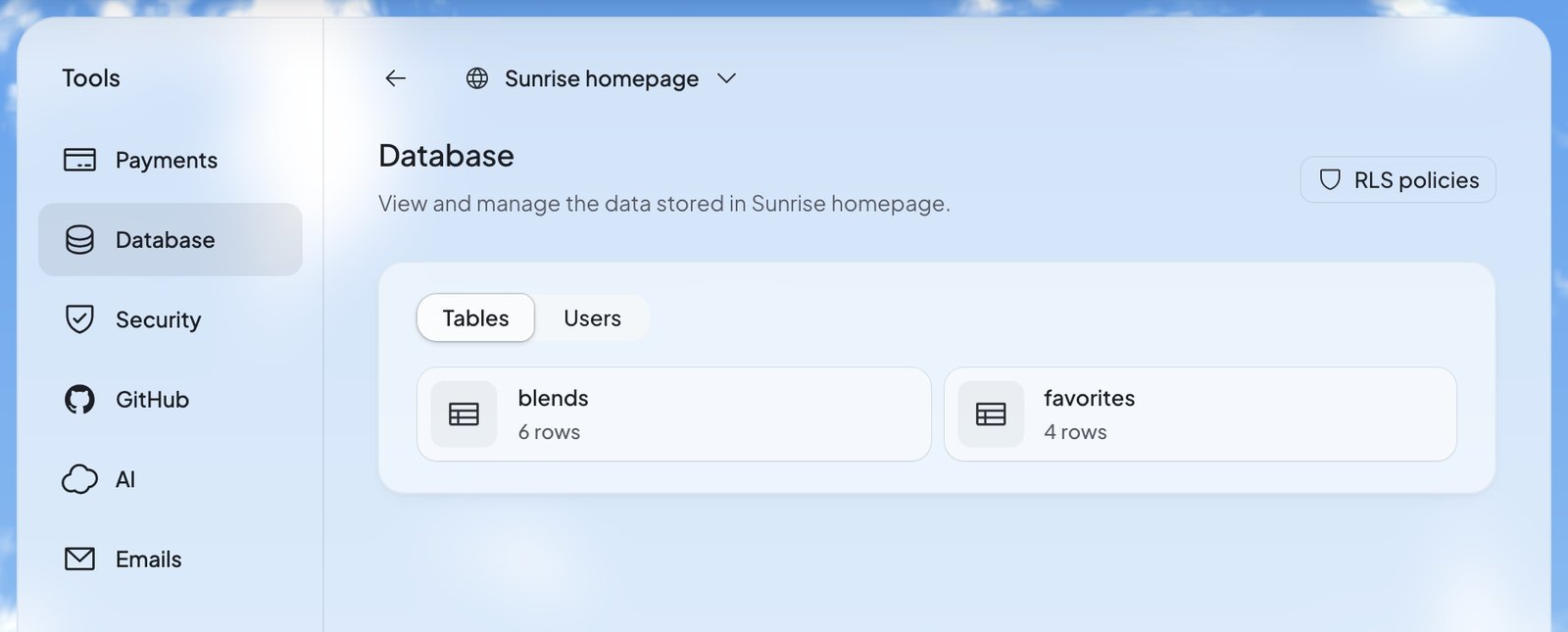 In Build, press **Tools**, then **Database**. You see your website’s **Tables**, each with its number of rows.
Press a table to see its rows.
Double-click a value, change it, and press **Save**.
Only the owner and admins can see and change the database. Everyone else sees “Only the owner or an admin can see this website’s data.”
## Look through a table
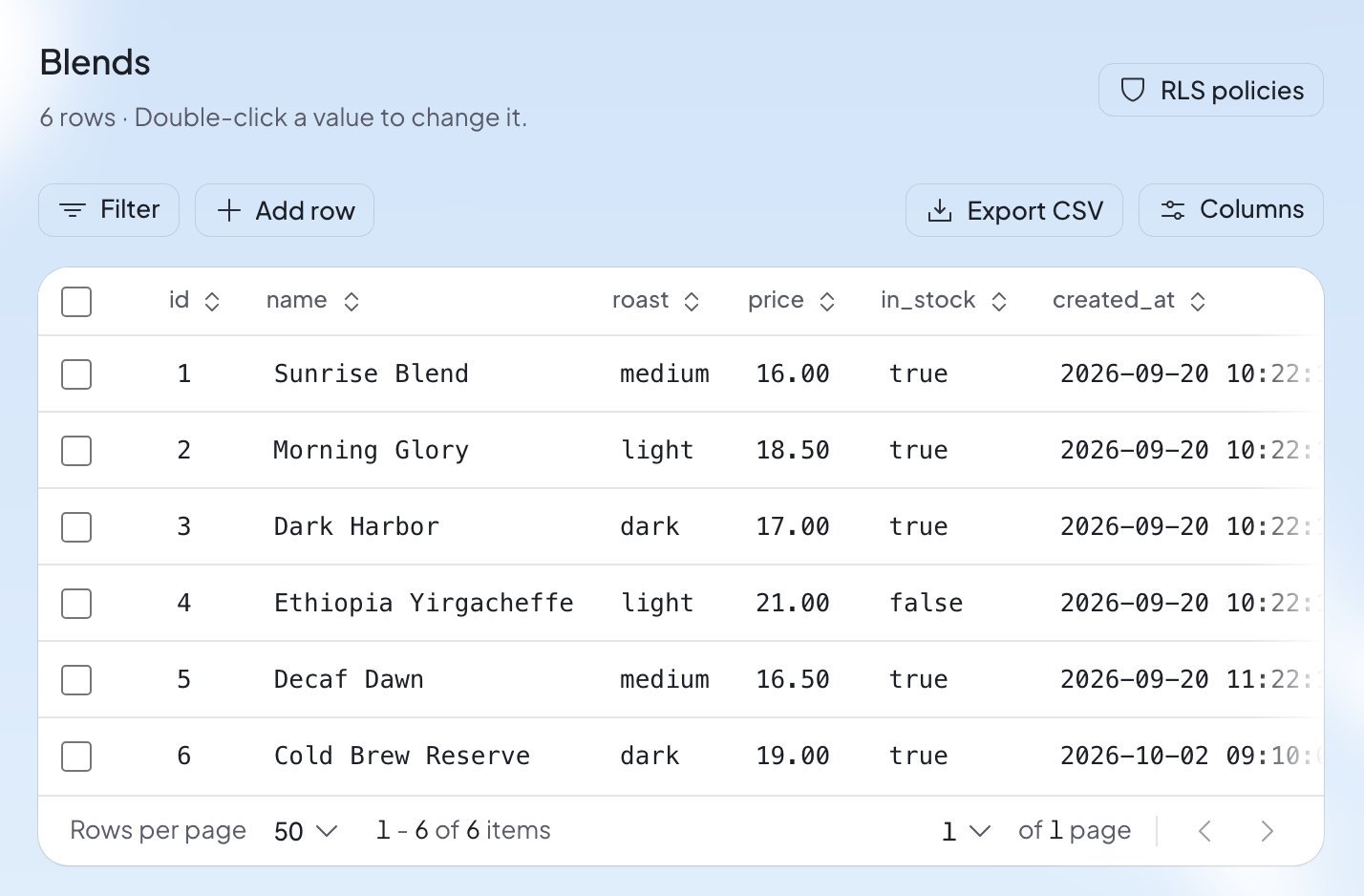
A table opens with its name, its number of rows and the reminder “Double-click a value to change it.” Above the rows:
| Button | What it does |
| - | - |
| **Filter** | Shows only the rows you want, like rows where a column equals, contains or is greater than a value. |
| **Columns** | Picks which columns show. At least one stays. |
| **Export CSV** | Downloads the rows as a CSV file, which opens in any spreadsheet app. |
| **Add row** | Adds a new row. |
| **Rows per page** | At the bottom: how many rows show at once. |
A filter checks what you type. You may see “Must be a valid number”, “Must be a valid date (YYYY-MM-DD)” or “Must be true or false”.
In Build, press **Tools**, then **Database**. You see your website’s **Tables**, each with its number of rows.
Press a table to see its rows.
Double-click a value, change it, and press **Save**.
Only the owner and admins can see and change the database. Everyone else sees “Only the owner or an admin can see this website’s data.”
## Look through a table
A table opens with its name, its number of rows and the reminder “Double-click a value to change it.” Above the rows:
| Button | What it does |
| - | - |
| **Filter** | Shows only the rows you want, like rows where a column equals, contains or is greater than a value. |
| **Columns** | Picks which columns show. At least one stays. |
| **Export CSV** | Downloads the rows as a CSV file, which opens in any spreadsheet app. |
| **Add row** | Adds a new row. |
| **Rows per page** | At the bottom: how many rows show at once. |
A filter checks what you type. You may see “Must be a valid number”, “Must be a valid date (YYYY-MM-DD)” or “Must be true or false”.
 ## Change, add or delete rows
* **Change one value**: double-click it, change it, and press **Save**.
* **Change a whole row**: press the pencil beside it (**Edit row**), make your changes, and press **Save**.
* **Add a row**: press **Add row**, fill in the values, and press **Save**.
* **Delete rows**: tick the boxes beside them, then press **Delete** with the number of rows, like **Delete 2 rows**. Foundable asks: “Are you sure you want to delete 2 rows? This action cannot be undone.”
Deleted rows are gone for good. Check the rows you ticked before you confirm.
Some tables can’t be changed here:
* A table marked “A view, read only.” is built from other tables. You can look, but not change it.
* A table that says “It has no primary key, so its rows can be added here but not changed.” takes new rows only. If you need to change its rows, ask Ted.
## Change the tables themselves
Database changes what’s in your tables, not how they’re built. There’s no button to add a table or a column here. Ask Ted instead, in your own words, like “Add a phone number to the sign-up form and keep it in the database.” He changes the tables for you.
## Who can see what: RLS policies
Press **RLS policies** at the top right to see your database’s rules. In the app’s words, “Row level security (RLS) controls which data users can access across your database, storage, and realtime.” Each table shows whether its rules are on (“RLS enabled”). Each rule says what it allows, like reading or adding rows, and who it applies to.
You can read the rules here. To change one, ask Ted. Security’s quick scan also checks these rules for you. See [Security and secrets](/build/security).
## The people who signed up
Press **Users** to see who signed up to your website, and to add test users who let you try it as someone else. You see:
* **Signups**: a chart of new sign-ups over the last 7, 30 or 90 days.
* A search box, “Email or name”.
* Everyone who signed up, with when they last signed in, or “Never signed in”.
Press **…** beside a person for:
| Action | What it does |
| - | - |
| **View details** | Shows their account details. |
| **Ban user** | “This account won’t be able to sign in to your website until you unban it.” Press **Unban user** to let them back in. |
| **Delete user** | Removes them for good: they “will no longer be able to sign in to your website, and the account can’t be recovered.” |
| **Preview as** | Test users only: “See your website signed in as this account.” |
You can’t delete someone while your website’s data still points to them. Foundable says “This user is still linked to data in your website’s database. Remove or update the records that reference them, then try again.”
## Try your website as someone else
A test user is a pretend account for checking what your website looks like to someone who signed in. “A test user signs in to your website through Viewing as or Preview as.”
In **Users**, press **Add test user**.
The **Password** is optional. Add one if you want to sign in as the test user on your website’s own email and password sign-in too. It needs at least 8 characters, with at least one number.
Press **Add test user**. The test user appears in the list, marked “Test user”, with an address like `tester1@example.com`.
Press **…** beside the test user, then **Preview as**. Or use **Viewing as** in the preview. See [Preview and change your website](/build/preview-and-edit).
A website can have up to 25 test users. When it has that many, Foundable says “Your website has 25 test users, the most it can have. Delete one to add another.”
## What you’ll see
| What you see | What it means | What to do |
| - | - | - |
| “Set up database” | This website has no database yet. “Set one up for this website’s data and sign-in.” | Press **Set up database**. “This takes about a minute.” |
| “Database setup failed” | “Something went wrong while setting it up. Ted can set it up again.” | Press **Try setup again**, or ask Ted. |
| “Database unavailable” | Your website’s database can’t be reached right now. | Try again later. |
| “This value changed after you opened it. Save again to replace it with yours.” | Someone else, or your website, changed this value while you were editing. | Check the new value. Press **Save** again to keep yours. |
| “Another row already has this value.” | This column needs a different value in every row. | Use another value. |
| “Other rows still point to this row, so it wasn’t deleted.” | Another table uses this row. | Change or delete those rows first. |
| “A row is too large to export.” | One row holds too much to go into the CSV file. | Ask Ted for the data you need. |
## FAQ
No. Every new website gets one, on every plan. If an older website has none, press **Set up database** in Database.
Not in Database. Ask Ted what you need, and he changes your website’s tables. See [Change the tables themselves](#change-the-tables-themselves).
No. Deleting rows “cannot be undone”, so check the rows you ticked before you confirm.
No. Foundable doesn’t show a test user’s password again or reset it. Delete the test user and add a new one.
Admins can. Members and view-only teammates can’t: they see “Only the owner or an admin can see this website’s data.” To change someone’s role, see [Invite your team](/account/team).
## Related
Check your database rules and keep your keys safe.
See your website signed in as you or as a test user.
Everything that runs behind your website.
Ask Ted to change your website and its tables.
This documentation is built and hosted on [Mintlify](https://mintlify.com), a developer documentation platform.
## Change, add or delete rows
* **Change one value**: double-click it, change it, and press **Save**.
* **Change a whole row**: press the pencil beside it (**Edit row**), make your changes, and press **Save**.
* **Add a row**: press **Add row**, fill in the values, and press **Save**.
* **Delete rows**: tick the boxes beside them, then press **Delete** with the number of rows, like **Delete 2 rows**. Foundable asks: “Are you sure you want to delete 2 rows? This action cannot be undone.”
Deleted rows are gone for good. Check the rows you ticked before you confirm.
Some tables can’t be changed here:
* A table marked “A view, read only.” is built from other tables. You can look, but not change it.
* A table that says “It has no primary key, so its rows can be added here but not changed.” takes new rows only. If you need to change its rows, ask Ted.
## Change the tables themselves
Database changes what’s in your tables, not how they’re built. There’s no button to add a table or a column here. Ask Ted instead, in your own words, like “Add a phone number to the sign-up form and keep it in the database.” He changes the tables for you.
## Who can see what: RLS policies
Press **RLS policies** at the top right to see your database’s rules. In the app’s words, “Row level security (RLS) controls which data users can access across your database, storage, and realtime.” Each table shows whether its rules are on (“RLS enabled”). Each rule says what it allows, like reading or adding rows, and who it applies to.
You can read the rules here. To change one, ask Ted. Security’s quick scan also checks these rules for you. See [Security and secrets](/build/security).
## The people who signed up
Press **Users** to see who signed up to your website, and to add test users who let you try it as someone else. You see:
* **Signups**: a chart of new sign-ups over the last 7, 30 or 90 days.
* A search box, “Email or name”.
* Everyone who signed up, with when they last signed in, or “Never signed in”.
Press **…** beside a person for:
| Action | What it does |
| - | - |
| **View details** | Shows their account details. |
| **Ban user** | “This account won’t be able to sign in to your website until you unban it.” Press **Unban user** to let them back in. |
| **Delete user** | Removes them for good: they “will no longer be able to sign in to your website, and the account can’t be recovered.” |
| **Preview as** | Test users only: “See your website signed in as this account.” |
You can’t delete someone while your website’s data still points to them. Foundable says “This user is still linked to data in your website’s database. Remove or update the records that reference them, then try again.”
## Try your website as someone else
A test user is a pretend account for checking what your website looks like to someone who signed in. “A test user signs in to your website through Viewing as or Preview as.”
In **Users**, press **Add test user**.
The **Password** is optional. Add one if you want to sign in as the test user on your website’s own email and password sign-in too. It needs at least 8 characters, with at least one number.
Press **Add test user**. The test user appears in the list, marked “Test user”, with an address like `tester1@example.com`.
Press **…** beside the test user, then **Preview as**. Or use **Viewing as** in the preview. See [Preview and change your website](/build/preview-and-edit).
A website can have up to 25 test users. When it has that many, Foundable says “Your website has 25 test users, the most it can have. Delete one to add another.”
## What you’ll see
| What you see | What it means | What to do |
| - | - | - |
| “Set up database” | This website has no database yet. “Set one up for this website’s data and sign-in.” | Press **Set up database**. “This takes about a minute.” |
| “Database setup failed” | “Something went wrong while setting it up. Ted can set it up again.” | Press **Try setup again**, or ask Ted. |
| “Database unavailable” | Your website’s database can’t be reached right now. | Try again later. |
| “This value changed after you opened it. Save again to replace it with yours.” | Someone else, or your website, changed this value while you were editing. | Check the new value. Press **Save** again to keep yours. |
| “Another row already has this value.” | This column needs a different value in every row. | Use another value. |
| “Other rows still point to this row, so it wasn’t deleted.” | Another table uses this row. | Change or delete those rows first. |
| “A row is too large to export.” | One row holds too much to go into the CSV file. | Ask Ted for the data you need. |
## FAQ
No. Every new website gets one, on every plan. If an older website has none, press **Set up database** in Database.
Not in Database. Ask Ted what you need, and he changes your website’s tables. See [Change the tables themselves](#change-the-tables-themselves).
No. Deleting rows “cannot be undone”, so check the rows you ticked before you confirm.
No. Foundable doesn’t show a test user’s password again or reset it. Delete the test user and add a new one.
Admins can. Members and view-only teammates can’t: they see “Only the owner or an admin can see this website’s data.” To change someone’s role, see [Invite your team](/account/team).
## Related
Check your database rules and keep your keys safe.
See your website signed in as you or as a test user.
Everything that runs behind your website.
Ask Ted to change your website and its tables.
This documentation is built and hosted on [Mintlify](https://mintlify.com), a developer documentation platform.