> ## Documentation Index
> Fetch the complete documentation index at: https://docs.foundable.com/llms.txt
> Use this file to discover all available pages before exploring further.
# Build your website
> Build is where your websites live. See them all on one board, open one to check it, ask Ted for changes and publish when you’re ready.
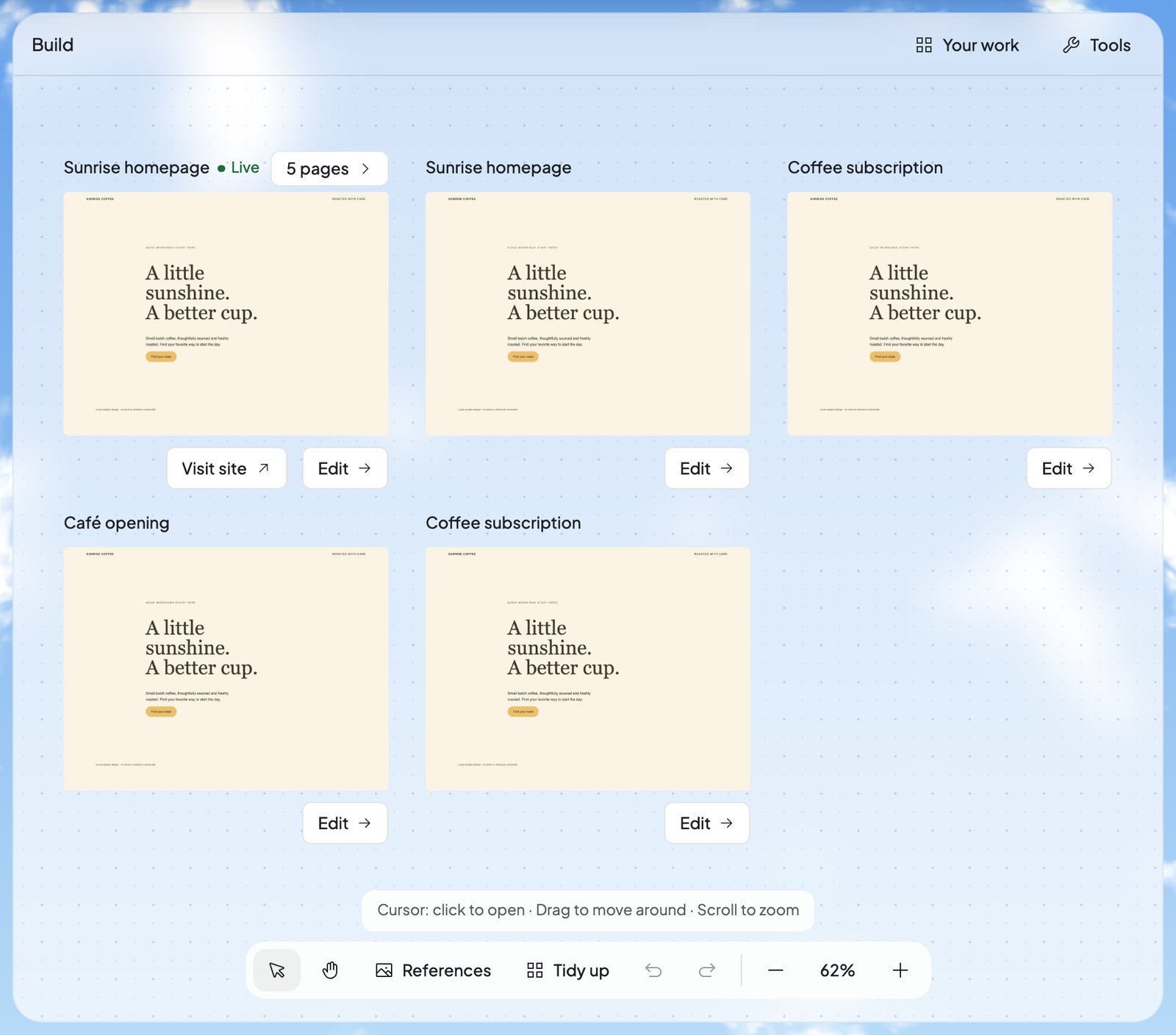
**Build** is the tab between [Home](/get-started/home) and [Run](/run/overview) where your websites live. Each website sits on one board as a card. Open a card to see the website page by page, ask Ted for changes, and [publish](/build/publish) it when you’re ready.
Ted does the building. You tell him what you want in your own words, and he designs, builds, checks and saves the website. You decide what goes live.
 See each page on a computer, tablet or phone, and point Ted at what to change.
Put your website online at its own address.
Look at any earlier version and go back to it.
## How a website gets made
You never build a website by hand. You describe it to Ted, and he makes it. Your first website starts from a plan Ted writes with you:
Chat with Ted in your own words. He turns what you tell him into a plan and saves it.
When the plan is saved, the chat offers **Start build**. Only the owner can start the first build.
A card appears on your board, marked “Starting”, then “Building”. It says “Ted is building your website” and shows about how long it usually takes. If it runs long, it says “Taking longer than usual”, and Ted keeps working.
When Ted saves it, your website opens in the preview. The first time, a short tour shows you around Build.
To see Ted start a business from scratch, see [Start your business with Ted](/get-started/start-your-business).
### Changes and new websites
After that, ask Ted in the chat for whatever you want: new words, another page, a different look, or a whole new website. Before Foundable saves any change, it checks that the website works. Each saved change becomes a new version, and Ted’s reply says “Build saved” with **Open website**.
Nothing you or Ted change reaches visitors until you say so: you [publish](/build/publish) it yourself, or approve a change Ted hands you.
### If a build doesn’t finish
Your website is safe when a build stops. Ted’s reply tells you what happened:
| What you see | What it means | What to do |
| - | - | - |
| “Build stopped. The last version is unchanged.” | The build stopped before it saved. | Ask Ted again when you’re ready. |
| “Build was interrupted. The last version is unchanged.” | Something cut the build short. | Ask Ted again. |
| “Build stopped: the changed website failed its tests. Nothing was saved.” | The change didn’t pass Foundable’s checks, so nothing changed. | Ask again, maybe in other words. |
| “Build finished without changing anything, so no new version was saved.” | The build ran, but nothing on your website changed. | Say more about what you want. |
| “Paused — out of credits” | Your [credits](/help/glossary#credit) ran out partway through a change. | Press **Get credits**, then **Continue**. |
## Your board
Every website you have is a card on the board, with a picture of the website and its name.
| On a card | What it means |
| - | - |
| “Live” | This is your published website, the one visitors see. |
| A page count, like “5 pages” | The website has more pages. Press the count to lay them out beside the card, then press a page to open the website there. |
| “Phone” | Ted made this website for phones. It opens in the phone-size preview. |
| “Starting”, “Building” | Ted is making this website now. |
| “Publishing…” | The website is going live now. |
| **Visit site** | Opens your live website. It shows only on the live website’s card. |
| **Edit** | Opens the website in the preview. You can also click its picture or name. |
Right-click a card for **Edit**, **Visit site** and **Show in chat**.
### Move around the board
The toolbar at the bottom of the board arranges your cards. It never changes your websites.
| Control | What it does |
| - | - |
| Cursor | Click a card to open it, or drag it to move it. |
| Hand | Drag the whole board around. |
| **References** | Example websites and your own pictures for Ted to follow. See [References](#references). |
| **Tidy up** | Arranges your cards neatly. It needs two or more cards. |
| **Undo**, **Redo** | Takes back or redoes a move on the board. |
| Zoom out, the zoom level, Zoom in | Press the zoom level to fit every card on screen. |
Scroll to zoom and drag to move around. Right-click an empty spot for **Tidy up**, **Undo**, **Redo**, **Sort by** (**Default order**, **Name**, **Newest** or **Oldest**), **Zoom to fit** and **Zoom to 100%**. On a phone, the toolbar keeps **References**, **Tidy up**, **Undo**, **Redo** and zoom to fit.
The board’s arrangement resets when you reload the page. Your websites stay exactly as they are.
### Your work
**Your work**, at the top right of the board, lists every website with the date it was last edited. Type in “Search your work…” to find one by name. A website Ted hasn’t saved yet reads “Not saved yet”.
## Rename, duplicate or delete a website
Open the website, then press ⋮ (**Website actions**) at the top of the preview.
* **Rename**: type a new name under “Website name” and press **Save**. To change its web address instead, see [Your web address](/build/publish#your-web-address).
* **Duplicate**: makes a copy with “copy” added to its name, and opens it. A copy of a website that sells starts with no products: “The copy has no products yet; add them in Payments.” You can’t duplicate a website before it’s saved, or while its database is being set up (“This website can’t be duplicated yet.”).
* **Delete**: asks “Delete website?” first. The website leaves Build. A website linked to [GitHub](/build/github) keeps its repository there.
Deleting your live website takes it offline. The dialog warns you: “Its live site goes offline.”
## References
Press **References** in the board’s toolbar to give Ted pictures to follow.
* **Explore** shows example websites in families like “Food & hospitality” and “Local services”. Pick one and press **Use for new website**: Ted will use that layout for your next new website. Foundable prepares the message in the chat: “Nothing starts until you press Send.”
* **Your uploads** holds your own screenshots and photos. Press **Upload image** to add a PNG, JPEG or WebP picture from your computer. Then press **Use as reference**, and it guides Ted on your next message.
References guide Ted. They don’t appear on your website by themselves. When you leave Build, your picks clear.
## Tools and Publish
* **Tools**, at the top right of the board and of every open website, holds what runs behind your website: **Payments**, **Database**, **Security**, **GitHub**, **AI** and **Emails**. See [Tools](/build/tools).
* **Publish**, at the top right of an open website, puts it online. See [Publish your website](/build/publish).
## Who can do what
Everyone in your foundable can see Build. What they can change depends on their role:
| Role | In Build, they can |
| - | - |
| Owner and admin | Everything a member can, plus **Viewing as** and the **Emails** tool. Only the owner starts the first build. |
| Member | Ask Ted for changes, use **Select**, **Edit text** and **Swap photo**, publish, go back to earlier versions, and rename, duplicate or delete websites. |
| View only | Look at every website and its history. They can’t change, publish or delete anything. |
To add people, see [Invite your team](/account/team).
## FAQ
No. Visitors see only what you publish. Your website stays out of public view until you press **Publish**, and later changes wait until you publish an update.
Yes. Describe a new website to Ted in the chat, and it appears on your board. Only one website is live at a time, though: publishing another one replaces it. See [One live website at a time](/build/publish#one-live-website-at-a-time).
No. Every change Ted saves becomes a new version, and every version stays in [Version history](/build/version-history).
In the chat, Ted works on your website when you ask him. While Run is on, he can also work on it by himself, but he never publishes. A change to your live website waits on its card until you press **Approve** or **Deny**. See [Decisions and website changes](/run/decisions).
The change pauses and says “Paused — out of credits”. Press **Get credits**, then **Continue**, and Ted finishes it. Your first website’s build never pauses for credits. See [Plans and credits](/account/plans-and-credits).
Open the account menu, choose **Tutorial hub**, then pick “Your website, and how to change it”.
## Related
Payments, your database, security, GitHub, AI and emails.
Ask Ted for changes and follow his work.
Sell from your website.
Give your website an address like yourbusiness.com.
This documentation is built and hosted on [Mintlify](https://mintlify.com), a developer documentation platform.
See each page on a computer, tablet or phone, and point Ted at what to change.
Put your website online at its own address.
Look at any earlier version and go back to it.
## How a website gets made
You never build a website by hand. You describe it to Ted, and he makes it. Your first website starts from a plan Ted writes with you:
Chat with Ted in your own words. He turns what you tell him into a plan and saves it.
When the plan is saved, the chat offers **Start build**. Only the owner can start the first build.
A card appears on your board, marked “Starting”, then “Building”. It says “Ted is building your website” and shows about how long it usually takes. If it runs long, it says “Taking longer than usual”, and Ted keeps working.
When Ted saves it, your website opens in the preview. The first time, a short tour shows you around Build.
To see Ted start a business from scratch, see [Start your business with Ted](/get-started/start-your-business).
### Changes and new websites
After that, ask Ted in the chat for whatever you want: new words, another page, a different look, or a whole new website. Before Foundable saves any change, it checks that the website works. Each saved change becomes a new version, and Ted’s reply says “Build saved” with **Open website**.
Nothing you or Ted change reaches visitors until you say so: you [publish](/build/publish) it yourself, or approve a change Ted hands you.
### If a build doesn’t finish
Your website is safe when a build stops. Ted’s reply tells you what happened:
| What you see | What it means | What to do |
| - | - | - |
| “Build stopped. The last version is unchanged.” | The build stopped before it saved. | Ask Ted again when you’re ready. |
| “Build was interrupted. The last version is unchanged.” | Something cut the build short. | Ask Ted again. |
| “Build stopped: the changed website failed its tests. Nothing was saved.” | The change didn’t pass Foundable’s checks, so nothing changed. | Ask again, maybe in other words. |
| “Build finished without changing anything, so no new version was saved.” | The build ran, but nothing on your website changed. | Say more about what you want. |
| “Paused — out of credits” | Your [credits](/help/glossary#credit) ran out partway through a change. | Press **Get credits**, then **Continue**. |
## Your board
Every website you have is a card on the board, with a picture of the website and its name.
| On a card | What it means |
| - | - |
| “Live” | This is your published website, the one visitors see. |
| A page count, like “5 pages” | The website has more pages. Press the count to lay them out beside the card, then press a page to open the website there. |
| “Phone” | Ted made this website for phones. It opens in the phone-size preview. |
| “Starting”, “Building” | Ted is making this website now. |
| “Publishing…” | The website is going live now. |
| **Visit site** | Opens your live website. It shows only on the live website’s card. |
| **Edit** | Opens the website in the preview. You can also click its picture or name. |
Right-click a card for **Edit**, **Visit site** and **Show in chat**.
### Move around the board
The toolbar at the bottom of the board arranges your cards. It never changes your websites.
| Control | What it does |
| - | - |
| Cursor | Click a card to open it, or drag it to move it. |
| Hand | Drag the whole board around. |
| **References** | Example websites and your own pictures for Ted to follow. See [References](#references). |
| **Tidy up** | Arranges your cards neatly. It needs two or more cards. |
| **Undo**, **Redo** | Takes back or redoes a move on the board. |
| Zoom out, the zoom level, Zoom in | Press the zoom level to fit every card on screen. |
Scroll to zoom and drag to move around. Right-click an empty spot for **Tidy up**, **Undo**, **Redo**, **Sort by** (**Default order**, **Name**, **Newest** or **Oldest**), **Zoom to fit** and **Zoom to 100%**. On a phone, the toolbar keeps **References**, **Tidy up**, **Undo**, **Redo** and zoom to fit.
The board’s arrangement resets when you reload the page. Your websites stay exactly as they are.
### Your work
**Your work**, at the top right of the board, lists every website with the date it was last edited. Type in “Search your work…” to find one by name. A website Ted hasn’t saved yet reads “Not saved yet”.
## Rename, duplicate or delete a website
Open the website, then press ⋮ (**Website actions**) at the top of the preview.
* **Rename**: type a new name under “Website name” and press **Save**. To change its web address instead, see [Your web address](/build/publish#your-web-address).
* **Duplicate**: makes a copy with “copy” added to its name, and opens it. A copy of a website that sells starts with no products: “The copy has no products yet; add them in Payments.” You can’t duplicate a website before it’s saved, or while its database is being set up (“This website can’t be duplicated yet.”).
* **Delete**: asks “Delete website?” first. The website leaves Build. A website linked to [GitHub](/build/github) keeps its repository there.
Deleting your live website takes it offline. The dialog warns you: “Its live site goes offline.”
## References
Press **References** in the board’s toolbar to give Ted pictures to follow.
* **Explore** shows example websites in families like “Food & hospitality” and “Local services”. Pick one and press **Use for new website**: Ted will use that layout for your next new website. Foundable prepares the message in the chat: “Nothing starts until you press Send.”
* **Your uploads** holds your own screenshots and photos. Press **Upload image** to add a PNG, JPEG or WebP picture from your computer. Then press **Use as reference**, and it guides Ted on your next message.
References guide Ted. They don’t appear on your website by themselves. When you leave Build, your picks clear.
## Tools and Publish
* **Tools**, at the top right of the board and of every open website, holds what runs behind your website: **Payments**, **Database**, **Security**, **GitHub**, **AI** and **Emails**. See [Tools](/build/tools).
* **Publish**, at the top right of an open website, puts it online. See [Publish your website](/build/publish).
## Who can do what
Everyone in your foundable can see Build. What they can change depends on their role:
| Role | In Build, they can |
| - | - |
| Owner and admin | Everything a member can, plus **Viewing as** and the **Emails** tool. Only the owner starts the first build. |
| Member | Ask Ted for changes, use **Select**, **Edit text** and **Swap photo**, publish, go back to earlier versions, and rename, duplicate or delete websites. |
| View only | Look at every website and its history. They can’t change, publish or delete anything. |
To add people, see [Invite your team](/account/team).
## FAQ
No. Visitors see only what you publish. Your website stays out of public view until you press **Publish**, and later changes wait until you publish an update.
Yes. Describe a new website to Ted in the chat, and it appears on your board. Only one website is live at a time, though: publishing another one replaces it. See [One live website at a time](/build/publish#one-live-website-at-a-time).
No. Every change Ted saves becomes a new version, and every version stays in [Version history](/build/version-history).
In the chat, Ted works on your website when you ask him. While Run is on, he can also work on it by himself, but he never publishes. A change to your live website waits on its card until you press **Approve** or **Deny**. See [Decisions and website changes](/run/decisions).
The change pauses and says “Paused — out of credits”. Press **Get credits**, then **Continue**, and Ted finishes it. Your first website’s build never pauses for credits. See [Plans and credits](/account/plans-and-credits).
Open the account menu, choose **Tutorial hub**, then pick “Your website, and how to change it”.
## Related
Payments, your database, security, GitHub, AI and emails.
Ask Ted for changes and follow his work.
Sell from your website.
Give your website an address like yourbusiness.com.
This documentation is built and hosted on [Mintlify](https://mintlify.com), a developer documentation platform.