> ## Documentation Index
> Fetch the complete documentation index at: https://docs.foundable.com/llms.txt
> Use this file to discover all available pages before exploring further.
# Security and secrets
> Scan your website for leaked keys, unsafe database rules and risky packages, and keep the secret keys it uses out of its code.
**Security**, in [Tools](/build/tools), has two parts. **Scan** checks your website for common security problems, and Ted can fix what it finds. **Secrets** keeps the private keys your website uses, like the key for an email service, safely out of its code.
You don’t have to remember to scan: Foundable scans your website every time you [publish](/build/publish).
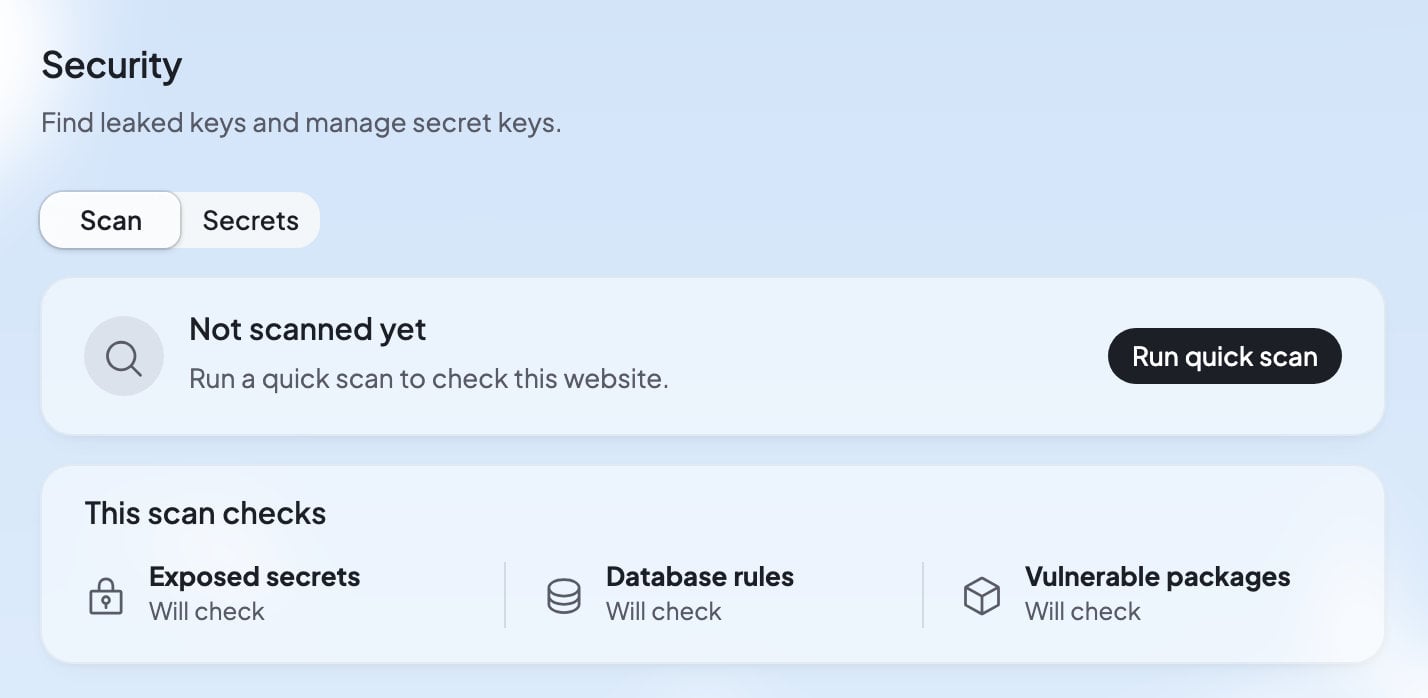 In Build, press **Tools**, then **Security**. **Scan** is selected.
Press **Run quick scan**. It says “Running quick scan…” while it works.
You see “No issues found”, or a list of findings.
Press **Try to fix** and Ted fixes it, or ignore a finding you’re sure about.
## What the quick scan checks
| Check | What it looks for |
| - | - |
| “Exposed secrets” | Keys and passwords written into your website’s code, where anyone who opens your website, or sees its code, could find them. |
| “Database rules” | Rules in your website’s [database](/build/database) that let the wrong people read, change or delete data, like “Anyone can change every row of …”. |
| “Vulnerable packages” | Ready-made pieces of code your website uses that have a known security problem. |
If the scan couldn’t check one of these, it says so, like “Couldn’t check database rules this time.” Run the scan again later.
## When scans run
Foundable scans every version you publish, Ted’s included. The scan card says “Up to date · Runs every time you publish”. Publishing never waits for the scan.
The **Security** row in the [Publish panel](/build/publish) shows how the latest scan went: “Not scanned”, “Scanning”, “No issues”, or the number of issues. You can also scan any time with **Run quick scan**.
## Read a finding
Each finding has a title that says what’s wrong, like “Database key exposed to visitors”, and a severity:
| Severity | What it means |
| - | - |
| Critical | “Problems that need your attention immediately” |
| Warning | “Issues you should review and fix if necessary” |
Open a finding to see **What could happen**, in plain words, and **Technical details**, which say where the problem is.
If a key was exposed, removing it from the code isn’t enough. In the app’s words: “Taking it out of the code isn’t enough once it’s been seen: replace it with a new one, kept in Secrets.” Make a new key at the service it came from, then save that one in [Secrets](#secrets).
## Fix or ignore a finding
* **Try to fix**: Ted fixes the problem in your website. This can use one of your [free fixes](/help/glossary#free-fix). When it does, the receipt under Ted’s reply reads “Free”.
* **…** › **Reference in chat**: puts “About this security issue in my website: …” in your message to Ted, so you can ask about it. Nothing is sent until you press send.
* **…** › **Ignore finding**: pick why, “This is intended”, “I accept this risk”, “This is wrong” or **Custom**. The finding moves to **Ignored findings**. To bring it back, open it there and press **Unignore finding**.
## Secrets
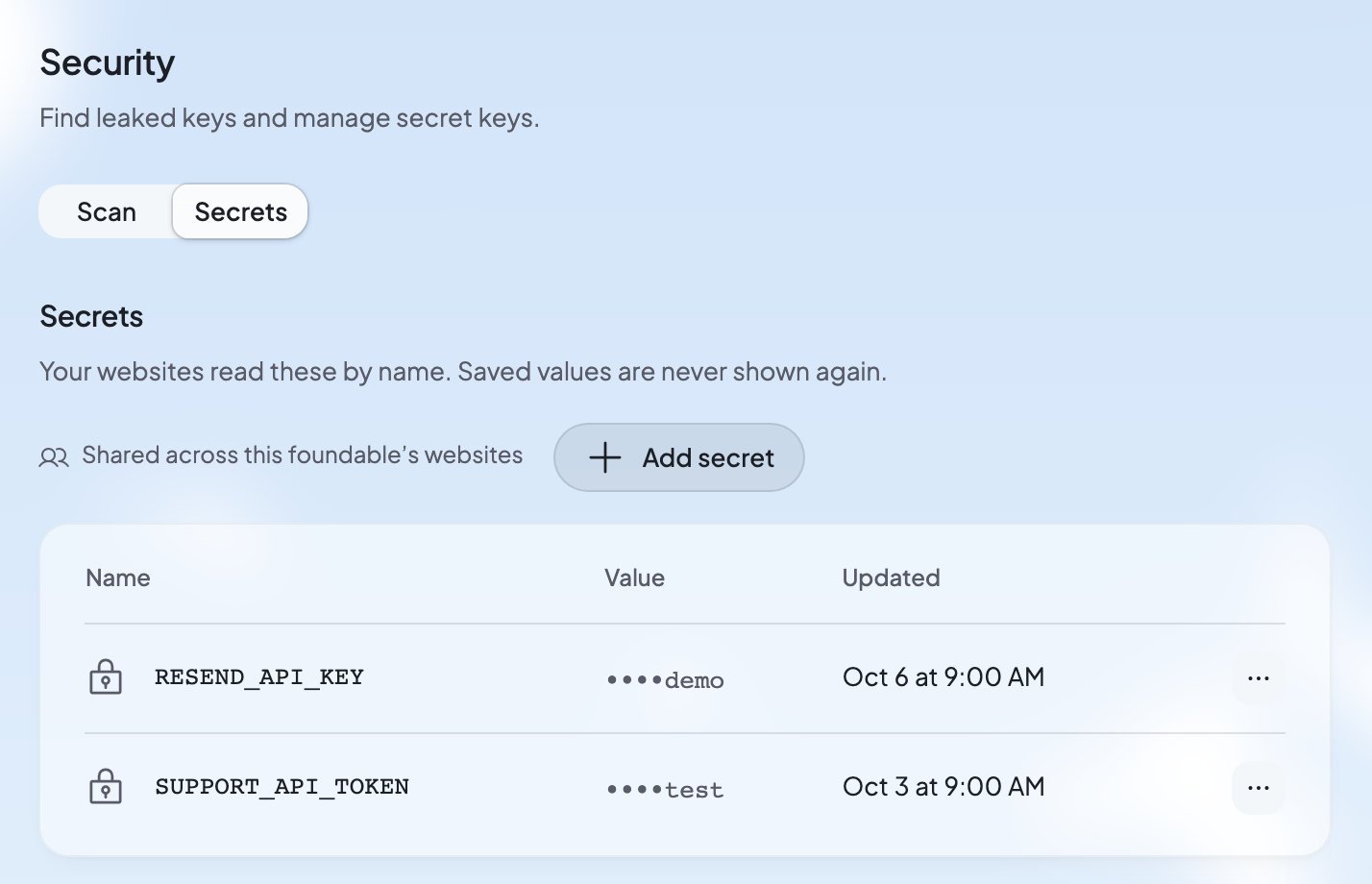
A secret is a private value your website’s server code uses, like the API key for an email or map service. Your website reads each secret by its name, and its value stays hidden: “Your websites read these by name. Saved values are never shown again.” Secrets are “Shared across this foundable’s websites”.
Press **Secrets** at the top of Security to see them. Each row shows the secret’s name, its value as dots with its last few characters (“Ends in …”), and when it was updated.
In Build, press **Tools**, then **Security**. **Scan** is selected.
Press **Run quick scan**. It says “Running quick scan…” while it works.
You see “No issues found”, or a list of findings.
Press **Try to fix** and Ted fixes it, or ignore a finding you’re sure about.
## What the quick scan checks
| Check | What it looks for |
| - | - |
| “Exposed secrets” | Keys and passwords written into your website’s code, where anyone who opens your website, or sees its code, could find them. |
| “Database rules” | Rules in your website’s [database](/build/database) that let the wrong people read, change or delete data, like “Anyone can change every row of …”. |
| “Vulnerable packages” | Ready-made pieces of code your website uses that have a known security problem. |
If the scan couldn’t check one of these, it says so, like “Couldn’t check database rules this time.” Run the scan again later.
## When scans run
Foundable scans every version you publish, Ted’s included. The scan card says “Up to date · Runs every time you publish”. Publishing never waits for the scan.
The **Security** row in the [Publish panel](/build/publish) shows how the latest scan went: “Not scanned”, “Scanning”, “No issues”, or the number of issues. You can also scan any time with **Run quick scan**.
## Read a finding
Each finding has a title that says what’s wrong, like “Database key exposed to visitors”, and a severity:
| Severity | What it means |
| - | - |
| Critical | “Problems that need your attention immediately” |
| Warning | “Issues you should review and fix if necessary” |
Open a finding to see **What could happen**, in plain words, and **Technical details**, which say where the problem is.
If a key was exposed, removing it from the code isn’t enough. In the app’s words: “Taking it out of the code isn’t enough once it’s been seen: replace it with a new one, kept in Secrets.” Make a new key at the service it came from, then save that one in [Secrets](#secrets).
## Fix or ignore a finding
* **Try to fix**: Ted fixes the problem in your website. This can use one of your [free fixes](/help/glossary#free-fix). When it does, the receipt under Ted’s reply reads “Free”.
* **…** › **Reference in chat**: puts “About this security issue in my website: …” in your message to Ted, so you can ask about it. Nothing is sent until you press send.
* **…** › **Ignore finding**: pick why, “This is intended”, “I accept this risk”, “This is wrong” or **Custom**. The finding moves to **Ignored findings**. To bring it back, open it there and press **Unignore finding**.
## Secrets
A secret is a private value your website’s server code uses, like the API key for an email or map service. Your website reads each secret by its name, and its value stays hidden: “Your websites read these by name. Saved values are never shown again.” Secrets are “Shared across this foundable’s websites”.
Press **Secrets** at the top of Security to see them. Each row shows the secret’s name, its value as dots with its last few characters (“Ends in …”), and when it was updated.
 ### When Ted asks for a key
Usually, you don’t add secrets yourself. When a feature needs a key, Ted asks for it on a card, “Secrets Ted asked for”. Type the value and press **Set** (or **Replace** for one you saved before). The card says: “Only your websites’ server code can read these. Ted and Build see the names, never the values.”
When Ted needs a key while he works in Run, he asks under **Ted needs you** in Run instead, and you add the key here. See [Decisions and website changes](/run/decisions).
### Add a secret yourself
In Build, press **Tools**, then **Security**, then **Secrets**.
A new row opens with **Name** and **Value**.
Use the name your website’s code expects, like `RESEND_API_KEY`. Paste the key into **Value**.
“Your websites use it from their next request, the preview included.”
A name uses letters, digits, `_` or `$`, and can’t start with a digit.
### Change or delete a secret
Press **…** beside a secret:
* **Replace** saves a new value under the same name.
* **Delete** asks first: “Delete RESEND\_API\_KEY? This can’t be undone.”
“A change reaches your websites on their next request, in the preview and on the published site, with no rebuild.”
### Secrets marked Foundable
“Foundable sets the ones marked Foundable for this website.” They connect your website to its database: `SUPABASE_URL`, `SUPABASE_PUBLISHABLE_KEY` and `SUPABASE_SERVICE_ROLE_KEY`. You can’t use these names for secrets of your own.
The server key has **Rotate**, which makes a new key. It asks first: “Foundable makes a new key, this website’s server code uses it from its next request, and the old key stops working.” If a rotation doesn’t finish, the old key keeps working and Security tells you to rotate it again.
### Use your own OpenAI key
Your website’s AI runs on your credits. To have OpenAI bill you instead, add a secret named `OPENAI_API_KEY`. See [Use your own OpenAI key](/build/website-ai#use-your-own-openai-key).
## Who can do what
| Role | What they can do |
| - | - |
| Owner and admin | Everything: scan, fix, ignore, and add, replace, delete or rotate secrets. |
| Member | Scan, fix and ignore findings, and see the secrets’ names. For changes to secrets they see “Only the owner or an admin can add or change them.” |
| View only | See the scan’s results. They can’t scan, fix, ignore or change anything. |
## What you’ll see
| What you see | What it means | What to do |
| - | - | - |
| “Save this website before running a quick scan.” | There’s no saved version to scan yet. | Ask Ted to build or save your website, then scan. |
| “The scan didn’t go through. Try again.” | The scan stopped before it finished. | Press **Run quick scan** again. |
| “Foundable sets that name in your websites. Choose another.” | That name is one of Foundable’s own. | Use another name. |
| “A VITE\_ name is built into the code browsers download, so it can’t be a secret. Choose another.” | A name starting with `VITE_` would be visible to every visitor. | Use a name without `VITE_`. |
| “Stripe secret and restricted keys can’t be saved: take payments with Foundable’s Payments, in Tools.” | Foundable keeps payments in Payments, not in Secrets. | Set up [Payments](/payments/overview) instead. |
| “That is more than a website can hold. Delete a secret you no longer use, or save a shorter value.” | Your secrets are too big all together. | Delete one you don’t use. |
| “That didn’t go through, so the old key still works. Try again.” | A rotation failed. | Press **Rotate** again. |
## FAQ
No. Once saved, a value is never shown again, to you, your team or Ted. Security shows only its name and its last few characters. Only your websites’ server code reads it.
Payments handles Stripe for you, so your website never needs a Stripe key. See [Get paid with Payments](/payments/overview).
On your website’s next request, in the preview and on your live website. Nothing needs to be rebuilt or published again.
No. Publishing never waits for the scan. Check the **Security** row in the Publish panel, and fix what it finds.
It means none of the three checks found a problem: exposed secrets, database rules and vulnerable packages. The quick scan looks for these common problems, not every possible one.
## Related
See the data and rules the scan checks.
Use Foundable AI, or your own OpenAI key.
Every publish runs a scan.
Everything that runs behind your website.
This documentation is built and hosted on [Mintlify](https://mintlify.com), a developer documentation platform.
### When Ted asks for a key
Usually, you don’t add secrets yourself. When a feature needs a key, Ted asks for it on a card, “Secrets Ted asked for”. Type the value and press **Set** (or **Replace** for one you saved before). The card says: “Only your websites’ server code can read these. Ted and Build see the names, never the values.”
When Ted needs a key while he works in Run, he asks under **Ted needs you** in Run instead, and you add the key here. See [Decisions and website changes](/run/decisions).
### Add a secret yourself
In Build, press **Tools**, then **Security**, then **Secrets**.
A new row opens with **Name** and **Value**.
Use the name your website’s code expects, like `RESEND_API_KEY`. Paste the key into **Value**.
“Your websites use it from their next request, the preview included.”
A name uses letters, digits, `_` or `$`, and can’t start with a digit.
### Change or delete a secret
Press **…** beside a secret:
* **Replace** saves a new value under the same name.
* **Delete** asks first: “Delete RESEND\_API\_KEY? This can’t be undone.”
“A change reaches your websites on their next request, in the preview and on the published site, with no rebuild.”
### Secrets marked Foundable
“Foundable sets the ones marked Foundable for this website.” They connect your website to its database: `SUPABASE_URL`, `SUPABASE_PUBLISHABLE_KEY` and `SUPABASE_SERVICE_ROLE_KEY`. You can’t use these names for secrets of your own.
The server key has **Rotate**, which makes a new key. It asks first: “Foundable makes a new key, this website’s server code uses it from its next request, and the old key stops working.” If a rotation doesn’t finish, the old key keeps working and Security tells you to rotate it again.
### Use your own OpenAI key
Your website’s AI runs on your credits. To have OpenAI bill you instead, add a secret named `OPENAI_API_KEY`. See [Use your own OpenAI key](/build/website-ai#use-your-own-openai-key).
## Who can do what
| Role | What they can do |
| - | - |
| Owner and admin | Everything: scan, fix, ignore, and add, replace, delete or rotate secrets. |
| Member | Scan, fix and ignore findings, and see the secrets’ names. For changes to secrets they see “Only the owner or an admin can add or change them.” |
| View only | See the scan’s results. They can’t scan, fix, ignore or change anything. |
## What you’ll see
| What you see | What it means | What to do |
| - | - | - |
| “Save this website before running a quick scan.” | There’s no saved version to scan yet. | Ask Ted to build or save your website, then scan. |
| “The scan didn’t go through. Try again.” | The scan stopped before it finished. | Press **Run quick scan** again. |
| “Foundable sets that name in your websites. Choose another.” | That name is one of Foundable’s own. | Use another name. |
| “A VITE\_ name is built into the code browsers download, so it can’t be a secret. Choose another.” | A name starting with `VITE_` would be visible to every visitor. | Use a name without `VITE_`. |
| “Stripe secret and restricted keys can’t be saved: take payments with Foundable’s Payments, in Tools.” | Foundable keeps payments in Payments, not in Secrets. | Set up [Payments](/payments/overview) instead. |
| “That is more than a website can hold. Delete a secret you no longer use, or save a shorter value.” | Your secrets are too big all together. | Delete one you don’t use. |
| “That didn’t go through, so the old key still works. Try again.” | A rotation failed. | Press **Rotate** again. |
## FAQ
No. Once saved, a value is never shown again, to you, your team or Ted. Security shows only its name and its last few characters. Only your websites’ server code reads it.
Payments handles Stripe for you, so your website never needs a Stripe key. See [Get paid with Payments](/payments/overview).
On your website’s next request, in the preview and on your live website. Nothing needs to be rebuilt or published again.
No. Publishing never waits for the scan. Check the **Security** row in the Publish panel, and fix what it finds.
It means none of the three checks found a problem: exposed secrets, database rules and vulnerable packages. The quick scan looks for these common problems, not every possible one.
## Related
See the data and rules the scan checks.
Use Foundable AI, or your own OpenAI key.
Every publish runs a scan.
Everything that runs behind your website.
This documentation is built and hosted on [Mintlify](https://mintlify.com), a developer documentation platform.