> ## Documentation Index
> Fetch the complete documentation index at: https://docs.foundable.com/llms.txt
> Use this file to discover all available pages before exploring further.
# Your website’s emails
> See every email your website sends, like welcomes and order confirmations, send yourself a test, and approve the newsletters Ted writes.
Your website can send emails by itself: a welcome when someone signs up, an order confirmation, and newsletters to the people who subscribed. Foundable sends them for you, so you don’t need an email service or a key of your own. **Emails**, in [Tools](/build/tools), lists every email your website sends.
These aren’t the emails in your Inbox. Your Inbox is your foundable’s own mailbox, where you and Ted write to people. See [Your Inbox](/inbox/overview).
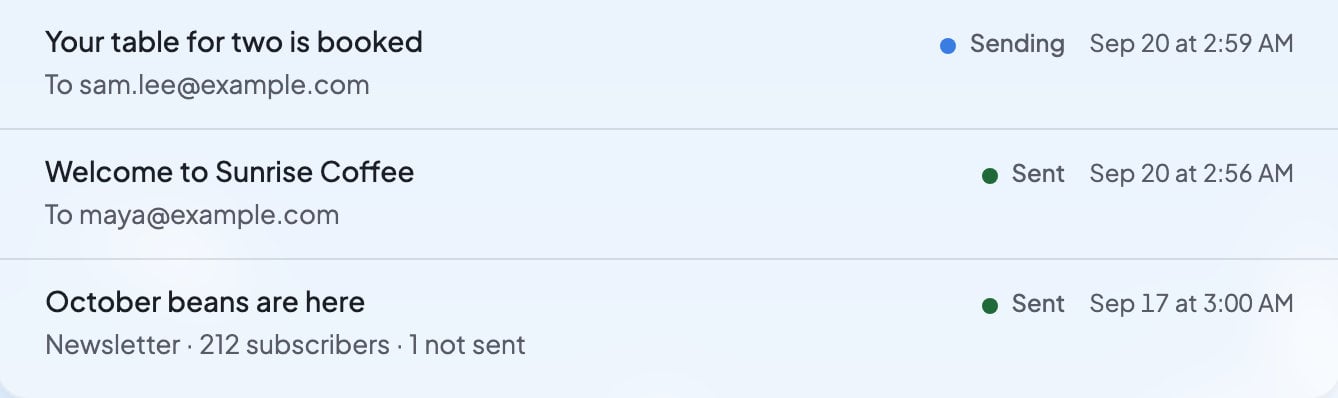 In Build, press **Tools**, then **Emails**.
**Sent emails** lists your website’s emails, newest first. Each row shows the subject, who it went to, where it stands and when it was sent.
Press **Send test**. You see “Test email sent”, and the test reaches your own email address in a moment. Open it to see what your customers get.
The top of the list also shows how many emails your foundable has sent this month, out of how many it can send.
## What each status means
| What you see | What it means |
| - | - |
| “Waiting for approval” | A newsletter Ted wrote, waiting for an owner’s or admin’s OK. |
| “Declined” | Someone declined the newsletter, so it wasn’t sent. |
| “Sending” | It’s on its way. |
| “Sent” | Foundable sent it. |
| “Delivered” | The person’s email service accepted it. |
| “Bounced” | It couldn’t be delivered, for example because the address doesn’t exist. |
| “Not sent” | It didn’t go out. |
| “Unsubscribed” | The person unsubscribed from your website’s emails, so it didn’t go to them. |
A row for an email to one person reads “To” and their address. A newsletter’s row reads “Newsletter” with the number of subscribers it went to.
## Who gets your website’s emails
On the Free plan, your website’s emails go only to you. Emails says “On Free, your website’s emails go only to you.” Press **Upgrade** beside it to choose a plan.
On every paid plan, your website emails your customers: “Confirmations, welcomes and newsletters”. **Send test** works on every plan. See [Plans and credits](/account/plans-and-credits).
## Newsletters Ted writes
Ted can write a newsletter for the people who subscribed on your website. It never goes out until an owner or admin approves it.
A card titled “Newsletter” appears in the chat. It shows the subject, how many subscribers it goes to, and the words your subscribers will get. People who unsubscribed are left out, and the card says how many.
Check the words. If you want changes, tell Ted in the chat.
Press **Approve** to send it, or **Decline** to stop it: “Declined. This newsletter won’t be sent.”
The card counts the emails as they go out (“Sending…”), then says “Sent to” and the number of subscribers.
If you didn’t see the card in the chat, the newsletter waits for you on [Home](/get-started/home), under **From Ted**. See [Approve Ted’s work](/ted/approvals).
If some emails can’t be sent, the card says how many “could not be sent”.
## When sending pauses
If too many of your website’s recent emails bounce or are marked as spam, Foundable pauses its emails for a while. Emails shows “Emails are paused” and why:
* “Too many of this website’s recent emails bounced. Sending starts again on its own on” a date it shows.
* “Too many of this website’s recent emails were marked as spam. Sending starts again on its own on” a date it shows.
You don’t need to do anything to turn sending back on.
## Who can see Emails
Only the owner and admins see **Emails** in Tools, because it shows who each email went to. Anyone else who opens it sees “Only an owner or admin can see emails”. Only the owner and admins can approve a newsletter. Others see “Only the owner or an admin can send it.”
## What you’ll see
| What you see | What it means | What to do |
| - | - | - |
| “No emails yet” | Your website hasn’t sent any emails yet. “Emails your website sends, like a welcome or an order confirmation, and its newsletters show here.” | Nothing. They appear as your website sends them. |
| “Couldn’t send a test email” | The test didn’t go out. | Press **Send test** again. |
| “Your account has no email address to send it to.” | The test has nowhere to go. | Contact support. |
| “This website sent as many emails as it may this hour. Try again later.” | Your website reached its emails for this hour. | Try again later. |
| “Your foundable sent all its emails for this month.” | Your foundable reached its emails for this month. | Your website can send again next month. |
| “This website’s emails are paused.” | Sending is paused because of bounces or spam reports. | Wait for the date Emails shows. |
## FAQ
On the Free plan, your website’s emails go only to you. Sending them to your customers needs a paid plan. Press **Upgrade** in Emails to choose one.
No. Foundable sends your website’s emails for you.
No. Every newsletter waits for an owner’s or admin’s **Approve**, on its card in the chat or from Home.
Too many recent emails bounced or were marked as spam. Emails shows “Emails are paused” and the date sending starts again on its own.
No. Emails shows what your website sends by itself. Your [Inbox](/inbox/overview) is your foundable’s mailbox, where you and Ted write to people and get their replies.
## Related
Newsletters and other drafts that wait for your OK.
Your foundable’s own mailbox.
Send your website’s emails to customers on a paid plan.
Everything that runs behind your website.
This documentation is built and hosted on [Mintlify](https://mintlify.com), a developer documentation platform.
In Build, press **Tools**, then **Emails**.
**Sent emails** lists your website’s emails, newest first. Each row shows the subject, who it went to, where it stands and when it was sent.
Press **Send test**. You see “Test email sent”, and the test reaches your own email address in a moment. Open it to see what your customers get.
The top of the list also shows how many emails your foundable has sent this month, out of how many it can send.
## What each status means
| What you see | What it means |
| - | - |
| “Waiting for approval” | A newsletter Ted wrote, waiting for an owner’s or admin’s OK. |
| “Declined” | Someone declined the newsletter, so it wasn’t sent. |
| “Sending” | It’s on its way. |
| “Sent” | Foundable sent it. |
| “Delivered” | The person’s email service accepted it. |
| “Bounced” | It couldn’t be delivered, for example because the address doesn’t exist. |
| “Not sent” | It didn’t go out. |
| “Unsubscribed” | The person unsubscribed from your website’s emails, so it didn’t go to them. |
A row for an email to one person reads “To” and their address. A newsletter’s row reads “Newsletter” with the number of subscribers it went to.
## Who gets your website’s emails
On the Free plan, your website’s emails go only to you. Emails says “On Free, your website’s emails go only to you.” Press **Upgrade** beside it to choose a plan.
On every paid plan, your website emails your customers: “Confirmations, welcomes and newsletters”. **Send test** works on every plan. See [Plans and credits](/account/plans-and-credits).
## Newsletters Ted writes
Ted can write a newsletter for the people who subscribed on your website. It never goes out until an owner or admin approves it.
A card titled “Newsletter” appears in the chat. It shows the subject, how many subscribers it goes to, and the words your subscribers will get. People who unsubscribed are left out, and the card says how many.
Check the words. If you want changes, tell Ted in the chat.
Press **Approve** to send it, or **Decline** to stop it: “Declined. This newsletter won’t be sent.”
The card counts the emails as they go out (“Sending…”), then says “Sent to” and the number of subscribers.
If you didn’t see the card in the chat, the newsletter waits for you on [Home](/get-started/home), under **From Ted**. See [Approve Ted’s work](/ted/approvals).
If some emails can’t be sent, the card says how many “could not be sent”.
## When sending pauses
If too many of your website’s recent emails bounce or are marked as spam, Foundable pauses its emails for a while. Emails shows “Emails are paused” and why:
* “Too many of this website’s recent emails bounced. Sending starts again on its own on” a date it shows.
* “Too many of this website’s recent emails were marked as spam. Sending starts again on its own on” a date it shows.
You don’t need to do anything to turn sending back on.
## Who can see Emails
Only the owner and admins see **Emails** in Tools, because it shows who each email went to. Anyone else who opens it sees “Only an owner or admin can see emails”. Only the owner and admins can approve a newsletter. Others see “Only the owner or an admin can send it.”
## What you’ll see
| What you see | What it means | What to do |
| - | - | - |
| “No emails yet” | Your website hasn’t sent any emails yet. “Emails your website sends, like a welcome or an order confirmation, and its newsletters show here.” | Nothing. They appear as your website sends them. |
| “Couldn’t send a test email” | The test didn’t go out. | Press **Send test** again. |
| “Your account has no email address to send it to.” | The test has nowhere to go. | Contact support. |
| “This website sent as many emails as it may this hour. Try again later.” | Your website reached its emails for this hour. | Try again later. |
| “Your foundable sent all its emails for this month.” | Your foundable reached its emails for this month. | Your website can send again next month. |
| “This website’s emails are paused.” | Sending is paused because of bounces or spam reports. | Wait for the date Emails shows. |
## FAQ
On the Free plan, your website’s emails go only to you. Sending them to your customers needs a paid plan. Press **Upgrade** in Emails to choose one.
No. Foundable sends your website’s emails for you.
No. Every newsletter waits for an owner’s or admin’s **Approve**, on its card in the chat or from Home.
Too many recent emails bounced or were marked as spam. Emails shows “Emails are paused” and the date sending starts again on its own.
No. Emails shows what your website sends by itself. Your [Inbox](/inbox/overview) is your foundable’s mailbox, where you and Ted write to people and get their replies.
## Related
Newsletters and other drafts that wait for your OK.
Your foundable’s own mailbox.
Send your website’s emails to customers on a paid plan.
Everything that runs behind your website.
This documentation is built and hosted on [Mintlify](https://mintlify.com), a developer documentation platform.