> ## Documentation Index
> Fetch the complete documentation index at: https://docs.foundable.com/llms.txt
> Use this file to discover all available pages before exploring further.
# Buy a domain
> Search for a name, buy it with credits, and Foundable registers it and puts your live website on it. There are no records to add.
When you buy a [domain](/help/glossary#domain) through Foundable, Foundable registers it for your foundable and points it at your live website. You don’t add records or change any settings. You pay with your [credits](/help/glossary#credit), and the domain renews each year while **Auto-renew** is on.
## Before you start
* **A paid plan.** “Buying and renewing domains needs an active plan.” On the Free plan, pressing **Buy** shows the plans instead.
* **The owner or an admin.** Members see the names and prices, with “Only the owner or an admin can buy domains.”
* **Enough credits** for the name you choose. Its price shows before you buy.
## Buy a domain in Settings
Open the account menu (your initial or photo at the top right), choose **Settings**, then **Domains**. On a phone, tap **More**, then **Settings**.
Under **Buy a domain**, type the name you want where it says “Search a name, like sunroomstudio”, then press **Search**. Each available name shows its price in credits for the first year. Press **View more endings** to see more.
Press **Buy** next to the domain you want. A short summary opens with the name and its price. Nothing is charged yet, and **Cancel** takes you back.
Press the **Buy for** button. It names the credits it spends. Under it, Foundable reminds you: “By buying, you agree to the Domain Holding Agreement.” and “It renews yearly until you turn it off.”
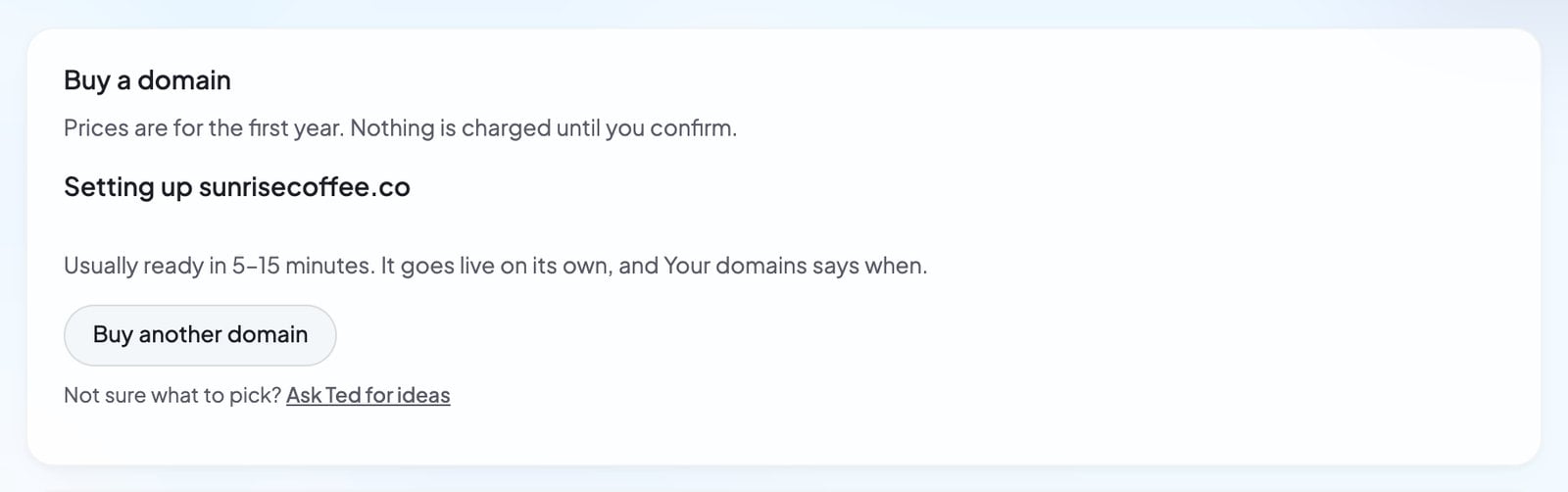
You see “Setting up” with your new domain: “Usually ready in 5–15 minutes. It goes live on its own, and Your domains says when.”
 ## What the search shows
| What you see | What it means | What to do |
| - | - | - |
| A price and **Buy** | The domain is available. The price is for its first year. | Press **Buy**. |
| “then … a year” | Each later year costs more than the first. | Check it before you buy. |
| “Taken” | Someone else already owns it. | Try another ending or another name. |
| “Premium, not sold on Foundable” | It’s a premium name, which Foundable doesn’t sell. | Choose another name. |
| “Couldn’t check” | Foundable got no answer about this name. | Search again. |
## Ask Ted to find a domain
Not sure what to choose? Ted can suggest names that fit your business.
1. Press **Ask Ted for ideas** under the search, or **Add your own domain** in Your next steps on [Home](/get-started/home).
2. Build opens with “Find me a domain for” and your foundable’s name in Ted’s message box. Add anything you have in mind, then send it.
3. Ted answers with a card titled “Domains”. His picks come first, each with its price, and the first is marked “Recommended”.
## What the search shows
| What you see | What it means | What to do |
| - | - | - |
| A price and **Buy** | The domain is available. The price is for its first year. | Press **Buy**. |
| “then … a year” | Each later year costs more than the first. | Check it before you buy. |
| “Taken” | Someone else already owns it. | Try another ending or another name. |
| “Premium, not sold on Foundable” | It’s a premium name, which Foundable doesn’t sell. | Choose another name. |
| “Couldn’t check” | Foundable got no answer about this name. | Search again. |
## Ask Ted to find a domain
Not sure what to choose? Ted can suggest names that fit your business.
1. Press **Ask Ted for ideas** under the search, or **Add your own domain** in Your next steps on [Home](/get-started/home).
2. Build opens with “Find me a domain for” and your foundable’s name in Ted’s message box. Add anything you have in mind, then send it.
3. Ted answers with a card titled “Domains”. His picks come first, each with its price, and the first is marked “Recommended”.
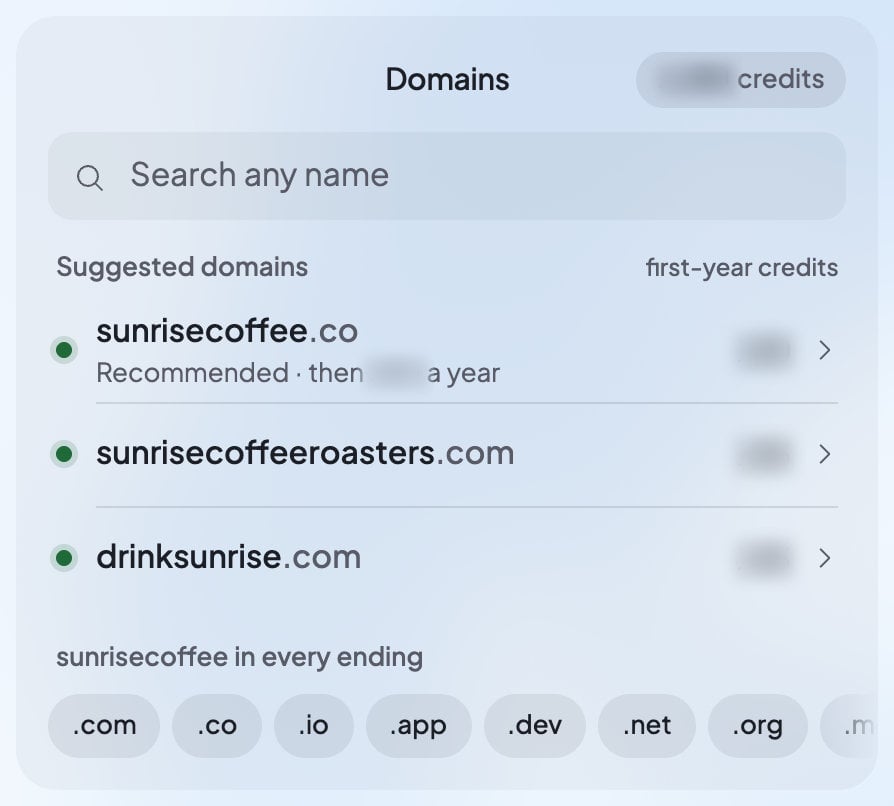 In the card you can:
* Type in **Search any name** to check your own idea, or press an ending to try your business’s name with it.
* Press **All** to see every result, or the other filter to see only the less expensive names.
* Press **More endings** for more choices. Names nobody can buy here gather on one line: “Not available: …”.
* Tap a name to open its Buy step. You see “Checking price…”, then the **Buy for** button with the same two lines under it as in Settings. **Back** returns to the list.
After you buy, the card says your domain “is yours”. A label shows how far it has come: “Registering”, then “Connecting to your site”, then “Live”. Once it’s live, **Open site** opens your website on it. **Find another** starts over.
Ted never buys a domain for you. If you type “yes” or “the second one” in the chat, the card opens that name’s Buy step. Nothing is bought until you press **Buy for** yourself.
## After you buy
Your domain appears under **Your domains** in Settings › Domains, newest first.
| What you see | What it means | What to do |
| - | - | - |
| “Setting up” | Foundable is registering the domain and pointing it at your website. | Nothing. It goes live on its own. |
| “Live” | “Your site shows here.” | Nothing. Your domain is ready. |
| “Couldn’t buy” | The order didn’t go through. The row says why, like “Someone else registered it first.”, and that your credits are back. | Choose another name. |
| “Needs a fix” | Setup stopped partway. The row says where, like “Registered, but it couldn’t be connected to your site.” | Press **Try again**. If it keeps happening, [contact support](/help/get-help). |
Once your domain is set up, its row shows the day it renews from your credits, with its **Auto-renew** switch at the end.
## If buying doesn’t work
| What you see | What to do |
| - | - |
| “Someone just took that name. You weren’t charged.” | Search again and choose another name. |
| “Couldn’t get today’s price. You weren’t charged. Try Buy again.” | Press **Buy** again. |
| “Your first Buy may still be going through. If it does, it shows here. You won’t be charged twice.” | Wait a moment, then look under **Your domains**. |
| “You don’t have enough credits for this domain. Upgrade your plan under Plans, then try again.” | Upgrade in **Plans & credit usage**. On Ted’s card, **Upgrade plan** takes the place of the Buy button. See [Plans and credits](/account/plans-and-credits). |
| “Buying and renewing domains needs an active plan.” | Choose a paid plan. |
| “Your account is on hold, so domains can’t be bought or renewed. Contact support.” | [Contact support](/help/get-help). |
| “We can’t sell that ending yet.” | Try another ending. |
| “Domain search isn’t available right now.” | Try again later. |
## Who owns the domain
Foundable registers the domain and holds it in trust for your foundable. When you buy, you agree to the [Domain Holding Agreement](https://foundable.com/legal/domain-holding-agreement), which explains the details.
* **Renewal**: while **Auto-renew** is on, Foundable renews the domain from your credits before its year ends.
* **Running short**: if your credits can’t cover a renewal, the domain isn’t renewed. Foundable doesn’t renew a domain after it expires.
* **Leaving later**: you can move the domain to another registrar. New domains are locked for a while first: “ICANN requires a 60-day lock on new domains, which Foundable can’t override.”
To turn off Auto-renew, renew early or move a domain, see [Manage your domains](/domains/manage-domains).
## FAQ
No. Foundable points a domain you buy at your website for you. If you want to connect other services to it later, like a shop or Google’s site check, add records on the domain’s page. See [DNS records](/domains/manage-domains#dns-records).
“Usually ready in 5–15 minutes.” It goes live on its own, and **Your domains** says when.
No. Domains are paid for with credits. If you don’t have enough, upgrade your plan for more credits. See [Plans and credits](/account/plans-and-credits).
No. If someone takes the name first, you see “You weren’t charged.” If the order is turned down later, your credits come back. Pressing **Buy** twice never charges you twice.
An admin can. Members see the names and prices, but only the owner or an admin can buy. Like all work in your foundable, a purchase uses the owner’s credits.
It stays registered, and **All domains** lists it marked deleted: “This domain isn’t renewed or connected to a site until you move it to one of your foundables.” See [Move a domain to another foundable](/domains/manage-domains#move-a-domain-to-another-foundable).
## Related
Auto-renew, renewals, DNS records and moves.
Already have a domain? Connect it instead.
How credits work and how to get more.
Buying, connecting and your primary domain.
This documentation is built and hosted on [Mintlify](https://mintlify.com), a developer documentation platform.
In the card you can:
* Type in **Search any name** to check your own idea, or press an ending to try your business’s name with it.
* Press **All** to see every result, or the other filter to see only the less expensive names.
* Press **More endings** for more choices. Names nobody can buy here gather on one line: “Not available: …”.
* Tap a name to open its Buy step. You see “Checking price…”, then the **Buy for** button with the same two lines under it as in Settings. **Back** returns to the list.
After you buy, the card says your domain “is yours”. A label shows how far it has come: “Registering”, then “Connecting to your site”, then “Live”. Once it’s live, **Open site** opens your website on it. **Find another** starts over.
Ted never buys a domain for you. If you type “yes” or “the second one” in the chat, the card opens that name’s Buy step. Nothing is bought until you press **Buy for** yourself.
## After you buy
Your domain appears under **Your domains** in Settings › Domains, newest first.
| What you see | What it means | What to do |
| - | - | - |
| “Setting up” | Foundable is registering the domain and pointing it at your website. | Nothing. It goes live on its own. |
| “Live” | “Your site shows here.” | Nothing. Your domain is ready. |
| “Couldn’t buy” | The order didn’t go through. The row says why, like “Someone else registered it first.”, and that your credits are back. | Choose another name. |
| “Needs a fix” | Setup stopped partway. The row says where, like “Registered, but it couldn’t be connected to your site.” | Press **Try again**. If it keeps happening, [contact support](/help/get-help). |
Once your domain is set up, its row shows the day it renews from your credits, with its **Auto-renew** switch at the end.
## If buying doesn’t work
| What you see | What to do |
| - | - |
| “Someone just took that name. You weren’t charged.” | Search again and choose another name. |
| “Couldn’t get today’s price. You weren’t charged. Try Buy again.” | Press **Buy** again. |
| “Your first Buy may still be going through. If it does, it shows here. You won’t be charged twice.” | Wait a moment, then look under **Your domains**. |
| “You don’t have enough credits for this domain. Upgrade your plan under Plans, then try again.” | Upgrade in **Plans & credit usage**. On Ted’s card, **Upgrade plan** takes the place of the Buy button. See [Plans and credits](/account/plans-and-credits). |
| “Buying and renewing domains needs an active plan.” | Choose a paid plan. |
| “Your account is on hold, so domains can’t be bought or renewed. Contact support.” | [Contact support](/help/get-help). |
| “We can’t sell that ending yet.” | Try another ending. |
| “Domain search isn’t available right now.” | Try again later. |
## Who owns the domain
Foundable registers the domain and holds it in trust for your foundable. When you buy, you agree to the [Domain Holding Agreement](https://foundable.com/legal/domain-holding-agreement), which explains the details.
* **Renewal**: while **Auto-renew** is on, Foundable renews the domain from your credits before its year ends.
* **Running short**: if your credits can’t cover a renewal, the domain isn’t renewed. Foundable doesn’t renew a domain after it expires.
* **Leaving later**: you can move the domain to another registrar. New domains are locked for a while first: “ICANN requires a 60-day lock on new domains, which Foundable can’t override.”
To turn off Auto-renew, renew early or move a domain, see [Manage your domains](/domains/manage-domains).
## FAQ
No. Foundable points a domain you buy at your website for you. If you want to connect other services to it later, like a shop or Google’s site check, add records on the domain’s page. See [DNS records](/domains/manage-domains#dns-records).
“Usually ready in 5–15 minutes.” It goes live on its own, and **Your domains** says when.
No. Domains are paid for with credits. If you don’t have enough, upgrade your plan for more credits. See [Plans and credits](/account/plans-and-credits).
No. If someone takes the name first, you see “You weren’t charged.” If the order is turned down later, your credits come back. Pressing **Buy** twice never charges you twice.
An admin can. Members see the names and prices, but only the owner or an admin can buy. Like all work in your foundable, a purchase uses the owner’s credits.
It stays registered, and **All domains** lists it marked deleted: “This domain isn’t renewed or connected to a site until you move it to one of your foundables.” See [Move a domain to another foundable](/domains/manage-domains#move-a-domain-to-another-foundable).
## Related
Auto-renew, renewals, DNS records and moves.
Already have a domain? Connect it instead.
How credits work and how to get more.
Buying, connecting and your primary domain.
This documentation is built and hosted on [Mintlify](https://mintlify.com), a developer documentation platform.