> ## Documentation Index
> Fetch the complete documentation index at: https://docs.foundable.com/llms.txt
> Use this file to discover all available pages before exploring further.
# Find your way around
> A tour of Foundable’s screen: the top bar, Home, Build and Run, the chat, search, your account menu, and Foundable on your phone.
Foundable fits on one screen. The chat with Ted sits on the left, your business fills the rest, and the top bar takes you everywhere else. On a phone, tabs along the bottom do the same job.
 ## The top bar
| In the bar | What it does |
| - | - |
| Ted’s mark, at the far left | Takes you to Home from anywhere. On Home, it shows as a dashed outline. |
| Your foundable’s name | Opens **Your foundables**, to switch businesses or start a new one. See [Your foundables](#your-foundables). |
| **Upgrade** | Shows the plans, where your account can buy one. A view-only teammate sees **View only** here instead. |
| **Home**, **Build**, **Run** | The three main places. A dot on Run, named “Ted needs you”, means a question or a decision is waiting for you. |
| Search (magnifying glass) | Finds chats, websites, files, emails and more in your foundable. See [Search](#search). |
| Inbox (envelope) | Your foundable’s email and social messages. See [Your Inbox](/inbox/overview). |
| Schedule (calendar) | The tasks Ted runs on a schedule. A dot means Ted set up a new task you haven’t opened. See [Scheduled tasks](/schedule/overview). |
| Earn credits (gift) | Invite friends with your link and earn credits. See [Earn credits](/account/earn-credits). |
| From Ted (bell) | What Ted made for you, with a red count of what you haven’t opened. See [From Ted](#from-ted). |
| **Support** | Chat with the Foundable team. A dot means they replied. See [Get help](/help/get-help). |
| Your initial | Opens your account menu. See [Your account menu](#your-account-menu). |
In a narrower window, some tools fold into a **…** menu, and **Support** shows only Foundable’s F. When there’s no room for the gift, **Earn credits** moves into your account menu.
## Home, Build and Run
What Ted is doing and has made, your next steps, and your website’s visitors and insights.
Design, change and publish your websites. Their **Tools** hold **Payments** and more.
Turn Run on and follow Ted as he runs your business: his thinking, and the decisions waiting for you.
A few more places open from the bar or from Search:
* **Inbox**: your foundable’s email and social messages, and drafts waiting for approval.
* **Schedule**: the tasks Ted runs on a schedule, on a calendar.
* **Library**: everything Ted made for your business, like posts, to review and post. It opens inside Run, from its **Run** | **Library** switch. See [Posts and the Library](/run/posts-and-library).
## Chat with Ted
The chat sits on the left of every page except Run. Type in the **Message Ted…** box and send.
* **Hide chat** folds the chat into a slim strip, and **Show chat** brings it back. While it’s hidden, a dot on **Show chat** tells you “Ted is working” or “Ted replied”.
* Drag the chat’s edge to make it wider or narrower.
* **Chat history** lists your chats, and **New chat** starts another one.
See [Chat with Ted](/ted/chat) for everything the chat can do.
## Search
Press ⌘K on a Mac or Ctrl+K on Windows, or press the magnifying glass in the top bar. On a phone, tap **More**, then **Search**.
## The top bar
| In the bar | What it does |
| - | - |
| Ted’s mark, at the far left | Takes you to Home from anywhere. On Home, it shows as a dashed outline. |
| Your foundable’s name | Opens **Your foundables**, to switch businesses or start a new one. See [Your foundables](#your-foundables). |
| **Upgrade** | Shows the plans, where your account can buy one. A view-only teammate sees **View only** here instead. |
| **Home**, **Build**, **Run** | The three main places. A dot on Run, named “Ted needs you”, means a question or a decision is waiting for you. |
| Search (magnifying glass) | Finds chats, websites, files, emails and more in your foundable. See [Search](#search). |
| Inbox (envelope) | Your foundable’s email and social messages. See [Your Inbox](/inbox/overview). |
| Schedule (calendar) | The tasks Ted runs on a schedule. A dot means Ted set up a new task you haven’t opened. See [Scheduled tasks](/schedule/overview). |
| Earn credits (gift) | Invite friends with your link and earn credits. See [Earn credits](/account/earn-credits). |
| From Ted (bell) | What Ted made for you, with a red count of what you haven’t opened. See [From Ted](#from-ted). |
| **Support** | Chat with the Foundable team. A dot means they replied. See [Get help](/help/get-help). |
| Your initial | Opens your account menu. See [Your account menu](#your-account-menu). |
In a narrower window, some tools fold into a **…** menu, and **Support** shows only Foundable’s F. When there’s no room for the gift, **Earn credits** moves into your account menu.
## Home, Build and Run
What Ted is doing and has made, your next steps, and your website’s visitors and insights.
Design, change and publish your websites. Their **Tools** hold **Payments** and more.
Turn Run on and follow Ted as he runs your business: his thinking, and the decisions waiting for you.
A few more places open from the bar or from Search:
* **Inbox**: your foundable’s email and social messages, and drafts waiting for approval.
* **Schedule**: the tasks Ted runs on a schedule, on a calendar.
* **Library**: everything Ted made for your business, like posts, to review and post. It opens inside Run, from its **Run** | **Library** switch. See [Posts and the Library](/run/posts-and-library).
## Chat with Ted
The chat sits on the left of every page except Run. Type in the **Message Ted…** box and send.
* **Hide chat** folds the chat into a slim strip, and **Show chat** brings it back. While it’s hidden, a dot on **Show chat** tells you “Ted is working” or “Ted replied”.
* Drag the chat’s edge to make it wider or narrower.
* **Chat history** lists your chats, and **New chat** starts another one.
See [Chat with Ted](/ted/chat) for everything the chat can do.
## Search
Press ⌘K on a Mac or Ctrl+K on Windows, or press the magnifying glass in the top bar. On a phone, tap **More**, then **Search**.
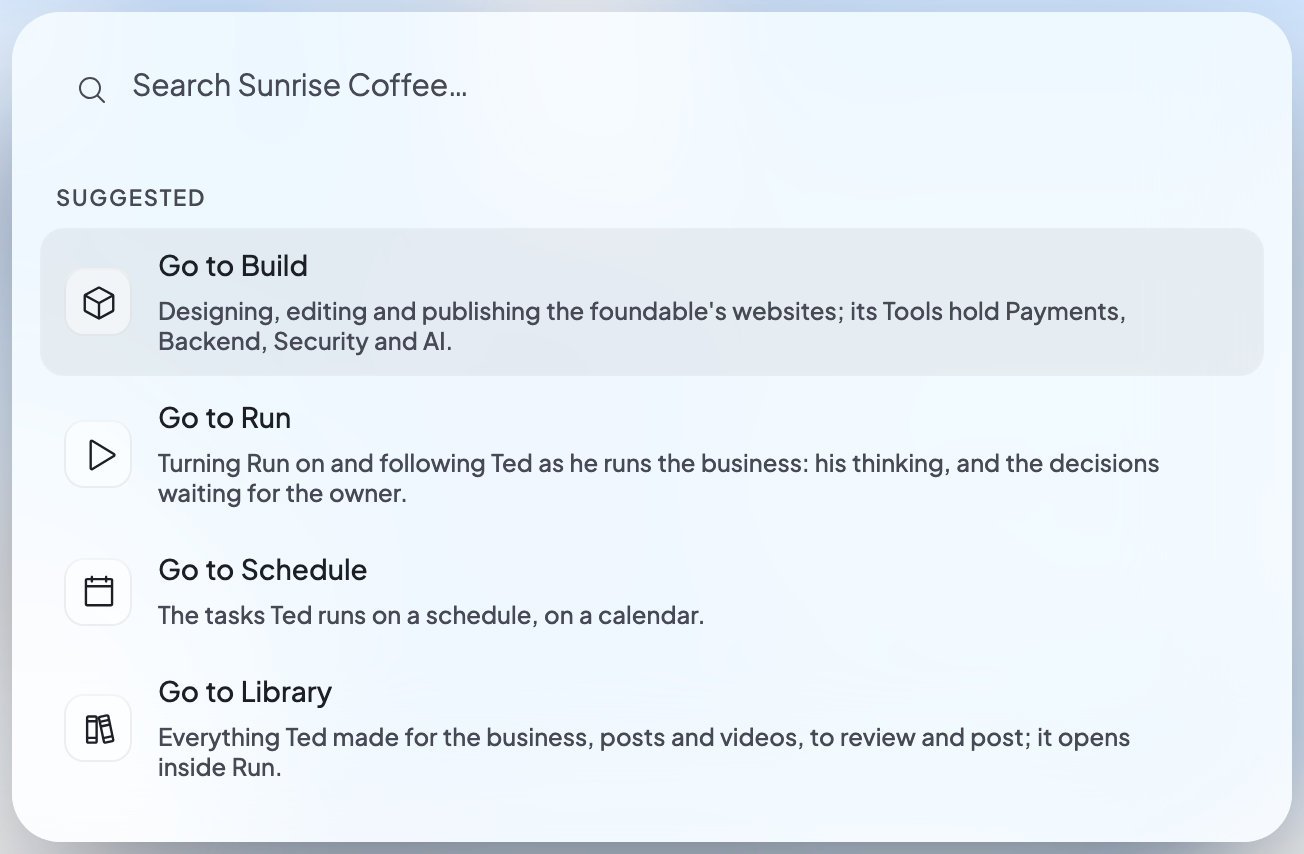 * **Before you type**, Search shows **Recent** items and **Suggested** places.
* **As you type**, it finds matches in your chats, documents, websites, files, posts, emails, email drafts, tasks, [connected apps](/account/integrations), settings and these help pages. Help results open in a new tab.
* **It can take you places**: **Go to Home**, **Go to Build**, **Go to Run**, **Go to Inbox**, **Go to Schedule** and **Go to Library**, plus **Text Ted** and **Settings**.
* **Nothing found?** Choose “Ask Ted: …” to send your words to Ted in the chat you have open.
Press Enter to open the top result, and the arrow keys to move between results. Escape clears the box, then closes it.
## From Ted
The bell at the top right collects what Ted made for you, on every page. A red number counts what you haven’t opened. Press the bell to open the **From Ted** panel, where each item offers **Review** or **Talk to Ted**. Until Ted makes something, it says “What Ted makes for you will appear here.”
On a phone, the count sits on the **Home** tab instead. See [From Ted on Home](/get-started/home#from-ted).
## Your account menu
Press your initial at the top right. From top to bottom, the menu holds:
* **Before you type**, Search shows **Recent** items and **Suggested** places.
* **As you type**, it finds matches in your chats, documents, websites, files, posts, emails, email drafts, tasks, [connected apps](/account/integrations), settings and these help pages. Help results open in a new tab.
* **It can take you places**: **Go to Home**, **Go to Build**, **Go to Run**, **Go to Inbox**, **Go to Schedule** and **Go to Library**, plus **Text Ted** and **Settings**.
* **Nothing found?** Choose “Ask Ted: …” to send your words to Ted in the chat you have open.
Press Enter to open the top result, and the arrow keys to move between results. Escape clears the box, then closes it.
## From Ted
The bell at the top right collects what Ted made for you, on every page. A red number counts what you haven’t opened. Press the bell to open the **From Ted** panel, where each item offers **Review** or **Talk to Ted**. Until Ted makes something, it says “What Ted makes for you will appear here.”
On a phone, the count sits on the **Home** tab instead. See [From Ted on Home](/get-started/home#from-ted).
## Your account menu
Press your initial at the top right. From top to bottom, the menu holds:
 | Row | What it does |
| - | - |
| Your name and email | Opens Settings › **Account**. |
| **Available credits** | Your credits, with **Upgrade** (or **View usage & billing**). See [Plans and credits](/account/plans-and-credits). |
| **Earn credits** | Shows here when the top bar has no room for its gift. |
| **Settings** | Everything about your foundable and your account. See [Settings](/account/settings). |
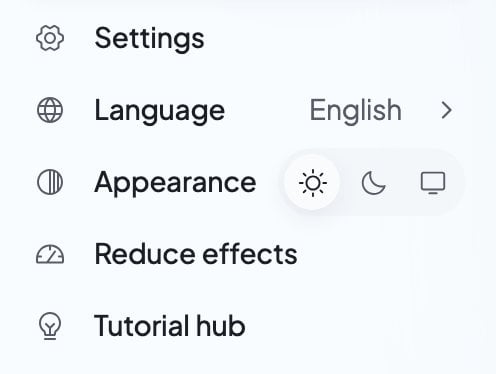
| **Language** | The language Foundable shows. Your choice saves to your account, and the page reloads in it. |
| **Appearance** | **Light**, **Dark** or **System**, for this device. Foundable opens light until you choose. |
| **Reduce effects** | Holds decorative motion still on this device. |
| **Tutorial hub** | Short tours of each place, to replay anytime. |
| **Docs** | Opens these pages in a new tab. |
| **Text Ted** | Text Ted from your phone. See [Text Ted from your phone](/ted/text-ted). |
| **Contact support** | Chat with the Foundable team. |
| **Report a bug** | Tell the team what went wrong. |
| **Log out** | Logs you out of Foundable. |
## Your foundables
Press your foundable’s name at the top left to open **Your foundables**:
* Every foundable you’re in is listed, with a check on the open one. Press another to switch.
* **Settings** opens the open foundable’s **General** settings.
* **Invite people** opens **Team**, if your role can invite.
* **Create foundable** starts a new business. The Free plan includes one foundable.
See [Your foundables](/account/foundables).
## On your phone
On a phone, five tabs sit along the bottom: **Home**, **Chat**, **Build**, **Run** and **More**.
| Row | What it does |
| - | - |
| Your name and email | Opens Settings › **Account**. |
| **Available credits** | Your credits, with **Upgrade** (or **View usage & billing**). See [Plans and credits](/account/plans-and-credits). |
| **Earn credits** | Shows here when the top bar has no room for its gift. |
| **Settings** | Everything about your foundable and your account. See [Settings](/account/settings). |
| **Language** | The language Foundable shows. Your choice saves to your account, and the page reloads in it. |
| **Appearance** | **Light**, **Dark** or **System**, for this device. Foundable opens light until you choose. |
| **Reduce effects** | Holds decorative motion still on this device. |
| **Tutorial hub** | Short tours of each place, to replay anytime. |
| **Docs** | Opens these pages in a new tab. |
| **Text Ted** | Text Ted from your phone. See [Text Ted from your phone](/ted/text-ted). |
| **Contact support** | Chat with the Foundable team. |
| **Report a bug** | Tell the team what went wrong. |
| **Log out** | Logs you out of Foundable. |
## Your foundables
Press your foundable’s name at the top left to open **Your foundables**:
* Every foundable you’re in is listed, with a check on the open one. Press another to switch.
* **Settings** opens the open foundable’s **General** settings.
* **Invite people** opens **Team**, if your role can invite.
* **Create foundable** starts a new business. The Free plan includes one foundable.
See [Your foundables](/account/foundables).
## On your phone
On a phone, five tabs sit along the bottom: **Home**, **Chat**, **Build**, **Run** and **More**.
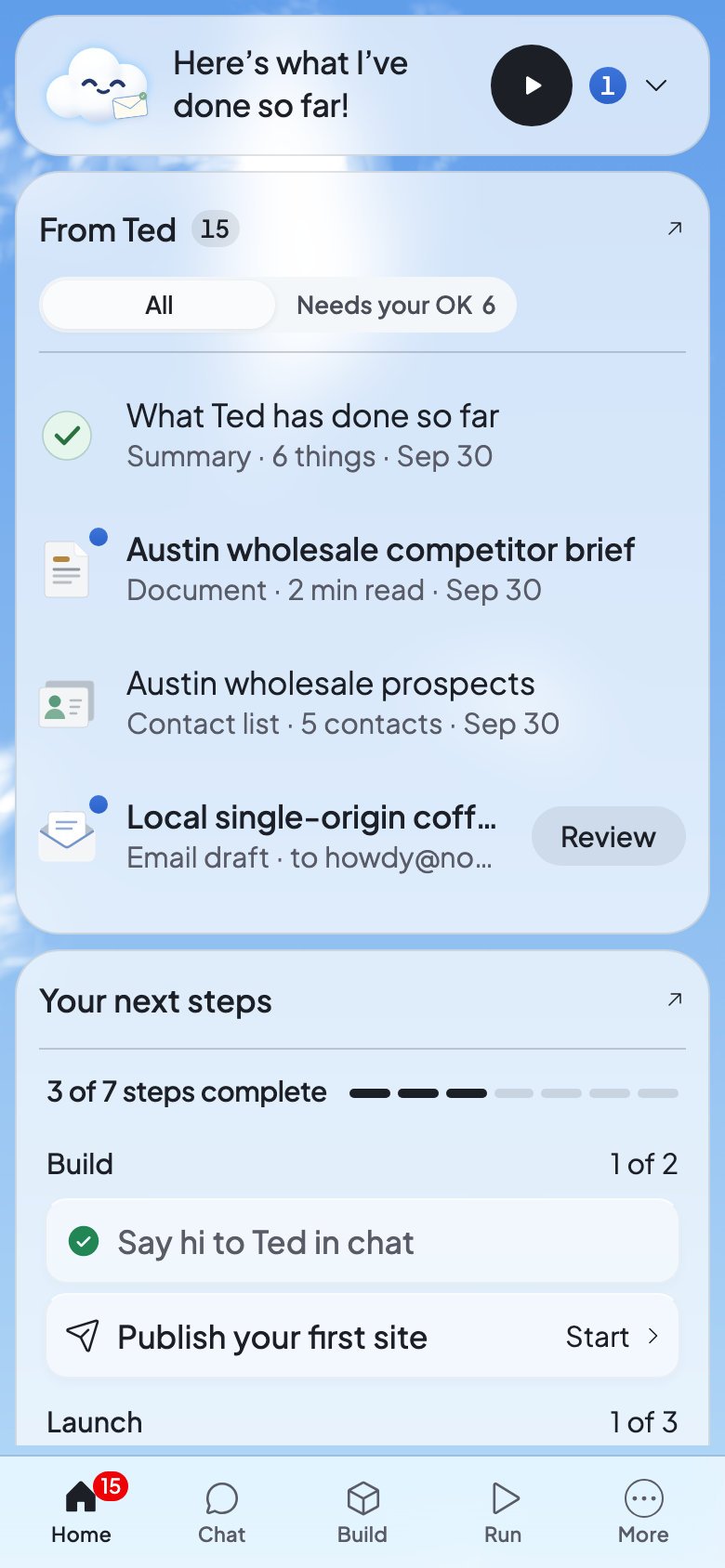
 * **Home** shows the count of items from Ted you haven’t opened.
* **Chat** opens your chat with Ted. Its dot tells you “Ted is working” or “Ted replied”.
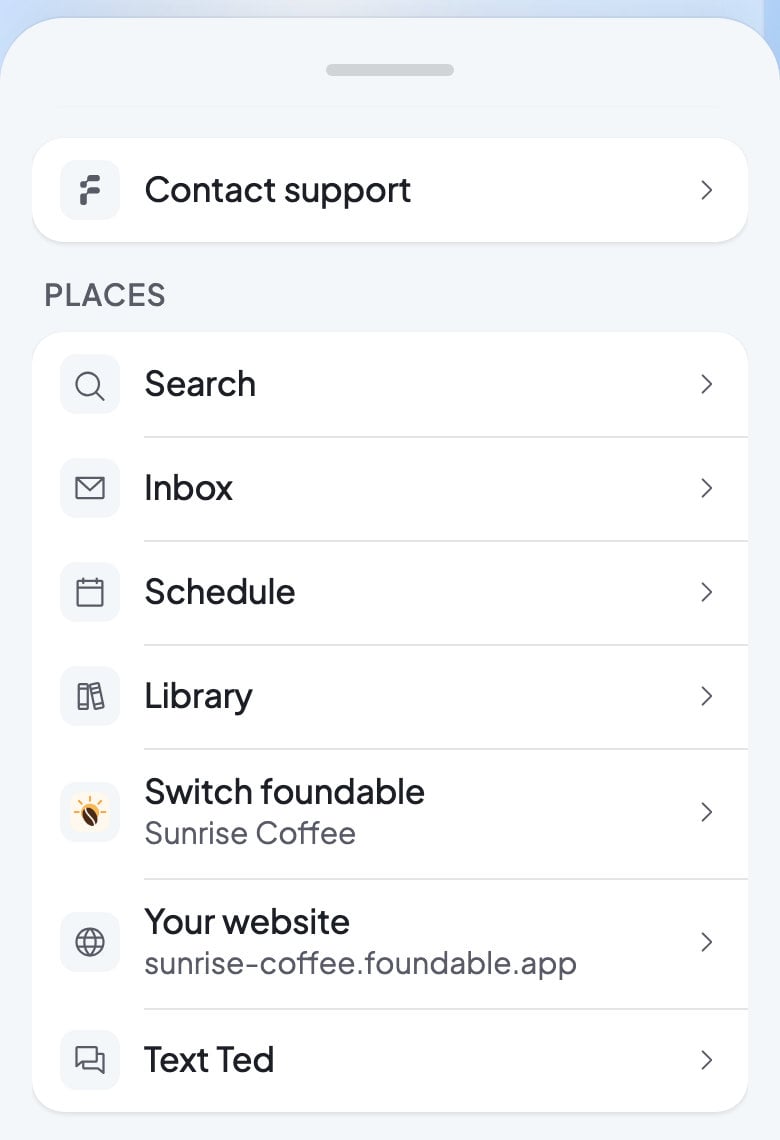
* **More** holds everything else: **Contact support** first, then **Places** (Search, Inbox, Schedule, Library, Switch foundable, Your website and Text Ted), **Account** (Settings, Language, Appearance and Reduce effects), **Help** (Tutorial hub, Docs and Report a bug), and **Log out**. **Your website** shows only while you have a live website.
A website preview in Build fills the whole screen, with its own bar. In the message box, Return starts a new line, and only **Send** sends. On an iPad, Foundable shows the computer layout.
## Keyboard shortcuts
| Keys | What they do |
| - | - |
| ⌘K (Mac) or Ctrl+K (Windows) | Open Search |
| Enter | Send your message, on a computer |
| Shift+Enter | Start a new line |
| ⌘Enter or Ctrl+Enter | Send your message, on any device |
| Esc, twice | Stop Ted while he’s working |
| Tab | Accept Ted’s gray suggestion in an empty message box |
## If you have view-only access
A teammate with view-only access sees **View only** after the foundable’s name: “You can see this foundable, but not change it or ask Ted for work.” They can read chats with Ted, but not send them. See [Invite your team](/account/team).
## FAQ
Press Ted’s mark at the top left, or the **Home** tab.
It opens inside Run, from its **Run** | **Library** switch. You can also choose **Go to Library** in Search, or tap **More**, then **Library**, on a phone.
It means “Ted needs you”: a question or a decision is waiting for you in Run.
In a narrower window, the gift leaves the top bar. Open your account menu and choose **Earn credits**.
Open your account menu and choose **Dark** next to **Appearance**. The choice is for this device only, so set it on each device you use.
Yes. On an iPad, Foundable shows the same layout as on a computer.
## Related
Your business at a glance, every time you open Foundable.
How to talk to Ted and follow his work.
Your foundable, your account, your team and your plan.
Chat with the Foundable team or report a bug.
This documentation is built and hosted on [Mintlify](https://mintlify.com), a developer documentation platform.
* **Home** shows the count of items from Ted you haven’t opened.
* **Chat** opens your chat with Ted. Its dot tells you “Ted is working” or “Ted replied”.
* **More** holds everything else: **Contact support** first, then **Places** (Search, Inbox, Schedule, Library, Switch foundable, Your website and Text Ted), **Account** (Settings, Language, Appearance and Reduce effects), **Help** (Tutorial hub, Docs and Report a bug), and **Log out**. **Your website** shows only while you have a live website.
A website preview in Build fills the whole screen, with its own bar. In the message box, Return starts a new line, and only **Send** sends. On an iPad, Foundable shows the computer layout.
## Keyboard shortcuts
| Keys | What they do |
| - | - |
| ⌘K (Mac) or Ctrl+K (Windows) | Open Search |
| Enter | Send your message, on a computer |
| Shift+Enter | Start a new line |
| ⌘Enter or Ctrl+Enter | Send your message, on any device |
| Esc, twice | Stop Ted while he’s working |
| Tab | Accept Ted’s gray suggestion in an empty message box |
## If you have view-only access
A teammate with view-only access sees **View only** after the foundable’s name: “You can see this foundable, but not change it or ask Ted for work.” They can read chats with Ted, but not send them. See [Invite your team](/account/team).
## FAQ
Press Ted’s mark at the top left, or the **Home** tab.
It opens inside Run, from its **Run** | **Library** switch. You can also choose **Go to Library** in Search, or tap **More**, then **Library**, on a phone.
It means “Ted needs you”: a question or a decision is waiting for you in Run.
In a narrower window, the gift leaves the top bar. Open your account menu and choose **Earn credits**.
Open your account menu and choose **Dark** next to **Appearance**. The choice is for this device only, so set it on each device you use.
Yes. On an iPad, Foundable shows the same layout as on a computer.
## Related
Your business at a glance, every time you open Foundable.
How to talk to Ted and follow his work.
Your foundable, your account, your team and your plan.
Chat with the Foundable team or report a bug.
This documentation is built and hosted on [Mintlify](https://mintlify.com), a developer documentation platform.