> ## Documentation Index
> Fetch the complete documentation index at: https://docs.foundable.com/llms.txt
> Use this file to discover all available pages before exploring further.
# Home: your business at a glance
> Home shows what Ted is doing and has made, what waits for your OK, your next steps, and your website’s visitors and sales.
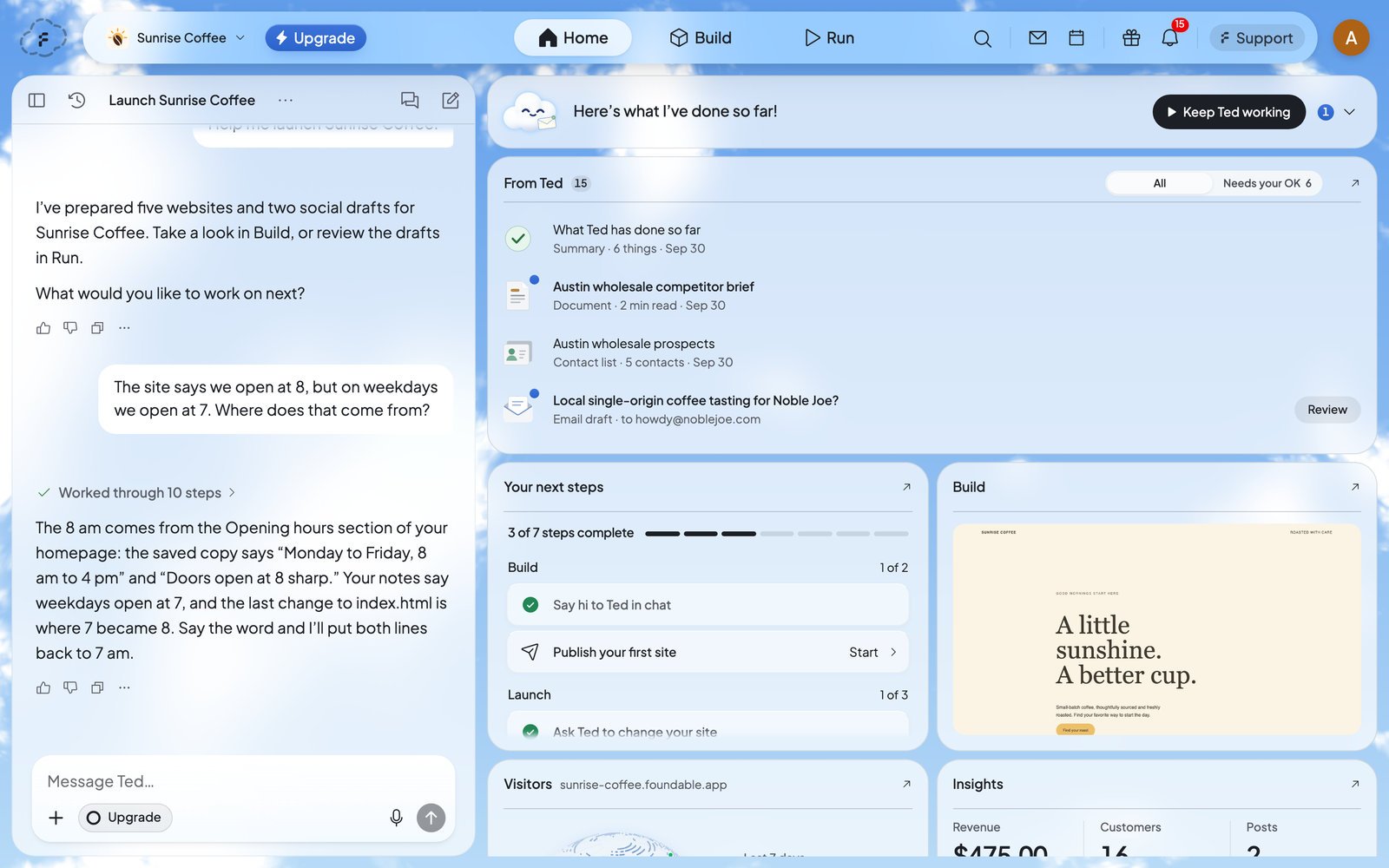
Home is the first tab, and the place to start each time you open Foundable. It shows what Ted is doing and has made, what’s waiting for your OK, your next steps, and how your website is doing. Press Ted’s mark at the top left to come back here from anywhere.
 ## What’s on Home
| Card | What it shows |
| - | - |
| [Ted at work](#ted-at-work) | What Ted is doing right now, and his activity. |
| [From Ted](#from-ted) | Everything Ted made for you, and what waits for your OK. |
| [Your next steps](#your-next-steps) | Your checklist for launching your business. |
| [Build](#build) | Your website, as Ted builds and saves it. |
| [Visitors](#visitors) | Who visits your published website. |
| [Insights](#insights) | Your sales, your customers and your posts. |
Most cards open full size from the arrow (↗) at their top right. **Back to Home** brings you back.
## Ted at work
The card at the top shows what Ted is doing, in his own words, like “Thinking through the next step…” or “Lining up my next step…”. When he has nothing to do, he says “I’m here when you need me.”
* Press **Show Ted’s activity** to open his log, step by step. **Hide Ted’s activity** folds it again.
* When a draft waits for you, he says so: “I have one draft waiting for your OK.” While Run waits on you in **Ask first**, Home says “Waiting for your approval: …” and names what’s waiting.
* Other lines tell you he’s paused (“I’m paused.”), trying again after a problem (“Trying again after a hiccup…”), or out of credits (“You’re out of credits.”).
After your free first run, Ted says “Here’s what I’ve done so far!”, and the owner sees **Keep Ted working**. It opens the plans if your account can buy one, or Run otherwise. See [Your free first run](/run/first-run).
## From Ted
**From Ted** collects everything Ted makes for you: the documents, lists and plans he writes, the websites he builds, and the emails and posts he drafts. A blue dot marks what you haven’t opened.
## What’s on Home
| Card | What it shows |
| - | - |
| [Ted at work](#ted-at-work) | What Ted is doing right now, and his activity. |
| [From Ted](#from-ted) | Everything Ted made for you, and what waits for your OK. |
| [Your next steps](#your-next-steps) | Your checklist for launching your business. |
| [Build](#build) | Your website, as Ted builds and saves it. |
| [Visitors](#visitors) | Who visits your published website. |
| [Insights](#insights) | Your sales, your customers and your posts. |
Most cards open full size from the arrow (↗) at their top right. **Back to Home** brings you back.
## Ted at work
The card at the top shows what Ted is doing, in his own words, like “Thinking through the next step…” or “Lining up my next step…”. When he has nothing to do, he says “I’m here when you need me.”
* Press **Show Ted’s activity** to open his log, step by step. **Hide Ted’s activity** folds it again.
* When a draft waits for you, he says so: “I have one draft waiting for your OK.” While Run waits on you in **Ask first**, Home says “Waiting for your approval: …” and names what’s waiting.
* Other lines tell you he’s paused (“I’m paused.”), trying again after a problem (“Trying again after a hiccup…”), or out of credits (“You’re out of credits.”).
After your free first run, Ted says “Here’s what I’ve done so far!”, and the owner sees **Keep Ted working**. It opens the plans if your account can buy one, or Run otherwise. See [Your free first run](/run/first-run).
## From Ted
**From Ted** collects everything Ted makes for you: the documents, lists and plans he writes, the websites he builds, and the emails and posts he drafts. A blue dot marks what you haven’t opened.
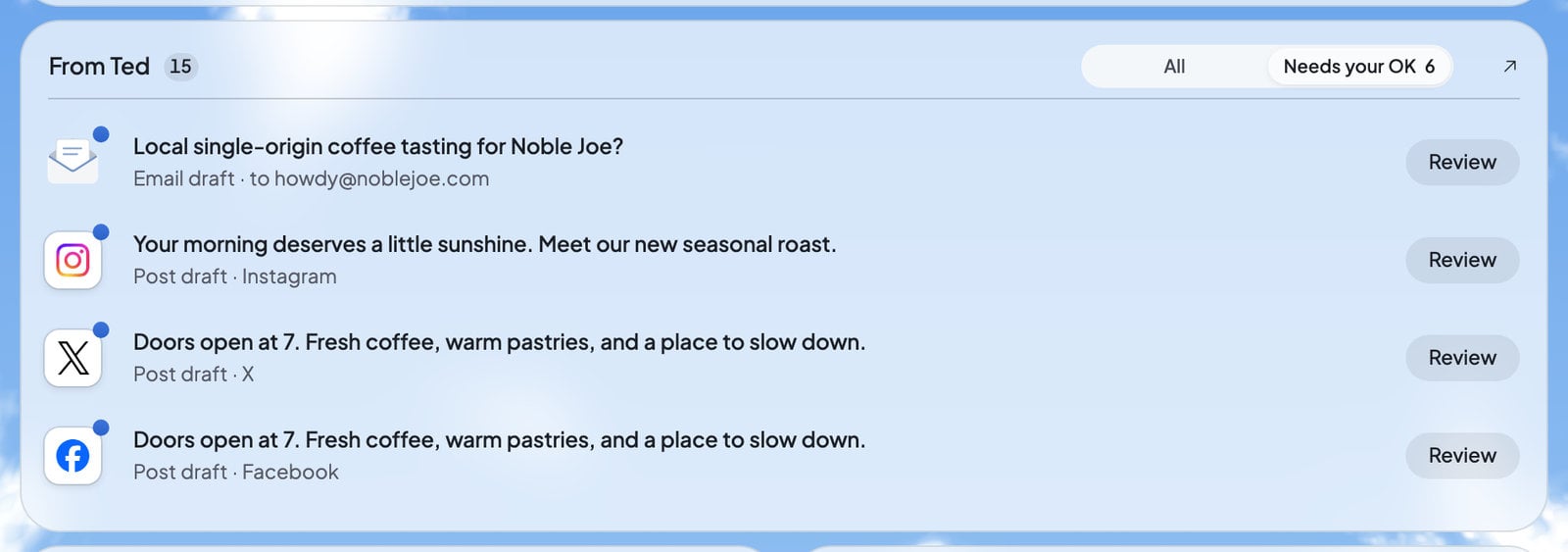 * **All** shows everything. **Needs your OK** shows only the drafts waiting for your decision, with how many there are. Teammates who can’t decide drafts see **Waiting for approval** instead.
* Press an item to open it. A draft has **Review**: open it to read it, change it, and approve or decline it. See [Approve Ted’s work](/ted/approvals).
* Each item also has **Talk to Ted**, to ask him about it in the chat.
* After you decide, a short message says where the draft went, like “Approved · Publishing”, “Declined” or “Sent by Ted”.
* Open From Ted full size and press **Mark all read** to clear the blue dots.
The bell at the top right shows the same list from any page.
## Your next steps
**Your next steps** is your checklist for launching your business. Press its heading to open it. A bar shows how many steps you’ve done, and the steps sit in three groups.
* **All** shows everything. **Needs your OK** shows only the drafts waiting for your decision, with how many there are. Teammates who can’t decide drafts see **Waiting for approval** instead.
* Press an item to open it. A draft has **Review**: open it to read it, change it, and approve or decline it. See [Approve Ted’s work](/ted/approvals).
* Each item also has **Talk to Ted**, to ask him about it in the chat.
* After you decide, a short message says where the draft went, like “Approved · Publishing”, “Declined” or “Sent by Ted”.
* Open From Ted full size and press **Mark all read** to clear the blue dots.
The bell at the top right shows the same list from any page.
## Your next steps
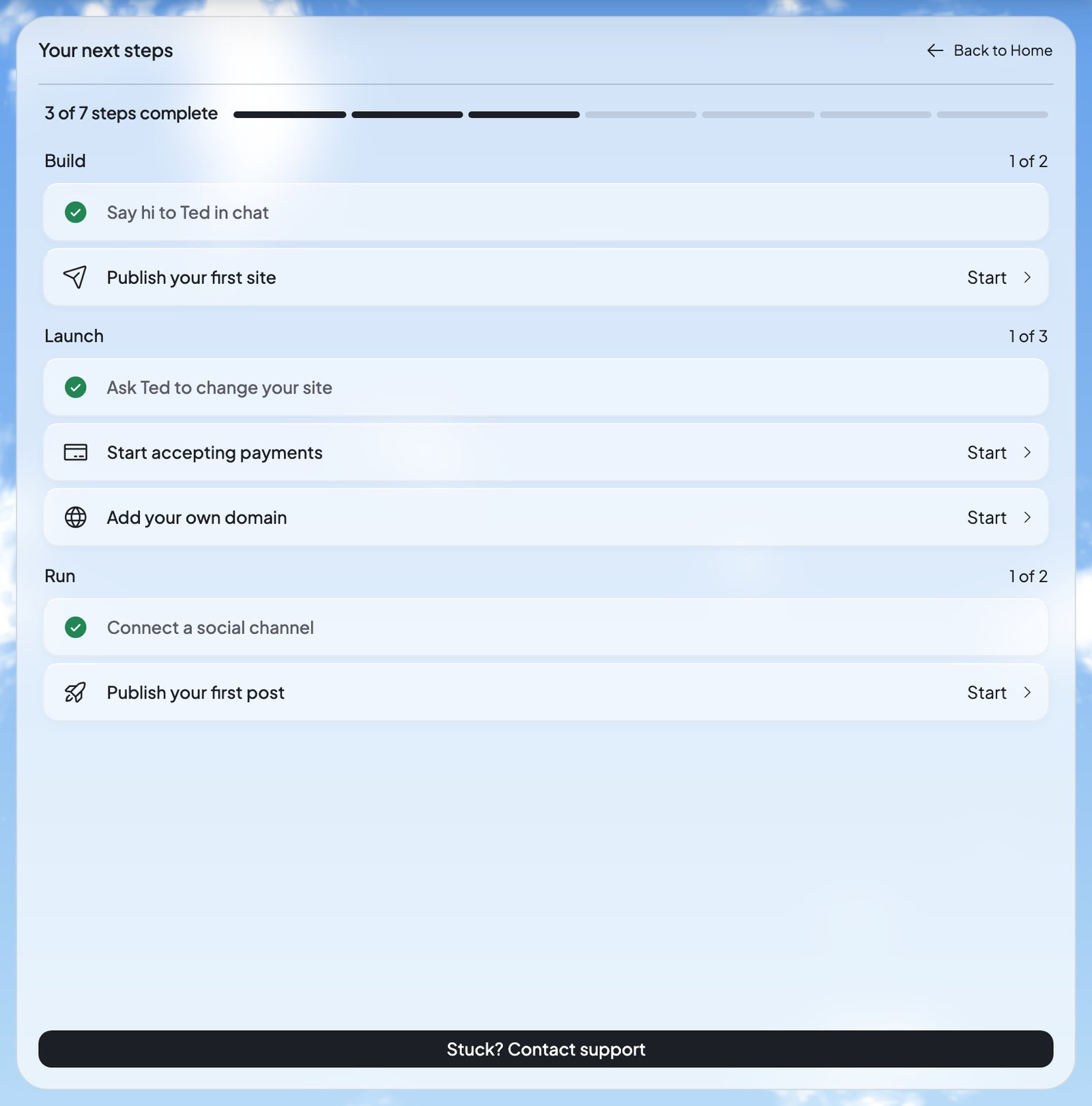
**Your next steps** is your checklist for launching your business. Press its heading to open it. A bar shows how many steps you’ve done, and the steps sit in three groups.
 | Group | Steps |
| - | - |
| Build | **Say hi to Ted in chat**, **Publish your first site** |
| Launch | **Ask Ted to change your site**, **Start accepting payments**, **Add your own domain** |
| Run | **Connect a social channel**, **Publish your first post** |
Press **Start** on a step to begin it. A few steps do something worth knowing:
* **Publish your first site** asks Ted in the chat to “Publish my website”. See [Publish your website](/build/publish).
* **Start accepting payments** opens [Payments](/payments/overview) in Build’s Tools. It stays done while your payments are ready, and comes undone if Stripe pauses them or you disconnect them.
* **Add your own domain** opens Build and writes “Find me a domain for …” in your message box, for you to send. See [Buy a domain](/domains/buy-a-domain).
At the bottom of the open checklist, **Stuck? Contact support** opens a chat with the Foundable team.
## Build
The **Build** card follows your website. Before your first build, it says “Your first build will appear here”. While Ted builds, it reads “Building…”, then “Your website is saved”. Press it to open your website in Build. See [Build your website](/build/overview).
## Visitors
**Visitors** shows the visits to your published website over the last 7 days, with its address and a globe of where visitors came from. Open it full size to pick another period, and to see how many are “Visiting now”, your top sources, pages and devices.
Only your published website counts. Visitor analytics is on for every plan. To turn it off, open the Publish panel’s **Published site actions** menu and switch off **Visitor analytics**. If the card can’t load, it says “Visitor data is unavailable.” with **Retry**.
## Insights
**Insights** shows your **Revenue**, **Customers** and **Posts**.
* Until payments are on, Revenue says “Payments aren’t on yet”. Press **Start accepting payments** to open Payments.
* Until you connect a social account, Insights asks you to “Connect a channel”: the posts Ted publishes, and how they do, land here. See [Connect your social accounts](/run/social-accounts).
Open Insights full size for three tabs: **Analytics** for your sales, **Customers** for the people who bought (marked New, Returning, Regular or One-time), and **Social** for your posts.
## Home on your phone
On a phone, Home’s cards stack in one column. The **Home** tab shows how many items from Ted you haven’t opened, and the chat has its own **Chat** tab. See [Find your way around](/get-started/find-your-way-around#on-your-phone).
## Who sees what
Everyone in your foundable sees Home. What they can do there depends on their role:
| Role | On Home |
| - | - |
| Owner | Everything, including **Keep Ted working** after the free first run. |
| Admin | Approves or declines drafts in **Needs your OK**, like the owner. **Keep Ted working** stays the owner’s. |
| Member | Sees **Waiting for approval**: the owner or an admin approves drafts. |
| View only | Sees what Ted is doing and what he made, and changes nothing. |
See [Invite your team](/account/team) for what each role can do.
## Home’s tour
The first time, a short tour shows you around Home, from “Meet Home” to “Your numbers”. To see it again, open your account menu, choose **Tutorial hub**, then pick “Your business at a glance”.
## FAQ
Your role can’t decide drafts. Only the owner or an admin can approve Ted’s emails and posts, so you see what’s waiting for them.
Visitors counts only your published website. Publish it first, and check that **Visitor analytics** is on in the Publish panel’s **Published site actions** menu.
Open the item, or open From Ted full size and press **Mark all read**.
Some steps follow what’s true now. **Start accepting payments** is done only while your payments are ready, so it comes undone if Stripe pauses them or you disconnect them.
After your free first run, it opens the plans if your account can buy one, so Ted can keep running your business. Otherwise, it opens Run.
## Related
Review, change, approve or decline what Ted drafts.
Turn Run on and follow Ted as he works by himself.
Put your website online, and update it later.
Sell on your website, and see your sales on Home.
This documentation is built and hosted on [Mintlify](https://mintlify.com), a developer documentation platform.
| Group | Steps |
| - | - |
| Build | **Say hi to Ted in chat**, **Publish your first site** |
| Launch | **Ask Ted to change your site**, **Start accepting payments**, **Add your own domain** |
| Run | **Connect a social channel**, **Publish your first post** |
Press **Start** on a step to begin it. A few steps do something worth knowing:
* **Publish your first site** asks Ted in the chat to “Publish my website”. See [Publish your website](/build/publish).
* **Start accepting payments** opens [Payments](/payments/overview) in Build’s Tools. It stays done while your payments are ready, and comes undone if Stripe pauses them or you disconnect them.
* **Add your own domain** opens Build and writes “Find me a domain for …” in your message box, for you to send. See [Buy a domain](/domains/buy-a-domain).
At the bottom of the open checklist, **Stuck? Contact support** opens a chat with the Foundable team.
## Build
The **Build** card follows your website. Before your first build, it says “Your first build will appear here”. While Ted builds, it reads “Building…”, then “Your website is saved”. Press it to open your website in Build. See [Build your website](/build/overview).
## Visitors
**Visitors** shows the visits to your published website over the last 7 days, with its address and a globe of where visitors came from. Open it full size to pick another period, and to see how many are “Visiting now”, your top sources, pages and devices.
Only your published website counts. Visitor analytics is on for every plan. To turn it off, open the Publish panel’s **Published site actions** menu and switch off **Visitor analytics**. If the card can’t load, it says “Visitor data is unavailable.” with **Retry**.
## Insights
**Insights** shows your **Revenue**, **Customers** and **Posts**.
* Until payments are on, Revenue says “Payments aren’t on yet”. Press **Start accepting payments** to open Payments.
* Until you connect a social account, Insights asks you to “Connect a channel”: the posts Ted publishes, and how they do, land here. See [Connect your social accounts](/run/social-accounts).
Open Insights full size for three tabs: **Analytics** for your sales, **Customers** for the people who bought (marked New, Returning, Regular or One-time), and **Social** for your posts.
## Home on your phone
On a phone, Home’s cards stack in one column. The **Home** tab shows how many items from Ted you haven’t opened, and the chat has its own **Chat** tab. See [Find your way around](/get-started/find-your-way-around#on-your-phone).
## Who sees what
Everyone in your foundable sees Home. What they can do there depends on their role:
| Role | On Home |
| - | - |
| Owner | Everything, including **Keep Ted working** after the free first run. |
| Admin | Approves or declines drafts in **Needs your OK**, like the owner. **Keep Ted working** stays the owner’s. |
| Member | Sees **Waiting for approval**: the owner or an admin approves drafts. |
| View only | Sees what Ted is doing and what he made, and changes nothing. |
See [Invite your team](/account/team) for what each role can do.
## Home’s tour
The first time, a short tour shows you around Home, from “Meet Home” to “Your numbers”. To see it again, open your account menu, choose **Tutorial hub**, then pick “Your business at a glance”.
## FAQ
Your role can’t decide drafts. Only the owner or an admin can approve Ted’s emails and posts, so you see what’s waiting for them.
Visitors counts only your published website. Publish it first, and check that **Visitor analytics** is on in the Publish panel’s **Published site actions** menu.
Open the item, or open From Ted full size and press **Mark all read**.
Some steps follow what’s true now. **Start accepting payments** is done only while your payments are ready, so it comes undone if Stripe pauses them or you disconnect them.
After your free first run, it opens the plans if your account can buy one, so Ted can keep running your business. Otherwise, it opens Run.
## Related
Review, change, approve or decline what Ted drafts.
Turn Run on and follow Ted as he works by himself.
Put your website online, and update it later.
Sell on your website, and see your sales on Home.
This documentation is built and hosted on [Mintlify](https://mintlify.com), a developer documentation platform.