> ## Documentation Index
> Fetch the complete documentation index at: https://docs.foundable.com/llms.txt
> Use this file to discover all available pages before exploring further.
# Quick start
> Go from a new account to a live website: choose how to start, let Ted plan and build it, then publish it to a link you can share.
Make your first website with Ted. You tell him about your business in your own words, he plans it and builds the website, and you publish it to a link you can share. Ted does the work. Your part is a few choices.
## Before you start
You need a Foundable account that has been let in from the waitlist. See [Create your account](/get-started/create-an-account).
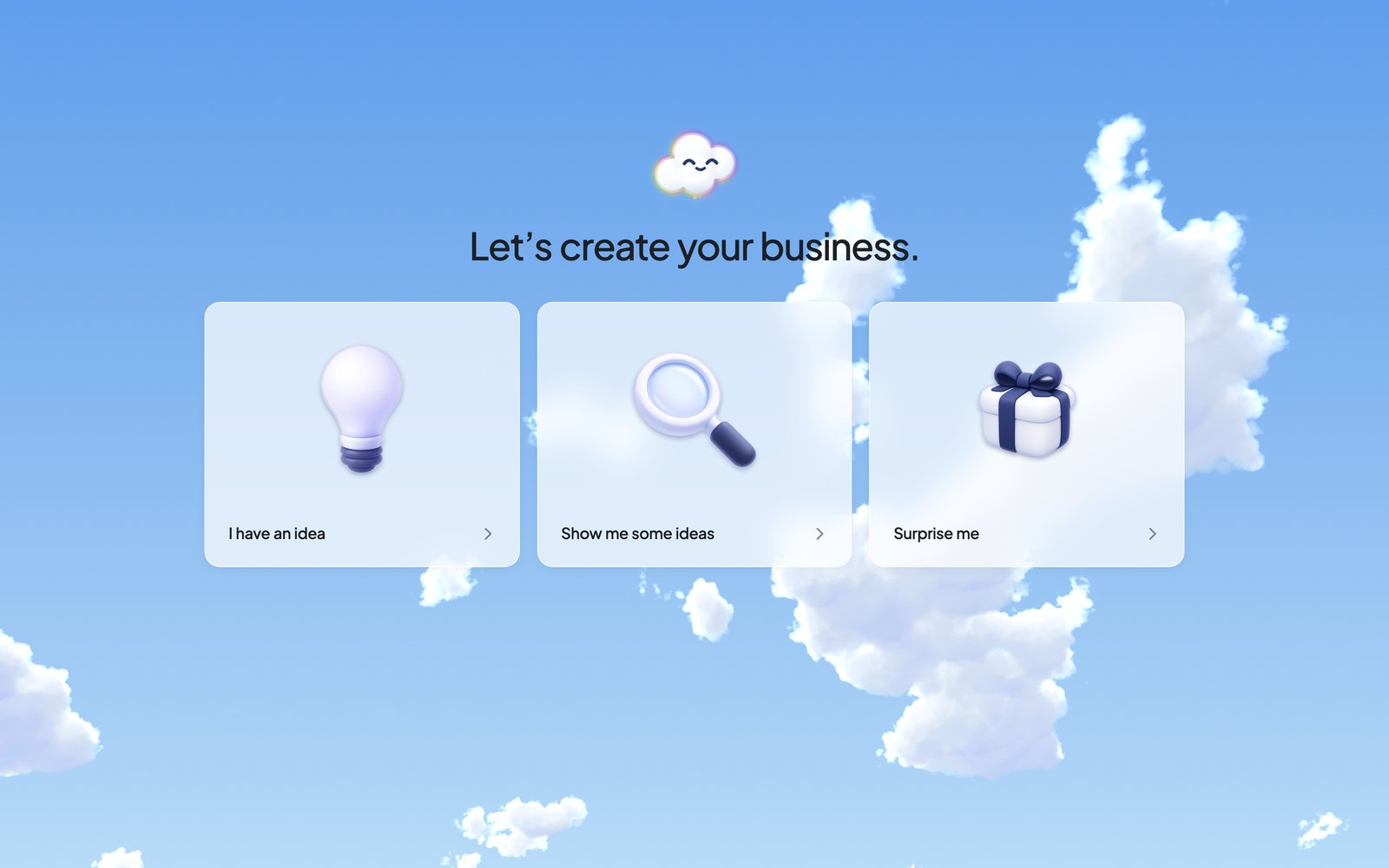
Once you’re in, you’ll see “Let’s create your business.” Pick **I have an idea**, **Show me some ideas** or **Surprise me**.
 With **I have an idea**, press **Let’s start**, then type a sentence or two in the **Message Ted…** box and send it. Even one sentence is plenty. Ted turns it into a plan for your business, gives your business a name and saves the plan.
With **Show me some ideas**, pick one of Ted’s ideas. With **Surprise me**, Ted chooses one for you.
When Ted saves your plan, the chat shows **Start build**. Press it. Only the owner can start the first build.
If you picked one of Ted’s ideas or chose **Surprise me**, Ted starts building by himself.
Ted designs and builds it. On Home, the **Build** card reads “Building…”, then “Your website is saved”. In the chat, Ted’s reply says what he built and offers **Open website**.
With **I have an idea**, press **Let’s start**, then type a sentence or two in the **Message Ted…** box and send it. Even one sentence is plenty. Ted turns it into a plan for your business, gives your business a name and saves the plan.
With **Show me some ideas**, pick one of Ted’s ideas. With **Surprise me**, Ted chooses one for you.
When Ted saves your plan, the chat shows **Start build**. Press it. Only the owner can start the first build.
If you picked one of Ted’s ideas or chose **Surprise me**, Ted starts building by himself.
Ted designs and builds it. On Home, the **Build** card reads “Building…”, then “Your website is saved”. In the chat, Ted’s reply says what he built and offers **Open website**.
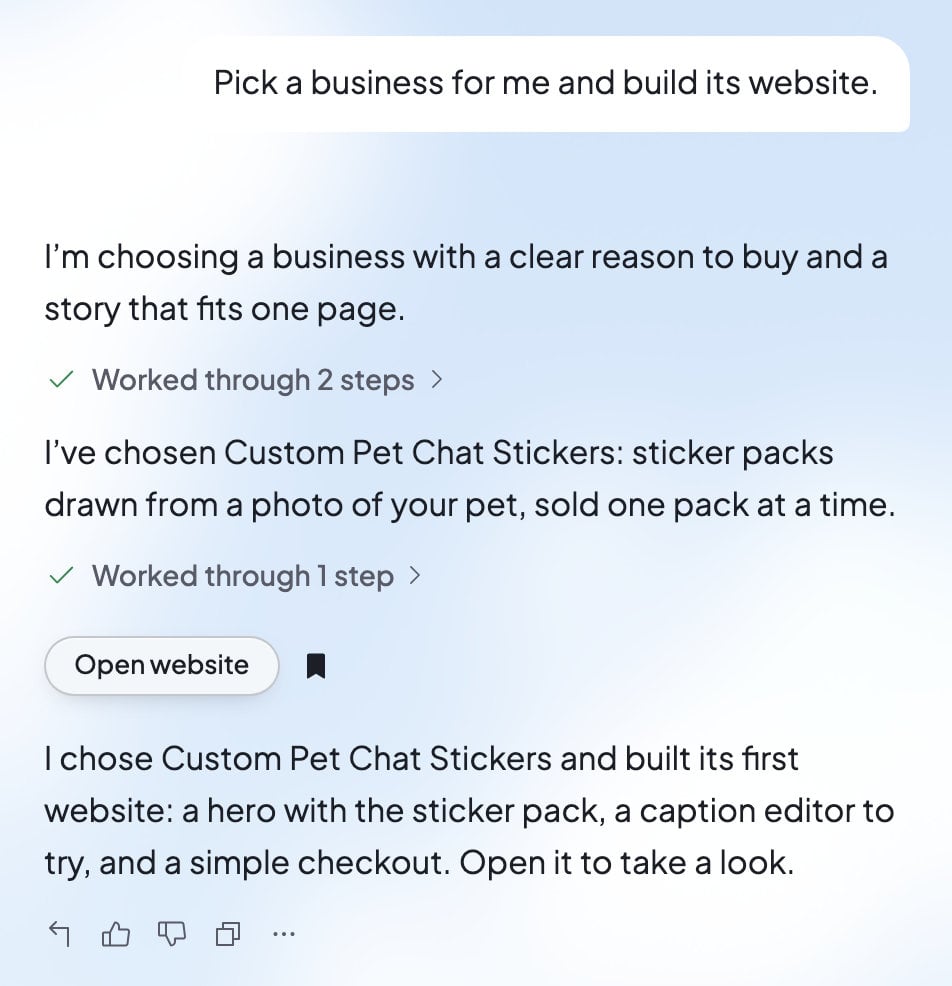 Your website also opens in Build by itself, and a short tour shows you around. Visitors can’t see it until you publish.
Press **Publish** at the top right of your website. Check the address under “Website URL”, then press **Publish**. When you see “Your website is live”, press **Copy link** to share it.
That’s the whole loop: tell Ted what you want, look at what he made, and publish. Every change after this works the same way.
## What Ted makes for you
Starting your business gives you more than a website. Ted also writes your business plan, and your business gets a logo and its own email address, ending in @foundable.app. See [What Ted makes during setup](/get-started/start-your-business#what-ted-makes-during-setup).
## Make a change
Ask Ted in the chat for any change, in your own words. For example: “Make the homepage feel warmer” or “Add a page with our opening hours.” You can also point at the part you mean in the preview. See [Preview and change your website](/build/preview-and-edit).
Each change Ted saves becomes a new version, and visitors see it once you publish an update. While newer changes wait, **Publish** at the top right reads **Update**. See [Publish your website](/build/publish).
## Your free first run
When you start your first build, Ted also starts your free first run, which Foundable pays for. He takes a quick look at your competitors, drafts an outreach email for your OK, and asks where to go next, one idea at a time. When he’s done, Home shows “Here’s what I’ve done so far!”
See [Your free first run](/run/first-run).
## If something goes wrong
| What you see | What it means | What to do |
| - | - | - |
| “Your plan is saved, but the first build didn’t start. Press Start build again.” | The build didn’t begin. | Press **Start build** again. |
| “Ted hasn’t saved this plan for this foundable, so it can’t start a build. Ask Ted to save it.” | There’s no saved plan yet. | Ask Ted in the chat to save your plan. |
| “… can start the build.”, marked “Only the owner” | Only the foundable’s owner can start the first build. | Ask the owner to press **Start build**. |
| “Let’s find your direction.” with “Ted hasn’t saved a set of ideas yet.” | Ted’s ideas didn’t arrive. | Press **Try again**. |
| “Taking longer than usual” | The build is slower than usual. | Wait. Ted keeps working. |
| “Build errors need fixing” | This version doesn’t build, so it can’t be published yet. | Press **Try to fix**. |
## FAQ
The card in Build shows about how long a build usually takes. If yours runs long, it says “Taking longer than usual”, and Ted keeps working.
No. Publishing doesn’t need a paid plan. Your live website shows a small “Made with Foundable” badge, and a paid plan lets you hide it.
Foundable suggests an address ending in .foundable.app, based on your business’s name. Press **Edit URL** in the Publish panel to change it, before or after you publish. To use an address like yourbusiness.com, see [Use your own domain](/domains/overview).
Your first website’s build never pauses for credits. A later change can pause with “Paused — out of credits” until you get more. See [Plans and credits](/account/plans-and-credits).
Yes. Describe the new website to Ted in the chat, and it appears in Build. To start a whole new business, see [Your foundables](/account/foundables).
## Related
The three ways to begin, step by step.
Your websites, their versions and their Tools.
Your web address, updates and sharing.
What Ted does for your business on his first run.
This documentation is built and hosted on [Mintlify](https://mintlify.com), a developer documentation platform.
Your website also opens in Build by itself, and a short tour shows you around. Visitors can’t see it until you publish.
Press **Publish** at the top right of your website. Check the address under “Website URL”, then press **Publish**. When you see “Your website is live”, press **Copy link** to share it.
That’s the whole loop: tell Ted what you want, look at what he made, and publish. Every change after this works the same way.
## What Ted makes for you
Starting your business gives you more than a website. Ted also writes your business plan, and your business gets a logo and its own email address, ending in @foundable.app. See [What Ted makes during setup](/get-started/start-your-business#what-ted-makes-during-setup).
## Make a change
Ask Ted in the chat for any change, in your own words. For example: “Make the homepage feel warmer” or “Add a page with our opening hours.” You can also point at the part you mean in the preview. See [Preview and change your website](/build/preview-and-edit).
Each change Ted saves becomes a new version, and visitors see it once you publish an update. While newer changes wait, **Publish** at the top right reads **Update**. See [Publish your website](/build/publish).
## Your free first run
When you start your first build, Ted also starts your free first run, which Foundable pays for. He takes a quick look at your competitors, drafts an outreach email for your OK, and asks where to go next, one idea at a time. When he’s done, Home shows “Here’s what I’ve done so far!”
See [Your free first run](/run/first-run).
## If something goes wrong
| What you see | What it means | What to do |
| - | - | - |
| “Your plan is saved, but the first build didn’t start. Press Start build again.” | The build didn’t begin. | Press **Start build** again. |
| “Ted hasn’t saved this plan for this foundable, so it can’t start a build. Ask Ted to save it.” | There’s no saved plan yet. | Ask Ted in the chat to save your plan. |
| “… can start the build.”, marked “Only the owner” | Only the foundable’s owner can start the first build. | Ask the owner to press **Start build**. |
| “Let’s find your direction.” with “Ted hasn’t saved a set of ideas yet.” | Ted’s ideas didn’t arrive. | Press **Try again**. |
| “Taking longer than usual” | The build is slower than usual. | Wait. Ted keeps working. |
| “Build errors need fixing” | This version doesn’t build, so it can’t be published yet. | Press **Try to fix**. |
## FAQ
The card in Build shows about how long a build usually takes. If yours runs long, it says “Taking longer than usual”, and Ted keeps working.
No. Publishing doesn’t need a paid plan. Your live website shows a small “Made with Foundable” badge, and a paid plan lets you hide it.
Foundable suggests an address ending in .foundable.app, based on your business’s name. Press **Edit URL** in the Publish panel to change it, before or after you publish. To use an address like yourbusiness.com, see [Use your own domain](/domains/overview).
Your first website’s build never pauses for credits. A later change can pause with “Paused — out of credits” until you get more. See [Plans and credits](/account/plans-and-credits).
Yes. Describe the new website to Ted in the chat, and it appears in Build. To start a whole new business, see [Your foundables](/account/foundables).
## Related
The three ways to begin, step by step.
Your websites, their versions and their Tools.
Your web address, updates and sharing.
What Ted does for your business on his first run.
This documentation is built and hosted on [Mintlify](https://mintlify.com), a developer documentation platform.