> ## Documentation Index
> Fetch the complete documentation index at: https://docs.foundable.com/llms.txt
> Use this file to discover all available pages before exploring further.
# Get help
> Chat with the Foundable team, report a bug or email us. See where to find help in Foundable and what to put in a bug report.
People on the Foundable team answer your questions. You can chat with them from anywhere in Foundable, send a bug report with screenshots, or email them.
For a change or a fix on your website, ask [Ted](/help/glossary#ted) in the chat. He does the work himself, and he can tell you about your plan and your [credits](/help/glossary#credit).
 Press **Support** at the top right of Foundable. On a phone, press **More**, then **Contact support**.
A chat with the Foundable team opens. Write what you need in your own words.
When the team answers, a dot appears on **Support** (“New reply from the Foundable team”). On a phone, the dot is on **More**. Open the chat again to read the reply.
## Where to start
| You want to | Start here |
| - | - |
| Talk to a person on the Foundable team | **Support**, at the top right. See [Chat with the team](#chat-with-the-team). |
| Tell us something in Foundable is broken | **Report a bug**, in the account menu. See [Report a bug](#report-a-bug). |
| Tell us a reply from Ted went wrong | **Report a problem**, on that reply. See [Tell us about a reply from Ted](#tell-us-about-a-reply-from-ted). |
| Fix an error on your website | Press **Try to fix** or **Fix error** where the error shows. Ted gets the error and works on a fix. See [Preview and change your website](/build/preview-and-edit). |
| Undo a change that broke something | Go back to an earlier version. See [Version history](/build/version-history). |
| Understand a message on screen | Find it in [Troubleshooting](/help/troubleshooting). |
| Learn how something works | Read these docs, or replay a short tour from the **Tutorial hub**. See [Learn on your own](#learn-on-your-own). |
| Know your plan, credits or prices | Ask Ted in the chat, or open **Settings**, then **Plans & credit usage**. See [Plans and credits](/account/plans-and-credits). |
## Chat with the team
**Support** opens Messenger, a chat with the Foundable team. The team answers you there.
Every one of these opens the same chat:
* **Support** in the top bar. On a narrower window it shows only the F. On a small window it moves into the **…** menu as **Contact support**.
* **Contact support** in the account menu (the round button at the top right).
* **More**, then **Contact support**, on a phone. It’s the first row.
* “Stuck? Contact support” on [Home](/get-started/home).
* **Contact support** in [Payments](/payments/overview), when Stripe setup takes longer than usual.
While the chat opens, you see “Opening support…”. If it can’t load, Foundable says “Chat is unavailable right now. You can still reach our team by email.” Press **Try chat again** if it shows, or write to [support@foundable.com](mailto:support@foundable.com).
### When Ted can’t finish
Sometimes a reply from Ted can’t finish. Then a card may ask “Send this to support?”. It shows a “Message to support” and what’s “Included with your message”. Press **Send to support** to send both to the team, or **Not now** to put the card away. Once it’s sent, the card says “Sent to support” and where the team’s reply will come.
## Report a bug
Something in Foundable not working the way it should? Tell the team in a few lines.
Press **Support** at the top right of Foundable. On a phone, press **More**, then **Contact support**.
A chat with the Foundable team opens. Write what you need in your own words.
When the team answers, a dot appears on **Support** (“New reply from the Foundable team”). On a phone, the dot is on **More**. Open the chat again to read the reply.
## Where to start
| You want to | Start here |
| - | - |
| Talk to a person on the Foundable team | **Support**, at the top right. See [Chat with the team](#chat-with-the-team). |
| Tell us something in Foundable is broken | **Report a bug**, in the account menu. See [Report a bug](#report-a-bug). |
| Tell us a reply from Ted went wrong | **Report a problem**, on that reply. See [Tell us about a reply from Ted](#tell-us-about-a-reply-from-ted). |
| Fix an error on your website | Press **Try to fix** or **Fix error** where the error shows. Ted gets the error and works on a fix. See [Preview and change your website](/build/preview-and-edit). |
| Undo a change that broke something | Go back to an earlier version. See [Version history](/build/version-history). |
| Understand a message on screen | Find it in [Troubleshooting](/help/troubleshooting). |
| Learn how something works | Read these docs, or replay a short tour from the **Tutorial hub**. See [Learn on your own](#learn-on-your-own). |
| Know your plan, credits or prices | Ask Ted in the chat, or open **Settings**, then **Plans & credit usage**. See [Plans and credits](/account/plans-and-credits). |
## Chat with the team
**Support** opens Messenger, a chat with the Foundable team. The team answers you there.
Every one of these opens the same chat:
* **Support** in the top bar. On a narrower window it shows only the F. On a small window it moves into the **…** menu as **Contact support**.
* **Contact support** in the account menu (the round button at the top right).
* **More**, then **Contact support**, on a phone. It’s the first row.
* “Stuck? Contact support” on [Home](/get-started/home).
* **Contact support** in [Payments](/payments/overview), when Stripe setup takes longer than usual.
While the chat opens, you see “Opening support…”. If it can’t load, Foundable says “Chat is unavailable right now. You can still reach our team by email.” Press **Try chat again** if it shows, or write to [support@foundable.com](mailto:support@foundable.com).
### When Ted can’t finish
Sometimes a reply from Ted can’t finish. Then a card may ask “Send this to support?”. It shows a “Message to support” and what’s “Included with your message”. Press **Send to support** to send both to the team, or **Not now** to put the card away. Once it’s sent, the card says “Sent to support” and where the team’s reply will come.
## Report a bug
Something in Foundable not working the way it should? Tell the team in a few lines.
 Press the account menu (the round button at the top right), then **Report a bug**. On a phone, press **More**, then **Report a bug** under **Help**.
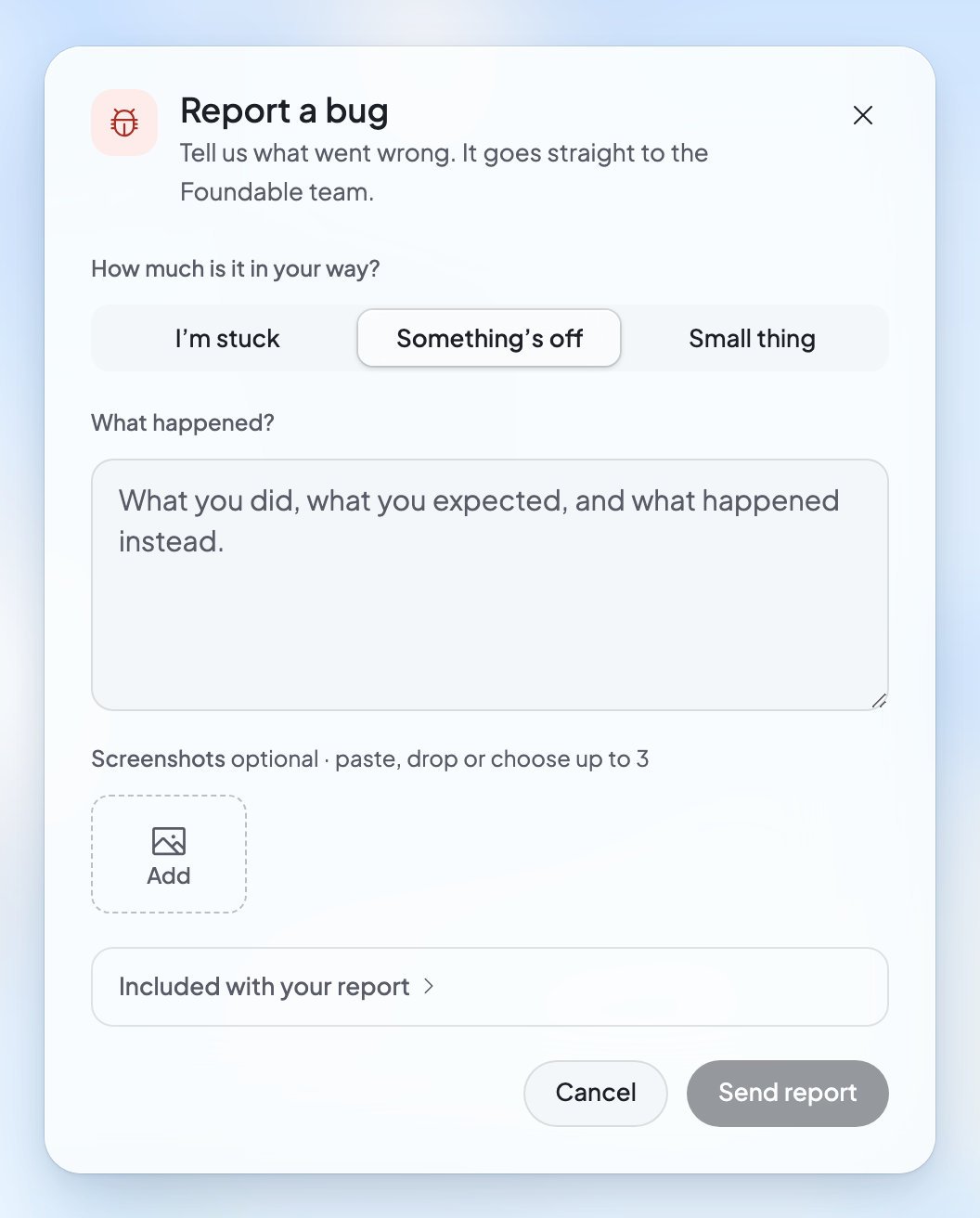
Under **How much is it in your way?**, pick **I’m stuck**, **Something’s off** or **Small thing**.
Under **What happened?**, write what you did, what you expected, and what happened instead. You can add up to 3 screenshots: paste them, drop them in, or press **Add** to choose them.
Press **Send report**. When you see **Report sent**, the team has it and will reply in Messenger.
Open **Included with your report** to see the details Foundable adds for the team: “Page”, “Reply”, “Chat”, “Browser”, “Window” and “Version”. They help the team see what you saw.
To add something later, press **Open Messenger** after you send. You can follow your report, and add anything else, under **Tickets** in Messenger.
If the report can’t be sent from Foundable, it says “Reports can’t be sent from here right now. It’s written and ready to email instead.” Press **Email report** to send it by email. For other messages, see [Troubleshooting](/help/troubleshooting#getting-help).
## Tell us about a reply from Ted
Under each of Ted’s replies you’ll find **Helpful** and **Not helpful**.
* **Not helpful** opens **Help us improve**. Pick a reason: “Didn’t communicate well”, “Design is off”, “Functionality is broken”, “Forgot what I told it before” or “Other”. Then press **Submit**, or **Skip**. You’ll see “Thanks for your feedback!”.
* For a bigger problem, press **…** (**More actions**) on the reply, then **Report a problem**. It opens the same form as Report a bug, about that reply, and goes straight to the Foundable team.
## Email us
Write from the email address you use for Foundable.
| Write to | For |
| - | - |
| [support@foundable.com](mailto:support@foundable.com) | Anything you need help with, including a refund request. |
| [privacy@foundable.com](mailto:privacy@foundable.com) | A copy of your data, or a question about your privacy. See [Privacy and deleting your data](/account/privacy-and-deletion). |
| [security@foundable.com](mailto:security@foundable.com) | A security problem you found in Foundable. See the [Responsible Disclosure Policy](https://foundable.com/responsible-disclosure). |
| [legal@foundable.com](mailto:legal@foundable.com) | A question about Foundable’s terms or policies. |
## Learn on your own
* **Tutorial hub**: “Pick a quick refresher. We’ll take it one step at a time.” Open the account menu, then **Tutorial hub**. On a phone, press **More**, then **Tutorial hub** under **Help**. Its lessons: “Your business at a glance”, “Your website, and how to change it”, “Your business email”, “Tasks Ted does for you” and “Work across your business”. You can also open it from **Settings**, then **Account**, under **Product tour**: press **Replay**.
* **Docs**: the account menu’s **Docs** row opens these pages in a new tab. On a phone, it’s under **Help** in **More**.
* **Ted**: ask him what he did and why, or about plans and prices. He answers in the chat.
## Foundable’s policies
Every policy is on foundable.com. In Foundable, open **Settings**, then **Privacy & security**, and look under **Legal & policies**.
| Policy | What it covers |
| - | - |
| [Terms of Service](https://foundable.com/terms) | The rules for using Foundable. |
| [Privacy Policy](https://foundable.com/privacy) | How Foundable handles your data. |
| [Refund & Dispute Policy](https://foundable.com/refund-policy) | How refunds work for plans and credits, and how to raise a billing dispute. |
| [Acceptable Use Policy](https://foundable.com/acceptable-use) | What you can’t do with Foundable. |
| [AI Disclosure](https://foundable.com/ai-disclosure) | How Foundable uses AI, and which providers serve each feature. |
| [Domain Holding Agreement](https://foundable.com/legal/domain-holding-agreement) | The terms for a domain you buy through Foundable. |
| [All legal documents](https://foundable.com/legal) | Security, subprocessors, the DPA, DMCA, cookies, data deletion and more. |
## FAQ
Yes. People on the Foundable team answer in the support chat and by email.
Email [support@foundable.com](mailto:support@foundable.com). foundable.com’s footer has a **Contact** link to the same address.
Open the support chat. Your report is under **Tickets** in Messenger, where the team replies and you can add more.
Read the [Refund & Dispute Policy](https://foundable.com/refund-policy) first. To ask, email [support@foundable.com](mailto:support@foundable.com) from your account’s email address. To stop your plan, see [Plans and credits](/account/plans-and-credits).
Some paid plans include **Priority support**, “Answered first by our team”, and a **1:1 onboarding call** to “Get set up with our team”. To see which plan has them, open **Settings**, then **Plans & credit usage**, and press **Compare plans**.
## Related
What each message on screen means, and what to do.
Quick answers about Foundable, Ted, plans and your account.
The words Foundable uses, in plain English.
The top bar, the account menu and your phone’s tabs.
This documentation is built and hosted on [Mintlify](https://mintlify.com), a developer documentation platform.
Press the account menu (the round button at the top right), then **Report a bug**. On a phone, press **More**, then **Report a bug** under **Help**.
Under **How much is it in your way?**, pick **I’m stuck**, **Something’s off** or **Small thing**.
Under **What happened?**, write what you did, what you expected, and what happened instead. You can add up to 3 screenshots: paste them, drop them in, or press **Add** to choose them.
Press **Send report**. When you see **Report sent**, the team has it and will reply in Messenger.
Open **Included with your report** to see the details Foundable adds for the team: “Page”, “Reply”, “Chat”, “Browser”, “Window” and “Version”. They help the team see what you saw.
To add something later, press **Open Messenger** after you send. You can follow your report, and add anything else, under **Tickets** in Messenger.
If the report can’t be sent from Foundable, it says “Reports can’t be sent from here right now. It’s written and ready to email instead.” Press **Email report** to send it by email. For other messages, see [Troubleshooting](/help/troubleshooting#getting-help).
## Tell us about a reply from Ted
Under each of Ted’s replies you’ll find **Helpful** and **Not helpful**.
* **Not helpful** opens **Help us improve**. Pick a reason: “Didn’t communicate well”, “Design is off”, “Functionality is broken”, “Forgot what I told it before” or “Other”. Then press **Submit**, or **Skip**. You’ll see “Thanks for your feedback!”.
* For a bigger problem, press **…** (**More actions**) on the reply, then **Report a problem**. It opens the same form as Report a bug, about that reply, and goes straight to the Foundable team.
## Email us
Write from the email address you use for Foundable.
| Write to | For |
| - | - |
| [support@foundable.com](mailto:support@foundable.com) | Anything you need help with, including a refund request. |
| [privacy@foundable.com](mailto:privacy@foundable.com) | A copy of your data, or a question about your privacy. See [Privacy and deleting your data](/account/privacy-and-deletion). |
| [security@foundable.com](mailto:security@foundable.com) | A security problem you found in Foundable. See the [Responsible Disclosure Policy](https://foundable.com/responsible-disclosure). |
| [legal@foundable.com](mailto:legal@foundable.com) | A question about Foundable’s terms or policies. |
## Learn on your own
* **Tutorial hub**: “Pick a quick refresher. We’ll take it one step at a time.” Open the account menu, then **Tutorial hub**. On a phone, press **More**, then **Tutorial hub** under **Help**. Its lessons: “Your business at a glance”, “Your website, and how to change it”, “Your business email”, “Tasks Ted does for you” and “Work across your business”. You can also open it from **Settings**, then **Account**, under **Product tour**: press **Replay**.
* **Docs**: the account menu’s **Docs** row opens these pages in a new tab. On a phone, it’s under **Help** in **More**.
* **Ted**: ask him what he did and why, or about plans and prices. He answers in the chat.
## Foundable’s policies
Every policy is on foundable.com. In Foundable, open **Settings**, then **Privacy & security**, and look under **Legal & policies**.
| Policy | What it covers |
| - | - |
| [Terms of Service](https://foundable.com/terms) | The rules for using Foundable. |
| [Privacy Policy](https://foundable.com/privacy) | How Foundable handles your data. |
| [Refund & Dispute Policy](https://foundable.com/refund-policy) | How refunds work for plans and credits, and how to raise a billing dispute. |
| [Acceptable Use Policy](https://foundable.com/acceptable-use) | What you can’t do with Foundable. |
| [AI Disclosure](https://foundable.com/ai-disclosure) | How Foundable uses AI, and which providers serve each feature. |
| [Domain Holding Agreement](https://foundable.com/legal/domain-holding-agreement) | The terms for a domain you buy through Foundable. |
| [All legal documents](https://foundable.com/legal) | Security, subprocessors, the DPA, DMCA, cookies, data deletion and more. |
## FAQ
Yes. People on the Foundable team answer in the support chat and by email.
Email [support@foundable.com](mailto:support@foundable.com). foundable.com’s footer has a **Contact** link to the same address.
Open the support chat. Your report is under **Tickets** in Messenger, where the team replies and you can add more.
Read the [Refund & Dispute Policy](https://foundable.com/refund-policy) first. To ask, email [support@foundable.com](mailto:support@foundable.com) from your account’s email address. To stop your plan, see [Plans and credits](/account/plans-and-credits).
Some paid plans include **Priority support**, “Answered first by our team”, and a **1:1 onboarding call** to “Get set up with our team”. To see which plan has them, open **Settings**, then **Plans & credit usage**, and press **Compare plans**.
## Related
What each message on screen means, and what to do.
Quick answers about Foundable, Ted, plans and your account.
The words Foundable uses, in plain English.
The top bar, the account menu and your phone’s tabs.
This documentation is built and hosted on [Mintlify](https://mintlify.com), a developer documentation platform.