> ## Documentation Index
> Fetch the complete documentation index at: https://docs.foundable.com/llms.txt
> Use this file to discover all available pages before exploring further.
# Your email address
> Every foundable gets its own email address. Change the name people see, pick a new address, or send email from your own domain.
Every foundable gets its own email address, so your business sends and receives email under its own name. Foundable makes it for you as soon as your foundable has a name. People write to it, their mail lands in your [Inbox](/inbox/overview), and you and Ted send from it.
Your address uses your website’s name on foundable.app, Foundable’s own domain, like `yourbusiness@foundable.app`. People see your foundable’s name as the sender.
Press **Inbox** in the top bar. Your address sits under the **Inbox** title.
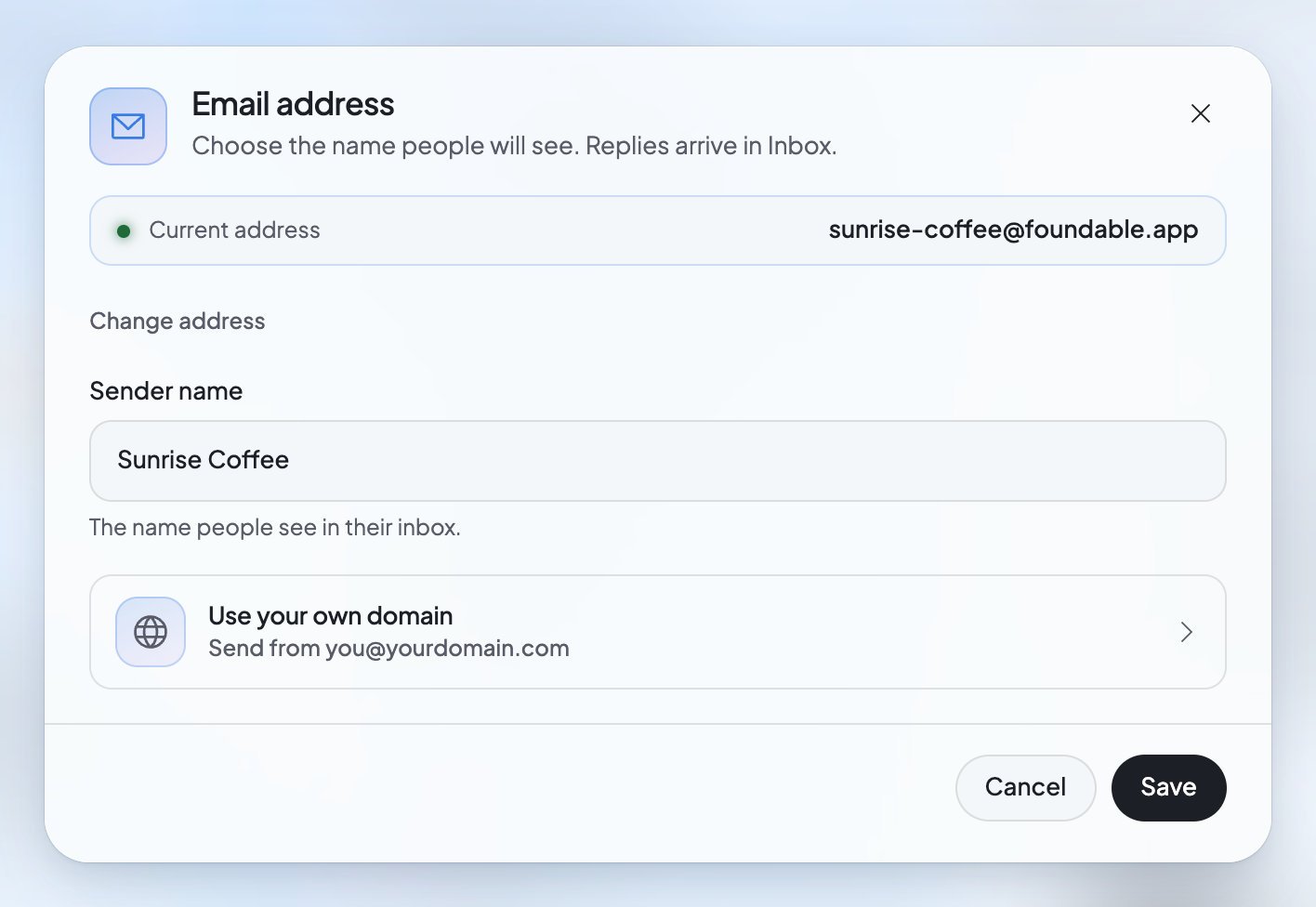
The **Email address** dialog opens. It shows your “Current address” and says “Choose the name people will see. Replies arrive in Inbox.”
Change the **Sender name**, press **Change address**, or press **Use your own domain**. Each one is explained below.
 ## While your address is being made
Until your address is ready, the Inbox says “Your email is on its way” and “We’re setting up your foundable’s own email address. This page updates by itself.” If it takes longer than usual, it says “Your email setup is taking longer”, and Foundable keeps trying. You don’t need to reload the page.
## Change the name people see
The sender name is the name people see in their inbox when your foundable emails them. An owner or admin can change it.
In the Inbox, press your address under the title.
Change the name in **Sender name**.
You’ll see “Sender name saved.”
While your email is on foundable.app, the sender name has to include your foundable’s name, so people know who is writing. If the name doesn’t fit the rules, the dialog says why:
| What you see | What to do |
| - | - |
| “Include your foundable’s name, …” | Add your foundable’s name to the sender name. |
| “Leave out Foundable’s name.” | Take the word Foundable out. |
| “Name your foundable in Settings first. Its sender name includes that name.” | Give your foundable a name in [Settings](/account/settings), then try again. |
| “Use letters, numbers, spaces and . ’ - & only.” | Take out any other symbols. |
## Pick a new address
Only the owner can change the address. It’s free.
In the Email address dialog, press **Change address**.
In **Email address**, type the part before “@foundable.app”. Use lowercase letters, numbers and hyphens. The dialog says “We’ll check this address when you save.”
The dialog explains it: “Changing deletes … and the mail in it, and discards unsent drafts. The old address stays yours, so no one else gets its mail.”
You’ll see “Address changed.” To go back without changing anything, press the button at the top that reads “Keep” and your current address.
A new address is a new, empty mailbox. Your old mailbox and all the mail in it are deleted, and unsent drafts are thrown away.
| What you see | What it means | What to do |
| - | - | - |
| “That address is taken. Try another name.” | Another foundable already uses it. | Try another name. |
| “You can change the address once every … hours, up to … addresses in all.” | You changed it recently, or too many times. | Wait, then try again later. |
| “Wait until your last email has finished sending, then try again.” | An email is still on its way. | Wait for it to send, then try again. |
## Send from your own domain
With a paid plan, your foundable can send and receive email at a domain you own, like `hello@yourbusiness.com`. An owner or admin sets the domain up, and the owner moves your email there.
### Before you start
* **A paid plan.** Email on your own domain needs a paid plan. Without one, pressing **Continue** closes the dialog and shows you the plans. See [Plans and credits](/account/plans-and-credits).
* **A [domain](/help/glossary#domain).** If you [bought it through Foundable](/domains/buy-a-domain), Foundable sets up its email for you. If you bought it somewhere else, you’ll add a few records where you manage it.
In the Email address dialog, press **Use your own domain** (“Send from `you@yourdomain.com`”).
Type it in **Your domain** and press **Continue**.
**Bought through Foundable:** the dialog says “Setting up email on …” and “Foundable is adding its records for you. This usually takes a few minutes.” After a few minutes, press **Check setup**.
**Bought somewhere else:** the dialog says “Add these records where you manage your domain, then come back here.” Each record shows its type, its name and its value. Press a value to copy it, add each record where you manage your domain, then press **Check setup**.
When the dialog says “… is ready”, choose the address and the **Sender name**, then press **Move email**.
Moving works like a new address: “Moving deletes … and the mail in it, and discards unsent drafts.” When it’s done, you’ll see “Email moved.” An admin can set the domain up, but only the owner can move the email. Admins see “Only the owner can move email to …”.
### What you’ll see while you set it up
| What you see | What it means | What to do |
| - | - | - |
| “Found” | Foundable sees this record. | Nothing. |
| “Not found yet” | Foundable can’t see this record yet. | Add it, wait a little, then press **Check setup**. |
| “Needs a fix” | The record is there, but not quite right. | Copy its value again and correct it. |
| “Setup is still updating. Try again shortly.” | The check isn’t done yet. | Wait, then press **Check setup** again. |
| “We couldn’t finish setting up …” and “This can happen when its email already runs somewhere else.” | Foundable couldn’t add its records to a domain you bought through it. | Press **Try again**. |
| “That domain is already connected to another foundable.” | Another foundable uses this domain for email. | Use a different domain. |
| “This domain can’t take mail here. If it already gets email elsewhere, use a subdomain such as mail.acme.com.” | The domain can’t receive mail through Foundable. | Use a subdomain of it instead. |
| “Your email is moving to this domain. Finish the move first.” | A move is under way. | Let it finish. |
### Change your mind
Before your email moves, press **Use a different domain** to start again with another one, or **Don’t use this domain for email** to stop. You’ll see “Domain no longer used for email.”
## FAQ
No. Foundable makes it for you as soon as your foundable has a name.
The old mailbox is deleted with all its mail, and unsent drafts are thrown away. The new address starts empty. The same happens when you move to your own domain.
No. “The old address stays yours, so no one else gets its mail.”
Changing your address on foundable.app is free. Email on your own domain needs a paid plan.
Use a subdomain, such as mail.yourbusiness.com, as the dialog suggests. Foundable may refuse a domain whose email already runs somewhere else.
## Related
Read and answer the mail people send you.
Send email from your new address.
Get a domain through Foundable, with email set up for you.
See which plan you’re on, and what a paid plan adds.
This documentation is built and hosted on [Mintlify](https://mintlify.com), a developer documentation platform.
## While your address is being made
Until your address is ready, the Inbox says “Your email is on its way” and “We’re setting up your foundable’s own email address. This page updates by itself.” If it takes longer than usual, it says “Your email setup is taking longer”, and Foundable keeps trying. You don’t need to reload the page.
## Change the name people see
The sender name is the name people see in their inbox when your foundable emails them. An owner or admin can change it.
In the Inbox, press your address under the title.
Change the name in **Sender name**.
You’ll see “Sender name saved.”
While your email is on foundable.app, the sender name has to include your foundable’s name, so people know who is writing. If the name doesn’t fit the rules, the dialog says why:
| What you see | What to do |
| - | - |
| “Include your foundable’s name, …” | Add your foundable’s name to the sender name. |
| “Leave out Foundable’s name.” | Take the word Foundable out. |
| “Name your foundable in Settings first. Its sender name includes that name.” | Give your foundable a name in [Settings](/account/settings), then try again. |
| “Use letters, numbers, spaces and . ’ - & only.” | Take out any other symbols. |
## Pick a new address
Only the owner can change the address. It’s free.
In the Email address dialog, press **Change address**.
In **Email address**, type the part before “@foundable.app”. Use lowercase letters, numbers and hyphens. The dialog says “We’ll check this address when you save.”
The dialog explains it: “Changing deletes … and the mail in it, and discards unsent drafts. The old address stays yours, so no one else gets its mail.”
You’ll see “Address changed.” To go back without changing anything, press the button at the top that reads “Keep” and your current address.
A new address is a new, empty mailbox. Your old mailbox and all the mail in it are deleted, and unsent drafts are thrown away.
| What you see | What it means | What to do |
| - | - | - |
| “That address is taken. Try another name.” | Another foundable already uses it. | Try another name. |
| “You can change the address once every … hours, up to … addresses in all.” | You changed it recently, or too many times. | Wait, then try again later. |
| “Wait until your last email has finished sending, then try again.” | An email is still on its way. | Wait for it to send, then try again. |
## Send from your own domain
With a paid plan, your foundable can send and receive email at a domain you own, like `hello@yourbusiness.com`. An owner or admin sets the domain up, and the owner moves your email there.
### Before you start
* **A paid plan.** Email on your own domain needs a paid plan. Without one, pressing **Continue** closes the dialog and shows you the plans. See [Plans and credits](/account/plans-and-credits).
* **A [domain](/help/glossary#domain).** If you [bought it through Foundable](/domains/buy-a-domain), Foundable sets up its email for you. If you bought it somewhere else, you’ll add a few records where you manage it.
In the Email address dialog, press **Use your own domain** (“Send from `you@yourdomain.com`”).
Type it in **Your domain** and press **Continue**.
**Bought through Foundable:** the dialog says “Setting up email on …” and “Foundable is adding its records for you. This usually takes a few minutes.” After a few minutes, press **Check setup**.
**Bought somewhere else:** the dialog says “Add these records where you manage your domain, then come back here.” Each record shows its type, its name and its value. Press a value to copy it, add each record where you manage your domain, then press **Check setup**.
When the dialog says “… is ready”, choose the address and the **Sender name**, then press **Move email**.
Moving works like a new address: “Moving deletes … and the mail in it, and discards unsent drafts.” When it’s done, you’ll see “Email moved.” An admin can set the domain up, but only the owner can move the email. Admins see “Only the owner can move email to …”.
### What you’ll see while you set it up
| What you see | What it means | What to do |
| - | - | - |
| “Found” | Foundable sees this record. | Nothing. |
| “Not found yet” | Foundable can’t see this record yet. | Add it, wait a little, then press **Check setup**. |
| “Needs a fix” | The record is there, but not quite right. | Copy its value again and correct it. |
| “Setup is still updating. Try again shortly.” | The check isn’t done yet. | Wait, then press **Check setup** again. |
| “We couldn’t finish setting up …” and “This can happen when its email already runs somewhere else.” | Foundable couldn’t add its records to a domain you bought through it. | Press **Try again**. |
| “That domain is already connected to another foundable.” | Another foundable uses this domain for email. | Use a different domain. |
| “This domain can’t take mail here. If it already gets email elsewhere, use a subdomain such as mail.acme.com.” | The domain can’t receive mail through Foundable. | Use a subdomain of it instead. |
| “Your email is moving to this domain. Finish the move first.” | A move is under way. | Let it finish. |
### Change your mind
Before your email moves, press **Use a different domain** to start again with another one, or **Don’t use this domain for email** to stop. You’ll see “Domain no longer used for email.”
## FAQ
No. Foundable makes it for you as soon as your foundable has a name.
The old mailbox is deleted with all its mail, and unsent drafts are thrown away. The new address starts empty. The same happens when you move to your own domain.
No. “The old address stays yours, so no one else gets its mail.”
Changing your address on foundable.app is free. Email on your own domain needs a paid plan.
Use a subdomain, such as mail.yourbusiness.com, as the dialog suggests. Foundable may refuse a domain whose email already runs somewhere else.
## Related
Read and answer the mail people send you.
Send email from your new address.
Get a domain through Foundable, with email set up for you.
See which plan you’re on, and what a paid plan adds.
This documentation is built and hosted on [Mintlify](https://mintlify.com), a developer documentation platform.