> ## Documentation Index
> Fetch the complete documentation index at: https://docs.foundable.com/llms.txt
> Use this file to discover all available pages before exploring further.
# Emails Ted writes for you
> Ted drafts emails for your business. Find them, check them, and approve, change or decline each one before it goes out.
Ted writes emails for your business: answers to customers, notes to other businesses, follow-ups. He drafts them, and they wait for you. You read each one, change it if you like, and approve it to send it from your foundable’s address.
 ## Where you’ll find them
| Place | What you see |
| - | - |
| [Inbox](/inbox/overview) | “Needs your OK” at the top of the list, and the **Drafts** folder. A new email opens on a card of its own. A reply waits at the end of its conversation. |
| [Home](/get-started/home) | From Ted’s “Needs your OK”, each with **Review**. |
| [Run](/run/decisions) | The decisions waiting for you while Run is on. |
| [The chat](/ted/approvals) | Ted’s email card, when he drafts one while you talk. |
| Your own email | “… is ready for your OK”, when a [scheduled task](/schedule/overview) drafted it. |
It’s the same draft everywhere. Decide in one place, and it’s done in all of them.
## Check and send an email from Ted
In the Inbox, press it under “Needs your OK”. On Home, press **Review**.
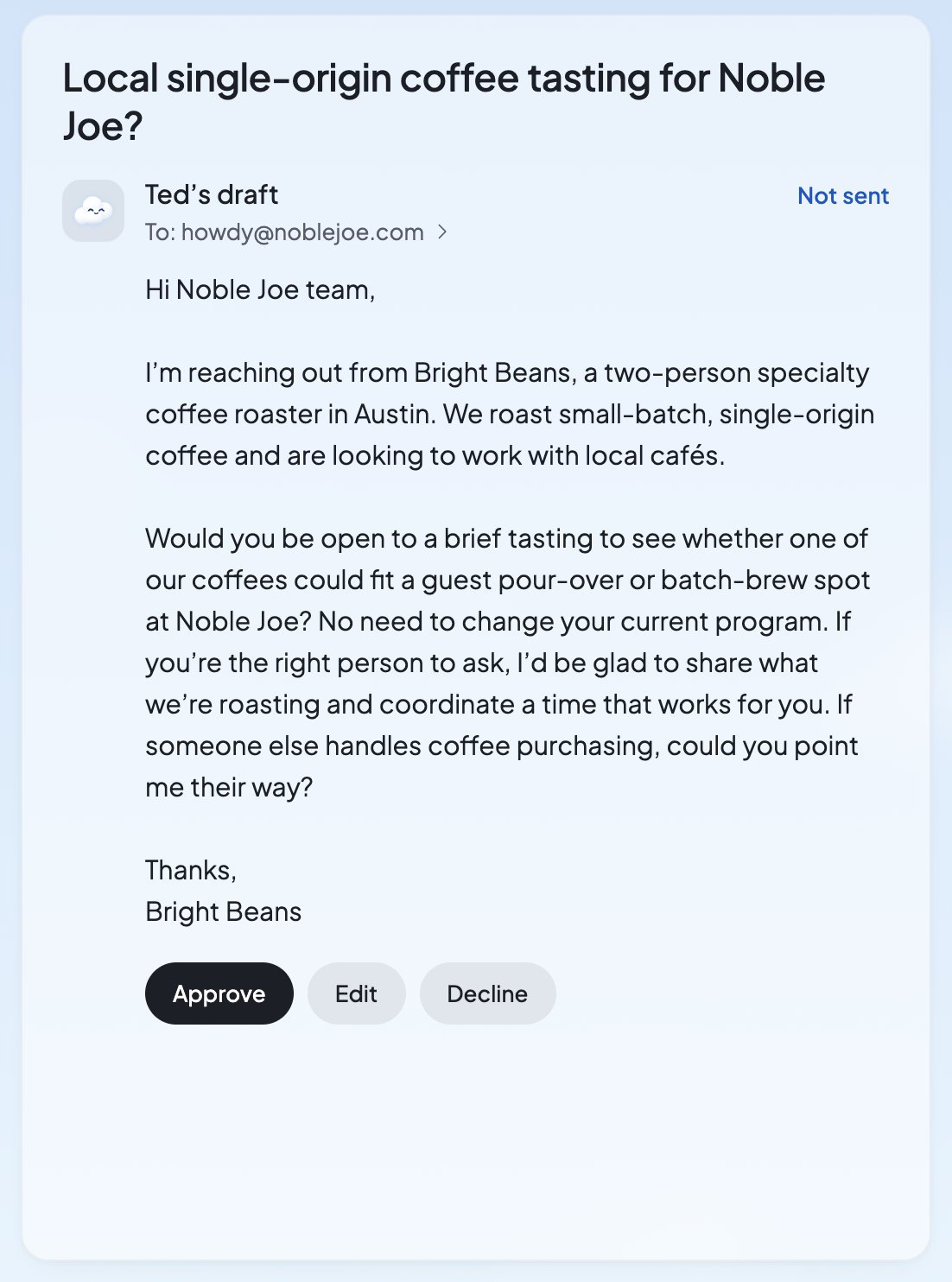
It’s headed “Ted’s draft”, with who it’s for (“To: …”) and “Not sent”.
Press **Approve** to send it. Press **Edit** to change it first. Press **Decline** if you don’t want it sent.
While it goes, the draft says “Approving…”, then “Sending…”. When it’s sent, you’ll see “Sent to …” with its subject. If you decline, you’ll see “Declined”, and it won’t be sent.
## What you’ll see
In the Inbox, a draft that waits says “Not sent”. On Home, in Run and in the chat, each email of Ted’s says where it stands:
| What you see | What it means | What to do |
| - | - | - |
| “Needs approval” | It waits for you. | **Approve**, **Edit** or **Decline** it. |
| “Approved” | It was approved, but it hasn’t gone yet. The button reads **Send**. | Press **Send**. |
| “Sending…” | It’s on its way. | Nothing. |
| “Sent” | The mail service took it. | Nothing. |
| “Sent by Ted” | Ted sent it himself. See [When Ted sends on his own](#when-ted-sends-on-his-own). | Nothing. |
| “Declined” | It won’t be sent. | Nothing. |
| “Can’t be sent” | Someone on it can’t get email. | See [Blocked and undelivered emails](#blocked-and-undelivered-emails). |
| “Failed”, “Unconfirmed” | It didn’t go, or Foundable can’t tell if it went. | Read the note under it. Look in **Sent** before you try again. |
## Change an email before it goes
* **In the Inbox**, press **Edit**. The email opens in the compose sheet as it stands. Change anything, then press **Send**.
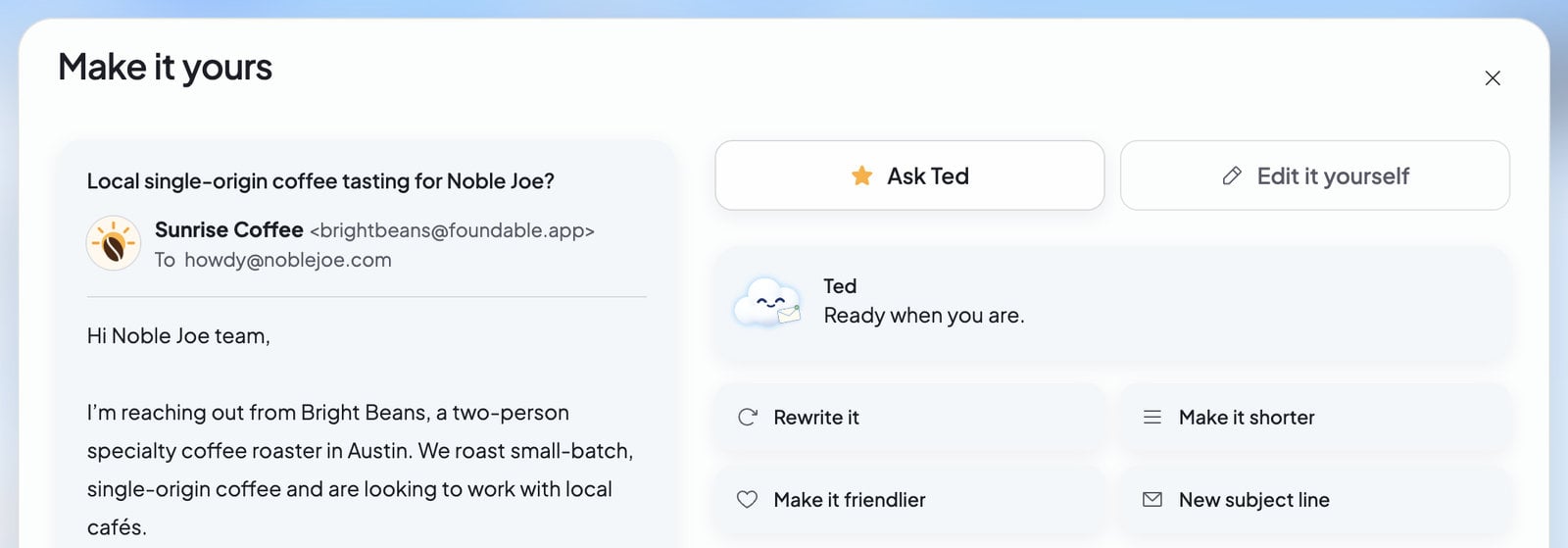
* **On Home**, press **Review**, then **Edit**. “Make it yours” opens with two tabs:
* **Edit it yourself**: change the email’s words. Press **Send** to send your version, or **Back** to return with your changes kept.
* **Ask Ted**: pick **Rewrite it**, **Make it shorter**, **Make it friendlier** or **New subject line**, or type what to change under “What would you change?”, then press **Ask Ted**. You’ll see “Rewriting the email…”, then Ted’s version. **Show what changed** marks what he rewrote.
Asking Ted to rewrite uses [credits](/help/glossary#credit). Editing it yourself doesn’t. Each saved change is a new version, so it needs your OK again before it goes.
## Where you’ll find them
| Place | What you see |
| - | - |
| [Inbox](/inbox/overview) | “Needs your OK” at the top of the list, and the **Drafts** folder. A new email opens on a card of its own. A reply waits at the end of its conversation. |
| [Home](/get-started/home) | From Ted’s “Needs your OK”, each with **Review**. |
| [Run](/run/decisions) | The decisions waiting for you while Run is on. |
| [The chat](/ted/approvals) | Ted’s email card, when he drafts one while you talk. |
| Your own email | “… is ready for your OK”, when a [scheduled task](/schedule/overview) drafted it. |
It’s the same draft everywhere. Decide in one place, and it’s done in all of them.
## Check and send an email from Ted
In the Inbox, press it under “Needs your OK”. On Home, press **Review**.
It’s headed “Ted’s draft”, with who it’s for (“To: …”) and “Not sent”.
Press **Approve** to send it. Press **Edit** to change it first. Press **Decline** if you don’t want it sent.
While it goes, the draft says “Approving…”, then “Sending…”. When it’s sent, you’ll see “Sent to …” with its subject. If you decline, you’ll see “Declined”, and it won’t be sent.
## What you’ll see
In the Inbox, a draft that waits says “Not sent”. On Home, in Run and in the chat, each email of Ted’s says where it stands:
| What you see | What it means | What to do |
| - | - | - |
| “Needs approval” | It waits for you. | **Approve**, **Edit** or **Decline** it. |
| “Approved” | It was approved, but it hasn’t gone yet. The button reads **Send**. | Press **Send**. |
| “Sending…” | It’s on its way. | Nothing. |
| “Sent” | The mail service took it. | Nothing. |
| “Sent by Ted” | Ted sent it himself. See [When Ted sends on his own](#when-ted-sends-on-his-own). | Nothing. |
| “Declined” | It won’t be sent. | Nothing. |
| “Can’t be sent” | Someone on it can’t get email. | See [Blocked and undelivered emails](#blocked-and-undelivered-emails). |
| “Failed”, “Unconfirmed” | It didn’t go, or Foundable can’t tell if it went. | Read the note under it. Look in **Sent** before you try again. |
## Change an email before it goes
* **In the Inbox**, press **Edit**. The email opens in the compose sheet as it stands. Change anything, then press **Send**.
* **On Home**, press **Review**, then **Edit**. “Make it yours” opens with two tabs:
* **Edit it yourself**: change the email’s words. Press **Send** to send your version, or **Back** to return with your changes kept.
* **Ask Ted**: pick **Rewrite it**, **Make it shorter**, **Make it friendlier** or **New subject line**, or type what to change under “What would you change?”, then press **Ask Ted**. You’ll see “Rewriting the email…”, then Ted’s version. **Show what changed** marks what he rewrote.
Asking Ted to rewrite uses [credits](/help/glossary#credit). Editing it yourself doesn’t. Each saved change is a new version, so it needs your OK again before it goes.
 If the email changed after you opened it, you’ll see “This email changed, so it wasn’t sent. Check the new version, then approve it.” Read the new version, then decide again.
## Answer in the chat
When Ted shows an email card in the chat, you can answer it in words. Type “yes” to approve and send it, or “no” to decline it. This works in the chat, not by text: when you [text Ted](/ted/text-ted), he sends you a link to decide in Foundable. See [Approve Ted’s work](/ted/approvals).
## When Ted sends on his own
Ted asks before he sends. Every email he drafts waits for an owner or admin to approve it, whether he wrote it in the chat, while working in Run, in a scheduled task or in your [free first run](/run/first-run).
He sends an email himself in only two cases:
* **You ask him to.** When the owner or an admin clearly asks Ted, in the chat or [by text](/ted/text-ted), to send an email, he can send it right away.
* **Run runs on its own.** While Run is set to **Runs on its own** and Email’s **Send outreach emails** is on, Ted may send emails himself. The [tasks Ted runs on a schedule](/schedule/overview) follow the same choice. This needs a paid plan. See [Ask first or Runs on its own](/run/ask-first-or-on-its-own).
An email Ted sent himself says “Sent by Ted”. Either way, he never writes to an address Foundable knows can’t get email.
## Blocked and undelivered emails
**“Can’t be sent”** means someone on the draft can’t get email, so Foundable won’t send it. The draft says why:
| What it says | What it means |
| - | - |
| “…: it can’t receive email.” | The address doesn’t work. |
| “…: its owner asked not to get these emails.” | The person doesn’t want these emails. |
| “…: the mail service won’t deliver to it.” | The mail service refuses this address. |
| “…: it isn’t receiving email right now.” | The address keeps turning email away for now. |
Decline the draft, or press **Edit** and take that person off. If you try to send to one of these addresses, you’ll see “Someone on this email can’t receive email, so it wasn’t sent. Remove them, then send.” Foundable keeps one list of these addresses for everyone who uses it, so an address can be on it even if you’ve never written to it.
**“Not delivered”** shows on an email in **Sent**, and in its conversation, when the mail service later says it didn’t reach someone. It says why: the address “doesn’t exist or won’t take email”, their mail server “kept refusing it”, or their mail server “didn’t take it”. Home and Ted’s card still say “Sent”, because the email did go out. Ted hears about it too.
## Who can decide
| Role | They can |
| - | - |
| Owner and admin | Approve, edit, decline and send. |
| Member | Change or decline a draft. Approving it waits for an owner or admin. |
| View only | Read only. They see “Only the owner or an admin can send email.” |
## FAQ
Not the ones he drafts: those wait for an owner or admin. He sends one himself only when you clearly ask him to, or while Run runs on its own with **Send outreach emails** on. See [When Ted sends on his own](#when-ted-sends-on-his-own).
The email went out, so it stays “Sent” on Home. Later the mail service said it didn’t reach someone, and the Inbox shows that, with the reason.
It won’t be sent. It leaves your waiting list and says “Declined”.
Yes. Press **Edit** in the Inbox, or **Review** and then **Edit** on Home. You can change it yourself or ask Ted to rewrite it.
No. Ted writes one outreach email in your free first run, and it waits under “Needs your OK” for you. See [Your free first run](/run/first-run).
## Related
Posts, website changes and everything else that waits for your OK.
Choose what Ted may do by himself in Run.
Write your own emails, or have Ted draft a reply.
What waits for you while Run is on.
This documentation is built and hosted on [Mintlify](https://mintlify.com), a developer documentation platform.
If the email changed after you opened it, you’ll see “This email changed, so it wasn’t sent. Check the new version, then approve it.” Read the new version, then decide again.
## Answer in the chat
When Ted shows an email card in the chat, you can answer it in words. Type “yes” to approve and send it, or “no” to decline it. This works in the chat, not by text: when you [text Ted](/ted/text-ted), he sends you a link to decide in Foundable. See [Approve Ted’s work](/ted/approvals).
## When Ted sends on his own
Ted asks before he sends. Every email he drafts waits for an owner or admin to approve it, whether he wrote it in the chat, while working in Run, in a scheduled task or in your [free first run](/run/first-run).
He sends an email himself in only two cases:
* **You ask him to.** When the owner or an admin clearly asks Ted, in the chat or [by text](/ted/text-ted), to send an email, he can send it right away.
* **Run runs on its own.** While Run is set to **Runs on its own** and Email’s **Send outreach emails** is on, Ted may send emails himself. The [tasks Ted runs on a schedule](/schedule/overview) follow the same choice. This needs a paid plan. See [Ask first or Runs on its own](/run/ask-first-or-on-its-own).
An email Ted sent himself says “Sent by Ted”. Either way, he never writes to an address Foundable knows can’t get email.
## Blocked and undelivered emails
**“Can’t be sent”** means someone on the draft can’t get email, so Foundable won’t send it. The draft says why:
| What it says | What it means |
| - | - |
| “…: it can’t receive email.” | The address doesn’t work. |
| “…: its owner asked not to get these emails.” | The person doesn’t want these emails. |
| “…: the mail service won’t deliver to it.” | The mail service refuses this address. |
| “…: it isn’t receiving email right now.” | The address keeps turning email away for now. |
Decline the draft, or press **Edit** and take that person off. If you try to send to one of these addresses, you’ll see “Someone on this email can’t receive email, so it wasn’t sent. Remove them, then send.” Foundable keeps one list of these addresses for everyone who uses it, so an address can be on it even if you’ve never written to it.
**“Not delivered”** shows on an email in **Sent**, and in its conversation, when the mail service later says it didn’t reach someone. It says why: the address “doesn’t exist or won’t take email”, their mail server “kept refusing it”, or their mail server “didn’t take it”. Home and Ted’s card still say “Sent”, because the email did go out. Ted hears about it too.
## Who can decide
| Role | They can |
| - | - |
| Owner and admin | Approve, edit, decline and send. |
| Member | Change or decline a draft. Approving it waits for an owner or admin. |
| View only | Read only. They see “Only the owner or an admin can send email.” |
## FAQ
Not the ones he drafts: those wait for an owner or admin. He sends one himself only when you clearly ask him to, or while Run runs on its own with **Send outreach emails** on. See [When Ted sends on his own](#when-ted-sends-on-his-own).
The email went out, so it stays “Sent” on Home. Later the mail service said it didn’t reach someone, and the Inbox shows that, with the reason.
It won’t be sent. It leaves your waiting list and says “Declined”.
Yes. Press **Edit** in the Inbox, or **Review** and then **Edit** on Home. You can change it yourself or ask Ted to rewrite it.
No. Ted writes one outreach email in your free first run, and it waits under “Needs your OK” for you. See [Your free first run](/run/first-run).
## Related
Posts, website changes and everything else that waits for your OK.
Choose what Ted may do by himself in Run.
Write your own emails, or have Ted draft a reply.
What waits for you while Run is on.
This documentation is built and hosted on [Mintlify](https://mintlify.com), a developer documentation platform.