> ## Documentation Index
> Fetch the complete documentation index at: https://docs.foundable.com/llms.txt
> Use this file to discover all available pages before exploring further.
# Ask first or Runs on its own
> Choose whether Ted waits for your OK before anything goes public, or posts and sends on his own where you allow it.
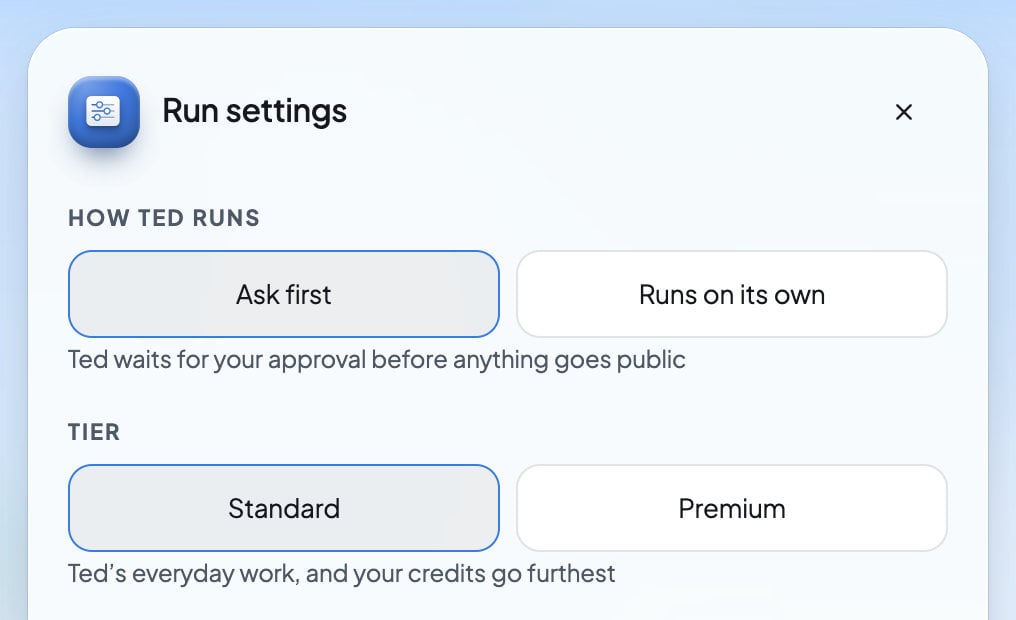
Run has two ways to work. With **Ask first**, Ted waits for your approval before anything goes public. With **Runs on its own**, he posts and sends on his own where you allow it, and the rest waits for your review.
Run starts on **Ask first** until you change it. Either way, Ted keeps working in the background, and you can switch whenever you like.
 ## Choose how Ted runs
Press **Run** at the top of the screen.
Press the gear on Run’s card, or **Settings** under **Tools Ted uses**. While a run is on, the button names the mode, like **Ask first**.
Under **How Ted runs**, press **Ask first** or **Runs on its own**. The line under them says what the mode does. Your choice saves as soon as you pick it.
The owner and admins can change how Ted runs. **Runs on its own** needs a paid plan.
## What each mode does
| Ted’s work | Ask first | Runs on its own |
| - | - | - |
| Emails to new people | Wait for your OK. The run pauses until you decide. | Ted sends them himself where Email’s **Send outreach emails** is on. |
| Social posts | Wait for your OK. The run pauses until you decide. | Ted posts and schedules them himself where a network’s **Publish & schedule posts** is on. |
| Taking down a post he published | Waits for the owner or an admin to press **Take down**. | Ted can take it down himself. |
| Changes to your live website | Wait for you to approve or deny them. The run pauses until you decide. | Wait for you to approve or deny them. The run keeps working. |
| Questions he asks you | The run waits for your answer. | The run keeps going, and Ted works on something else. |
| Replies to messages and comments | Wait for the owner or an admin to send them. | Wait for the owner or an admin to send them. |
In both modes, anything Ted saves as a draft waits for you.
Ted never publishes changes to your live website by himself, in either mode. See [Approve a change to your website](/run/decisions#approve-a-change-to-your-website).
## Ask first
Ted does the work and saves it, and nothing goes public until you say so. At the end of each pass, every email and post he drafted, and every change he made to your live website, waits for you. The run pauses until you decide.
Run’s card says “Waiting for you” and names what waits, like “Paused until you decide an email and a website change.” [Home](/get-started/home) says the same: “Waiting for your approval: …”. As soon as you decide, the next pass starts. A question Ted asks you also holds the run until you answer it.
To decide, press **Review** beside the draft in **Ted’s activity**, or open it under **From Ted** on Home. See [Approve Ted’s work](/ted/approvals) and [Decisions and website changes](/run/decisions).
## Runs on its own
Ted does more without stopping. Within what you allow, he can:
* send outreach emails, where Email’s **Send outreach emails** is on
* publish and schedule posts, where a network’s **Publish & schedule posts** is on
* take down a post he published
When Ted picks a time for a post, it goes out at that time. While a question waits for you, he works on his other goals. Changes to your live website and replies to messages still wait for you.
There’s no daily limit on how much Ted posts. To post less, turn off **Publish & schedule posts** on a network, or switch back to **Ask first**.
Switching to **Runs on its own** doesn’t send the drafts already waiting. They stay drafts until you decide. Your choice also applies to the [tasks Ted runs on a schedule](/schedule/overview).
### Choose what Ted may do on each channel
Open a channel on the Run canvas, like **Instagram** in the **Social** box or **Email** in the **Outreach** box. Under **Ted is allowed to**, turn a switch off to keep Ted from doing that on his own:
* **Publish & schedule posts** (“Share updates with your audience”), on each social network
* **Send outreach emails** (“Start conversations with new customers”), on Email
See [Connect your social accounts](/run/social-accounts) for every switch on a channel.
## Without a paid plan
**Runs on its own** needs a paid plan. If you pick it without one, Run stays on **Ask first** and tells you why: “Autonomous mode needs an active plan.” The plans open so you can choose one.
If your plan ends while **Runs on its own** is on, Ted goes back to asking first. Run’s card says “Without an active plan, Ted asks before he posts or sends anything.” and shows **Upgrade**. Your choice is kept, so Ted acts on his own again once you’re on a paid plan. Only the owner can upgrade. See [Plans and credits](/account/plans-and-credits).
## FAQ
No. In both modes, each change to your live website waits for you to approve or deny it. With **Runs on its own**, the run keeps working while the change waits.
No. Ted can draft replies, but every reply waits for the owner or an admin to send it. See [Social messages and comments](/inbox/social-messages).
**Runs on its own** needs a paid plan. Without one, Run keeps **Ask first**, and the card says “Without an active plan, Ted asks before he posts or sends anything.”
There’s no daily limit. Turn off **Publish & schedule posts** on the networks you want Ted to leave alone, or use **Ask first** to approve each post yourself.
No. Drafts that were already waiting stay drafts until you decide them.
Yes. The tasks Ted runs on a schedule follow the same choice. Whatever a task saves as a draft still waits for you. See [Scheduled tasks](/schedule/overview).
## Related
What waits for you in Run, and how to decide it.
Pick the accounts Ted may use and what he may do there.
Review the emails and posts Ted drafts.
What a paid plan adds, including Runs on its own.
This documentation is built and hosted on [Mintlify](https://mintlify.com), a developer documentation platform.
## Choose how Ted runs
Press **Run** at the top of the screen.
Press the gear on Run’s card, or **Settings** under **Tools Ted uses**. While a run is on, the button names the mode, like **Ask first**.
Under **How Ted runs**, press **Ask first** or **Runs on its own**. The line under them says what the mode does. Your choice saves as soon as you pick it.
The owner and admins can change how Ted runs. **Runs on its own** needs a paid plan.
## What each mode does
| Ted’s work | Ask first | Runs on its own |
| - | - | - |
| Emails to new people | Wait for your OK. The run pauses until you decide. | Ted sends them himself where Email’s **Send outreach emails** is on. |
| Social posts | Wait for your OK. The run pauses until you decide. | Ted posts and schedules them himself where a network’s **Publish & schedule posts** is on. |
| Taking down a post he published | Waits for the owner or an admin to press **Take down**. | Ted can take it down himself. |
| Changes to your live website | Wait for you to approve or deny them. The run pauses until you decide. | Wait for you to approve or deny them. The run keeps working. |
| Questions he asks you | The run waits for your answer. | The run keeps going, and Ted works on something else. |
| Replies to messages and comments | Wait for the owner or an admin to send them. | Wait for the owner or an admin to send them. |
In both modes, anything Ted saves as a draft waits for you.
Ted never publishes changes to your live website by himself, in either mode. See [Approve a change to your website](/run/decisions#approve-a-change-to-your-website).
## Ask first
Ted does the work and saves it, and nothing goes public until you say so. At the end of each pass, every email and post he drafted, and every change he made to your live website, waits for you. The run pauses until you decide.
Run’s card says “Waiting for you” and names what waits, like “Paused until you decide an email and a website change.” [Home](/get-started/home) says the same: “Waiting for your approval: …”. As soon as you decide, the next pass starts. A question Ted asks you also holds the run until you answer it.
To decide, press **Review** beside the draft in **Ted’s activity**, or open it under **From Ted** on Home. See [Approve Ted’s work](/ted/approvals) and [Decisions and website changes](/run/decisions).
## Runs on its own
Ted does more without stopping. Within what you allow, he can:
* send outreach emails, where Email’s **Send outreach emails** is on
* publish and schedule posts, where a network’s **Publish & schedule posts** is on
* take down a post he published
When Ted picks a time for a post, it goes out at that time. While a question waits for you, he works on his other goals. Changes to your live website and replies to messages still wait for you.
There’s no daily limit on how much Ted posts. To post less, turn off **Publish & schedule posts** on a network, or switch back to **Ask first**.
Switching to **Runs on its own** doesn’t send the drafts already waiting. They stay drafts until you decide. Your choice also applies to the [tasks Ted runs on a schedule](/schedule/overview).
### Choose what Ted may do on each channel
Open a channel on the Run canvas, like **Instagram** in the **Social** box or **Email** in the **Outreach** box. Under **Ted is allowed to**, turn a switch off to keep Ted from doing that on his own:
* **Publish & schedule posts** (“Share updates with your audience”), on each social network
* **Send outreach emails** (“Start conversations with new customers”), on Email
See [Connect your social accounts](/run/social-accounts) for every switch on a channel.
## Without a paid plan
**Runs on its own** needs a paid plan. If you pick it without one, Run stays on **Ask first** and tells you why: “Autonomous mode needs an active plan.” The plans open so you can choose one.
If your plan ends while **Runs on its own** is on, Ted goes back to asking first. Run’s card says “Without an active plan, Ted asks before he posts or sends anything.” and shows **Upgrade**. Your choice is kept, so Ted acts on his own again once you’re on a paid plan. Only the owner can upgrade. See [Plans and credits](/account/plans-and-credits).
## FAQ
No. In both modes, each change to your live website waits for you to approve or deny it. With **Runs on its own**, the run keeps working while the change waits.
No. Ted can draft replies, but every reply waits for the owner or an admin to send it. See [Social messages and comments](/inbox/social-messages).
**Runs on its own** needs a paid plan. Without one, Run keeps **Ask first**, and the card says “Without an active plan, Ted asks before he posts or sends anything.”
There’s no daily limit. Turn off **Publish & schedule posts** on the networks you want Ted to leave alone, or use **Ask first** to approve each post yourself.
No. Drafts that were already waiting stay drafts until you decide them.
Yes. The tasks Ted runs on a schedule follow the same choice. Whatever a task saves as a draft still waits for you. See [Scheduled tasks](/schedule/overview).
## Related
What waits for you in Run, and how to decide it.
Pick the accounts Ted may use and what he may do there.
Review the emails and posts Ted drafts.
What a paid plan adds, including Runs on its own.
This documentation is built and hosted on [Mintlify](https://mintlify.com), a developer documentation platform.