> ## Documentation Index
> Fetch the complete documentation index at: https://docs.foundable.com/llms.txt
> Use this file to discover all available pages before exploring further.
# Decisions and website changes
> Answer Ted’s questions, pick the work he plans, and approve or deny the changes he makes to your live website.
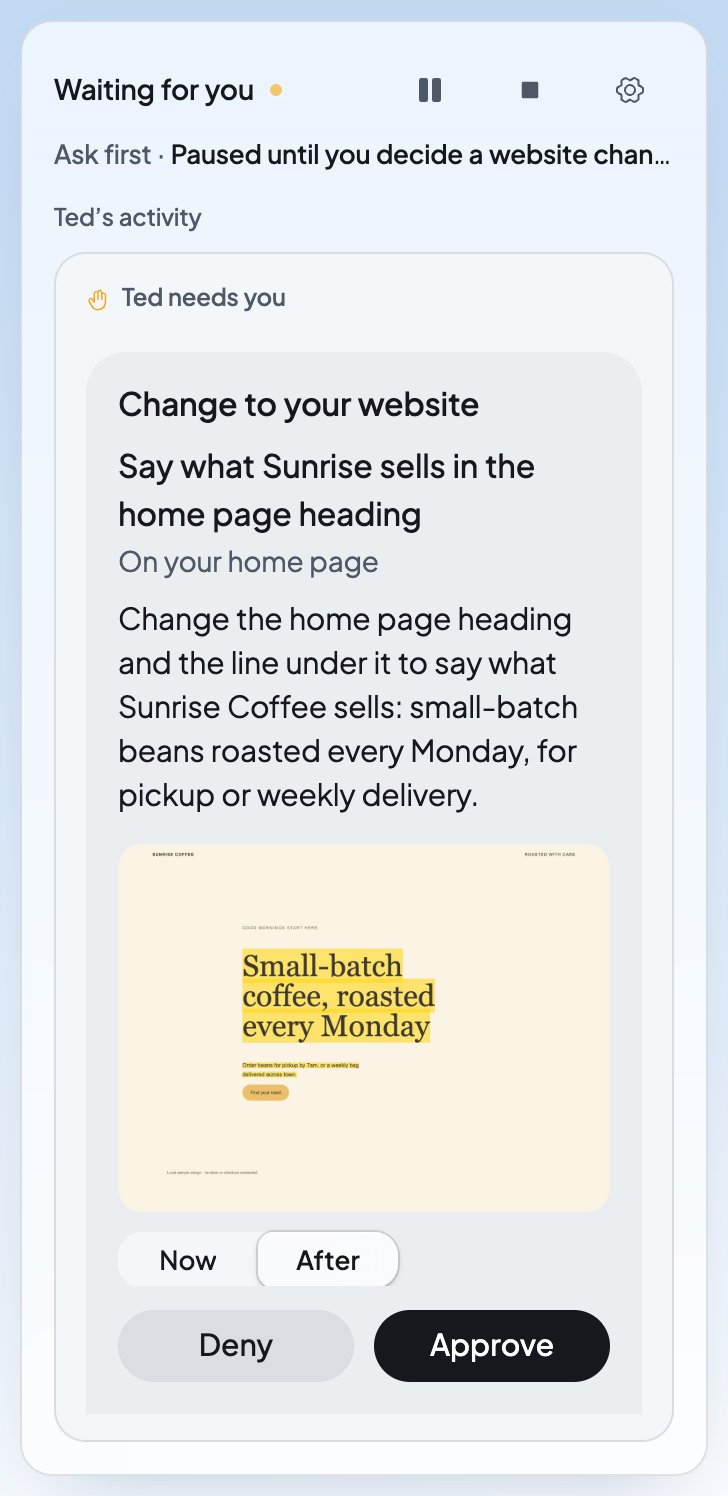
Ted does most of the work in Run, but some calls are yours: a question only you can answer, which work to take on, and any change to your live website. They wait for you under **Ted needs you**, at the foot of Run’s card. When Ted asks you something, or the run pauses for you, the **Run** tab at the top shows a dot.
The emails and posts Ted drafts wait for you too. To review those, see [Approve Ted’s work](/ted/approvals).
 ## What waits for you
| What you see | What it is | What to do |
| - | - | - |
| “Ted asks · Goal 1” and a question | Something only you can tell Ted | Answer it, or press **Later** or **Skip**. |
| A card with **Not now** and **Explore this** | Work Ted plans to do | Pick one. |
| “Change to your website” | A change Ted made to your live website, not yet published | Press **Approve** or **Deny**. |
| **Review** beside a draft in **Ted’s activity** | An email or a post Ted drafted | Press **Review**. See [Approve Ted’s work](/ted/approvals). |
When several things wait, the box shows one at a time, with arrows and a count like “1 of 2”. With **Ask first**, the run pauses until you decide. With **Runs on its own**, it keeps working. See [Ask first or Runs on its own](/run/ask-first-or-on-its-own).
## Answer Ted’s questions
Ted asks when he needs something only you can give him, like a choice, a fact, a link, a file or a connection. Each question says which goal it’s for (“Ted asks · Goal 1”) and why he asks.
| Ted asks for | How to answer |
| - | - |
| A choice | Press one of his answers. His pick is marked “Recommended”. |
| Yes or no | Press **Yes** or **No**. |
| Words, a link or a file | Type in the box, or press **+** to add a file. Then press **Send**. |
| A connected app | Press **Open Integrations**, connect the app, then press **I’ve connected it**. See [Connect your apps](/account/integrations). |
| A secret key | Add the key in your website’s **Build** › **Tools** › **Security** secrets, then press **I’ve added it**. See [Security and secrets](/build/security). |
For most questions, you can also type your own answer in “Or tell him…”. If your answer is long, add it as a file.
* **Later** sets the question aside for now. It stays in the box.
* **Skip** leaves it to Ted: “Skipped. Ted decides himself.”
* After you send an answer, the box says “Sent. Ted reads it next.”
Never paste a key into an answer. If what you type looks like one, the box says “Looks like a key.” Add keys only in your website’s **Security** secrets.
## Pick the work Ted plans
In a run you start, Ted may show you a card for a piece of work he plans, with his reason. Press **Explore this** to have him take it on, or **Not now** to leave it. The run keeps working while a card waits, and the same card shows on [Home](/get-started/home). Only the owner can answer these cards.
Your free first run asks this way too. See [Pick where Ted goes next](/run/first-run#pick-where-ted-goes-next).
## Approve a change to your website
Your website is in Run unless you take it out. Ted checks your live website as he works, and he can change it, for example to make a heading say what you sell. He never publishes the change himself. He saves it and hands it to you to approve or deny.
In Run, it’s under **Ted needs you**. You can also press **Review** beside “Suggested a website change” in **Ted’s activity**, or open it under **From Ted** on Home.
The card says “Change to your website”, what Ted changed and on which page, like “On your home page”. Switch the picture between **Now** and **After** to see the difference. **Open your home page** shows the page in [Build](/build/overview).
Press **Approve** to put the change live, or **Deny** to leave your website as it is. If the card lists more than one change, it says “Approve puts them all live together, and Deny keeps your website as it is now.”
Only the owner or an admin can approve, deny or undo a website change.
### After you decide
| What you see | What it means | What to do |
| - | - | - |
| “Publishing” | You approved the change, and it’s going live. | Wait a moment. |
| “Live” | Visitors see the change. | Press **Undo** if you want your website back the way it was. |
| “Undoing”, then “Undone” | Your website is going back, then is back, to how it was. | Nothing. |
| “Denied” | You turned the change down. Your live website didn’t change. | Nothing. |
| “Replaced by a newer version” | A newer version of your website took its place. If Ted built on this change while it waited, his newest card lists it too. | Nothing. Look at the newest version in [Build](/build/overview). |
| “Too much of the page changed to show in one picture.” | The change is too big for the card’s picture. | Open the page to look at it. |
### How Ted treats your website
* **He builds on a change that waits.** With **Runs on its own**, Ted can keep working on your website while a change waits for you, and his next change joins the same card. While your website has changes you haven’t published, or while it’s publishing, he leaves your live website alone.
* **New things stay unpublished.** A new page or website Ted makes is saved for you to look at. Publish it yourself when you’re ready. See [Publish your website](/build/publish).
* **It comes from your budget.** Ted’s website work in a run is paid from your Run budget.
To keep Ted off your website in Run, open **Website** in the **Build** box and turn off **Use in Run**. Turn it back on whenever you like.
## When an answer doesn’t go through
| What you see | What to do |
| - | - |
| “Couldn’t send your answer. Try again.” | Send it again. What you typed is kept. |
| “This question changed. Look again.” | Read the question again, then answer it. |
| “A file you added isn’t saved yet or is gone. Add it again.” | Add the file again, then send. |
## FAQ
No. In both modes, Ted hands each change to your live website to you. It goes live only when you press **Approve**.
Yes. While the change is live, press **Undo**. You can also go back to any earlier version in [Version history](/build/version-history).
With **Ask first**, the run waits until you answer. With **Runs on its own**, Ted works on his other goals meanwhile. Press **Skip** if you’d rather Ted decide himself.
Only the owner or an admin can approve, deny or undo website changes. Ask one of them, or see [Invite your team](/account/team) for what each role can do.
## Related
Review the emails and posts Ted drafts.
Put the new pages Ted makes online.
Look at any earlier version and go back to it.
Choose when a run waits for you.
This documentation is built and hosted on [Mintlify](https://mintlify.com), a developer documentation platform.
## What waits for you
| What you see | What it is | What to do |
| - | - | - |
| “Ted asks · Goal 1” and a question | Something only you can tell Ted | Answer it, or press **Later** or **Skip**. |
| A card with **Not now** and **Explore this** | Work Ted plans to do | Pick one. |
| “Change to your website” | A change Ted made to your live website, not yet published | Press **Approve** or **Deny**. |
| **Review** beside a draft in **Ted’s activity** | An email or a post Ted drafted | Press **Review**. See [Approve Ted’s work](/ted/approvals). |
When several things wait, the box shows one at a time, with arrows and a count like “1 of 2”. With **Ask first**, the run pauses until you decide. With **Runs on its own**, it keeps working. See [Ask first or Runs on its own](/run/ask-first-or-on-its-own).
## Answer Ted’s questions
Ted asks when he needs something only you can give him, like a choice, a fact, a link, a file or a connection. Each question says which goal it’s for (“Ted asks · Goal 1”) and why he asks.
| Ted asks for | How to answer |
| - | - |
| A choice | Press one of his answers. His pick is marked “Recommended”. |
| Yes or no | Press **Yes** or **No**. |
| Words, a link or a file | Type in the box, or press **+** to add a file. Then press **Send**. |
| A connected app | Press **Open Integrations**, connect the app, then press **I’ve connected it**. See [Connect your apps](/account/integrations). |
| A secret key | Add the key in your website’s **Build** › **Tools** › **Security** secrets, then press **I’ve added it**. See [Security and secrets](/build/security). |
For most questions, you can also type your own answer in “Or tell him…”. If your answer is long, add it as a file.
* **Later** sets the question aside for now. It stays in the box.
* **Skip** leaves it to Ted: “Skipped. Ted decides himself.”
* After you send an answer, the box says “Sent. Ted reads it next.”
Never paste a key into an answer. If what you type looks like one, the box says “Looks like a key.” Add keys only in your website’s **Security** secrets.
## Pick the work Ted plans
In a run you start, Ted may show you a card for a piece of work he plans, with his reason. Press **Explore this** to have him take it on, or **Not now** to leave it. The run keeps working while a card waits, and the same card shows on [Home](/get-started/home). Only the owner can answer these cards.
Your free first run asks this way too. See [Pick where Ted goes next](/run/first-run#pick-where-ted-goes-next).
## Approve a change to your website
Your website is in Run unless you take it out. Ted checks your live website as he works, and he can change it, for example to make a heading say what you sell. He never publishes the change himself. He saves it and hands it to you to approve or deny.
In Run, it’s under **Ted needs you**. You can also press **Review** beside “Suggested a website change” in **Ted’s activity**, or open it under **From Ted** on Home.
The card says “Change to your website”, what Ted changed and on which page, like “On your home page”. Switch the picture between **Now** and **After** to see the difference. **Open your home page** shows the page in [Build](/build/overview).
Press **Approve** to put the change live, or **Deny** to leave your website as it is. If the card lists more than one change, it says “Approve puts them all live together, and Deny keeps your website as it is now.”
Only the owner or an admin can approve, deny or undo a website change.
### After you decide
| What you see | What it means | What to do |
| - | - | - |
| “Publishing” | You approved the change, and it’s going live. | Wait a moment. |
| “Live” | Visitors see the change. | Press **Undo** if you want your website back the way it was. |
| “Undoing”, then “Undone” | Your website is going back, then is back, to how it was. | Nothing. |
| “Denied” | You turned the change down. Your live website didn’t change. | Nothing. |
| “Replaced by a newer version” | A newer version of your website took its place. If Ted built on this change while it waited, his newest card lists it too. | Nothing. Look at the newest version in [Build](/build/overview). |
| “Too much of the page changed to show in one picture.” | The change is too big for the card’s picture. | Open the page to look at it. |
### How Ted treats your website
* **He builds on a change that waits.** With **Runs on its own**, Ted can keep working on your website while a change waits for you, and his next change joins the same card. While your website has changes you haven’t published, or while it’s publishing, he leaves your live website alone.
* **New things stay unpublished.** A new page or website Ted makes is saved for you to look at. Publish it yourself when you’re ready. See [Publish your website](/build/publish).
* **It comes from your budget.** Ted’s website work in a run is paid from your Run budget.
To keep Ted off your website in Run, open **Website** in the **Build** box and turn off **Use in Run**. Turn it back on whenever you like.
## When an answer doesn’t go through
| What you see | What to do |
| - | - |
| “Couldn’t send your answer. Try again.” | Send it again. What you typed is kept. |
| “This question changed. Look again.” | Read the question again, then answer it. |
| “A file you added isn’t saved yet or is gone. Add it again.” | Add the file again, then send. |
## FAQ
No. In both modes, Ted hands each change to your live website to you. It goes live only when you press **Approve**.
Yes. While the change is live, press **Undo**. You can also go back to any earlier version in [Version history](/build/version-history).
With **Ask first**, the run waits until you answer. With **Runs on its own**, Ted works on his other goals meanwhile. Press **Skip** if you’d rather Ted decide himself.
Only the owner or an admin can approve, deny or undo website changes. Ask one of them, or see [Invite your team](/account/team) for what each role can do.
## Related
Review the emails and posts Ted drafts.
Put the new pages Ted makes online.
Look at any earlier version and go back to it.
Choose when a run waits for you.
This documentation is built and hosted on [Mintlify](https://mintlify.com), a developer documentation platform.