> ## Documentation Index
> Fetch the complete documentation index at: https://docs.foundable.com/llms.txt
> Use this file to discover all available pages before exploring further.
# Run: Ted runs your business
> Turn on Run and Ted works on your business in the background, pass after pass. See what he’s doing and thinking, and decide what matters.
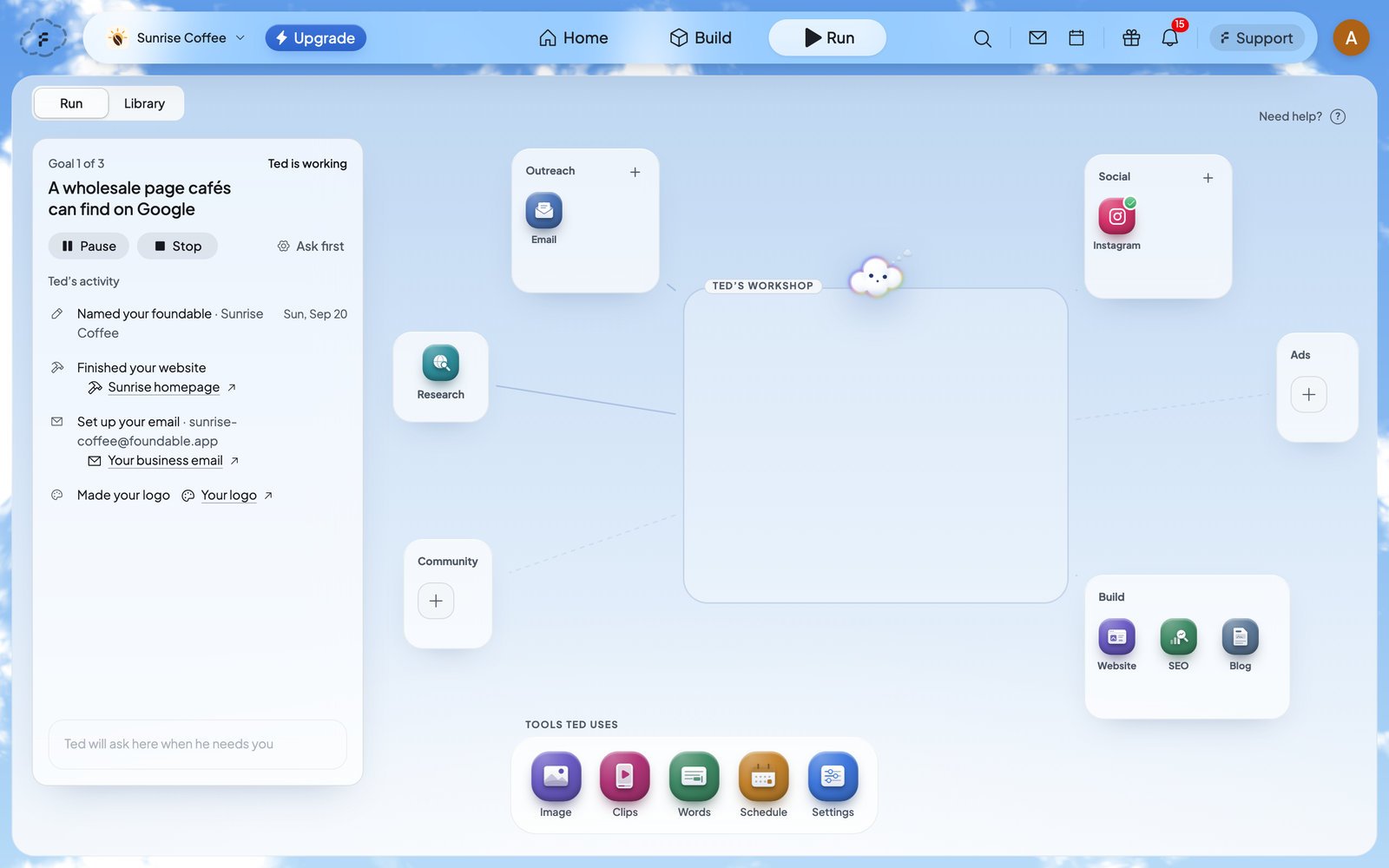
**Run** is the tab where Ted runs your business for you. Turn it on, and he works in the background, [pass](/help/glossary#run-pass) after pass, without being asked. In each pass he picks a useful next step and does it: he looks things up, writes documents and lists, drafts emails and posts, and works on your website.
You can always see what Ted is doing and thinking. What goes public stays your call: you choose whether he asks first or acts on his own, and some things always wait for you.
 Foundable pays for your first run. See what Ted does in it.
Choose how much Ted does without asking you.
Answer Ted’s questions and approve changes to your live website.
## How a run works
A run starts when you press **Start Run**. In each pass, Ted reads where things stand, works toward one of the goals he set for your business, and saves what he made. Then the next pass begins. Run’s card shows the goal he’s on, like “Goal 1 of 3”.
A run keeps going until one of these happens:
* you press **Stop**
* Ted has used the budget you set
* your [credits](/help/glossary#credit) run out
* billing needs attention
* several passes in a row run into problems
So pick a budget you’re comfortable with. **Pause** holds a run at any time, and **Resume** carries on where it stopped. With **Ask first**, a run also waits while something needs your decision. See [Decisions and website changes](/run/decisions).
## Start Run
Press **Run** at the top of the screen.
The boxes on the canvas hold the channels Ted works on. A new Run starts with **Website**, **Email**, **Instagram**, **SEO** and **Blog**. To add another, press **+** on a box, then **+** beside the channel. To let Ted post, [connect your social accounts](/run/social-accounts).
Press the gear on Run’s card to open **Run settings**. Pick how Ted runs: it saves as soon as you pick it. Then choose a tier and a budget, and press **Save preferences**. See [Run settings](#run-settings).
The card says “Ted is working”, and each step he takes appears under **Ted’s activity**.
Only the owner can start, pause, resume or stop Run.
## The Run screen
| Part | What it shows |
| - | - |
| **Run** and **Library**, top left | Switch between the canvas and the [Library](/run/posts-and-library), which keeps everything Ted made. |
| Run’s card, on the left | Where the run stands (“Ready to run”, “Ted is working”, “Run paused”), the goal Ted is on, and **Pause**, **Stop** and Run settings. |
| **Ted’s activity** | Each step Ted takes and each thing he makes, newest at the bottom. **Load earlier activity** shows older passes. A draft waiting for you has **Review** beside it. |
| **Ted needs you** | At the foot of the card: Ted’s questions and the decisions waiting for you. With nothing waiting, it says “Ted will ask here when he needs you”. |
| **Ted’s workshop** | The middle of the canvas. Ted walks to a box, a tool or the **Research** station as he works, and a short line about what he’s doing floats above his head. **Made this run** shows what he made in this run. |
| The boxes | **Outreach** (Email, WhatsApp), **Social** (your social networks), **Ads**, **Community** and **Build** (Website, SEO, Blog). A box shows how many drafts wait for you, like “1 waiting”. Channels marked “Coming soon” aren’t ready yet. |
| **Tools Ted uses** | The tools Ted picks up as he works, such as **Image** and **Words**. **Settings** opens Run settings. |
When Ted asks you something, or the run pauses for you, the **Run** tab at the top shows a dot, so you can see it from anywhere. When Ted finishes something, a note pops up: “I made something for you.” Press **Open** to see it.
## Run settings
Open **Run settings** with the gear on Run’s card, or with **Settings** under **Tools Ted uses**. While a run is on, the button shows its mode, like **Ask first**.
| Setting | Your choices |
| - | - |
| **How Ted runs** | **Ask first**: “Ted waits for your approval before anything goes public”. **Runs on its own**: Ted sends emails and posts by himself where you allow it, and the rest waits for your review. Changes to your live website still wait for your **Approve**. See [Ask first or Runs on its own](/run/ask-first-or-on-its-own). |
| **Tier** | **Standard**, the default: “Ted’s everyday work, and your credits go furthest”. **Premium**: “Ted’s most capable work, at a much higher cost for each step”. |
| **Credits** | The most this run may use. Pick **Light touch**, **Steady clip**, **Big swing** or **Full send** (each shows its limit), or type your own number under **Custom limit**. A custom limit can’t be more than the credits you have. |
Press **Save preferences** when you’re done. The **Image** tool under **Tools Ted uses** has a setting of its own, **Picture quality**, for the pictures Ted makes for posts. Pick **Low** (the default), **Medium** or **High**.
## Pause, resume or stop
* **Pause** holds the run. Press **Resume** to carry on from where Ted stopped.
* **Stop** ends the run. The next time you press **Start Run**, Ted carries on from the goals he set.
Your free first run is different: it can’t be paused or stopped. See [Your free first run](/run/first-run).
## When a run ends
Ted’s **Run summary** opens by itself once, on whatever page you’re on. To open it again, find its row under **From Ted** on [Home](/get-started/home).
The summary starts with how the run ended, the days it covered and the credits it used. Then it counts what Ted did, what he sent or published, what’s scheduled and what’s waiting on you. Under **Needs you** are the drafts still waiting for you (press **Review**), and under **What I made** is everything he made. Press **Talk to Ted** to ask him about the run, or **Done** to close it.
| How it ended | What it means |
| - | - |
| “Stopped” | You pressed **Stop**. |
| “Budget used” | Ted used the budget you set in Run settings. |
| “Credits ran out” | Your credits ran out. |
| “Billing needs attention” | Billing for your plan needs fixing. See [Plans and credits](/account/plans-and-credits). |
| “Stopped after repeated problems” | Several passes in a row ran into problems. |
If you stop a run before Ted spent or made anything, there’s no summary. A run that made nothing shows what Ted was working toward, where he got to and what’s up next, with **Keep going**.
## If Run won’t start
| What you see | What it means | What to do |
| - | - | - |
| “Add an item to Run before starting.” | No channel is in Run. | Add a channel to a box, then press **Start Run** again. |
| “You’re out of credits. See your plan in Settings to start Run.” | There are no credits left for Ted’s work. | Choose a plan or add credits. See [Plans and credits](/account/plans-and-credits). |
| “Billing needs attention before Run can start.” | Billing for your plan needs fixing. | Open **Settings** › **Plans & credit usage**. |
| “Only the owner can start or stop Run.” | Your role can’t start Run. | Ask the owner of the foundable. |
| “Run couldn’t start. Try again.” | Something went wrong for a moment. | Press **Start Run** again. |
## Who can do what
| Role | In Run, they can |
| - | - |
| Owner | Start, pause, resume and stop Run, plus everything an admin can do. |
| Admin | Change Run settings, add channels, connect social accounts, and approve Ted’s posts, emails and website changes. |
| Member | See the canvas and Ted’s activity. The boxes and tools don’t open for them. |
| View only | See what Ted is doing and what he made. They can’t change anything. |
To add people, see [Invite your team](/account/team).
## Plans and credits
Run works on every plan. Foundable pays for your [first run](/run/first-run). After that, Ted’s work in a run uses your credits, up to the budget you set.
A paid plan adds **Runs on its own**, Ted’s posts, and connecting the social accounts he posts to. Without an active plan, Ted asks before he posts or sends anything. See [Plans and credits](/account/plans-and-credits).
## FAQ
No. Run works in the background, whether or not you’re looking. Come back any time and **Ted’s activity** shows what he did.
With **Ask first**, a run waits whenever Ted has something for you to decide. The card says “Waiting for you” and names what waits, like “Paused until you decide a website change.” Decide it, and the next pass starts. See [Decisions and website changes](/run/decisions).
No. Ted can work on your website in a run, but he never publishes it himself. Each change to your live website waits for you to approve or deny it. See [Approve a change to your website](/run/decisions#approve-a-change-to-your-website).
Set a budget under **Credits** in Run settings before you start. The run ends when Ted has used it. **Standard** makes your credits go furthest, and you can press **Pause** or **Stop** at any time.
Yes. Everyone in your foundable can see Run, and their role decides what they can change. See [Who can do what](#who-can-do-what).
Press **Need help?** at the top right of the Run canvas. Ted shows you around again.
## Related
Let Ted post to Instagram, Facebook, LinkedIn, X and Threads.
Everything Ted made, and how your posts are doing.
Review the emails and posts Ted drafts for you.
What a paid plan adds, and how credits work.
This documentation is built and hosted on [Mintlify](https://mintlify.com), a developer documentation platform.
Foundable pays for your first run. See what Ted does in it.
Choose how much Ted does without asking you.
Answer Ted’s questions and approve changes to your live website.
## How a run works
A run starts when you press **Start Run**. In each pass, Ted reads where things stand, works toward one of the goals he set for your business, and saves what he made. Then the next pass begins. Run’s card shows the goal he’s on, like “Goal 1 of 3”.
A run keeps going until one of these happens:
* you press **Stop**
* Ted has used the budget you set
* your [credits](/help/glossary#credit) run out
* billing needs attention
* several passes in a row run into problems
So pick a budget you’re comfortable with. **Pause** holds a run at any time, and **Resume** carries on where it stopped. With **Ask first**, a run also waits while something needs your decision. See [Decisions and website changes](/run/decisions).
## Start Run
Press **Run** at the top of the screen.
The boxes on the canvas hold the channels Ted works on. A new Run starts with **Website**, **Email**, **Instagram**, **SEO** and **Blog**. To add another, press **+** on a box, then **+** beside the channel. To let Ted post, [connect your social accounts](/run/social-accounts).
Press the gear on Run’s card to open **Run settings**. Pick how Ted runs: it saves as soon as you pick it. Then choose a tier and a budget, and press **Save preferences**. See [Run settings](#run-settings).
The card says “Ted is working”, and each step he takes appears under **Ted’s activity**.
Only the owner can start, pause, resume or stop Run.
## The Run screen
| Part | What it shows |
| - | - |
| **Run** and **Library**, top left | Switch between the canvas and the [Library](/run/posts-and-library), which keeps everything Ted made. |
| Run’s card, on the left | Where the run stands (“Ready to run”, “Ted is working”, “Run paused”), the goal Ted is on, and **Pause**, **Stop** and Run settings. |
| **Ted’s activity** | Each step Ted takes and each thing he makes, newest at the bottom. **Load earlier activity** shows older passes. A draft waiting for you has **Review** beside it. |
| **Ted needs you** | At the foot of the card: Ted’s questions and the decisions waiting for you. With nothing waiting, it says “Ted will ask here when he needs you”. |
| **Ted’s workshop** | The middle of the canvas. Ted walks to a box, a tool or the **Research** station as he works, and a short line about what he’s doing floats above his head. **Made this run** shows what he made in this run. |
| The boxes | **Outreach** (Email, WhatsApp), **Social** (your social networks), **Ads**, **Community** and **Build** (Website, SEO, Blog). A box shows how many drafts wait for you, like “1 waiting”. Channels marked “Coming soon” aren’t ready yet. |
| **Tools Ted uses** | The tools Ted picks up as he works, such as **Image** and **Words**. **Settings** opens Run settings. |
When Ted asks you something, or the run pauses for you, the **Run** tab at the top shows a dot, so you can see it from anywhere. When Ted finishes something, a note pops up: “I made something for you.” Press **Open** to see it.
## Run settings
Open **Run settings** with the gear on Run’s card, or with **Settings** under **Tools Ted uses**. While a run is on, the button shows its mode, like **Ask first**.
| Setting | Your choices |
| - | - |
| **How Ted runs** | **Ask first**: “Ted waits for your approval before anything goes public”. **Runs on its own**: Ted sends emails and posts by himself where you allow it, and the rest waits for your review. Changes to your live website still wait for your **Approve**. See [Ask first or Runs on its own](/run/ask-first-or-on-its-own). |
| **Tier** | **Standard**, the default: “Ted’s everyday work, and your credits go furthest”. **Premium**: “Ted’s most capable work, at a much higher cost for each step”. |
| **Credits** | The most this run may use. Pick **Light touch**, **Steady clip**, **Big swing** or **Full send** (each shows its limit), or type your own number under **Custom limit**. A custom limit can’t be more than the credits you have. |
Press **Save preferences** when you’re done. The **Image** tool under **Tools Ted uses** has a setting of its own, **Picture quality**, for the pictures Ted makes for posts. Pick **Low** (the default), **Medium** or **High**.
## Pause, resume or stop
* **Pause** holds the run. Press **Resume** to carry on from where Ted stopped.
* **Stop** ends the run. The next time you press **Start Run**, Ted carries on from the goals he set.
Your free first run is different: it can’t be paused or stopped. See [Your free first run](/run/first-run).
## When a run ends
Ted’s **Run summary** opens by itself once, on whatever page you’re on. To open it again, find its row under **From Ted** on [Home](/get-started/home).
The summary starts with how the run ended, the days it covered and the credits it used. Then it counts what Ted did, what he sent or published, what’s scheduled and what’s waiting on you. Under **Needs you** are the drafts still waiting for you (press **Review**), and under **What I made** is everything he made. Press **Talk to Ted** to ask him about the run, or **Done** to close it.
| How it ended | What it means |
| - | - |
| “Stopped” | You pressed **Stop**. |
| “Budget used” | Ted used the budget you set in Run settings. |
| “Credits ran out” | Your credits ran out. |
| “Billing needs attention” | Billing for your plan needs fixing. See [Plans and credits](/account/plans-and-credits). |
| “Stopped after repeated problems” | Several passes in a row ran into problems. |
If you stop a run before Ted spent or made anything, there’s no summary. A run that made nothing shows what Ted was working toward, where he got to and what’s up next, with **Keep going**.
## If Run won’t start
| What you see | What it means | What to do |
| - | - | - |
| “Add an item to Run before starting.” | No channel is in Run. | Add a channel to a box, then press **Start Run** again. |
| “You’re out of credits. See your plan in Settings to start Run.” | There are no credits left for Ted’s work. | Choose a plan or add credits. See [Plans and credits](/account/plans-and-credits). |
| “Billing needs attention before Run can start.” | Billing for your plan needs fixing. | Open **Settings** › **Plans & credit usage**. |
| “Only the owner can start or stop Run.” | Your role can’t start Run. | Ask the owner of the foundable. |
| “Run couldn’t start. Try again.” | Something went wrong for a moment. | Press **Start Run** again. |
## Who can do what
| Role | In Run, they can |
| - | - |
| Owner | Start, pause, resume and stop Run, plus everything an admin can do. |
| Admin | Change Run settings, add channels, connect social accounts, and approve Ted’s posts, emails and website changes. |
| Member | See the canvas and Ted’s activity. The boxes and tools don’t open for them. |
| View only | See what Ted is doing and what he made. They can’t change anything. |
To add people, see [Invite your team](/account/team).
## Plans and credits
Run works on every plan. Foundable pays for your [first run](/run/first-run). After that, Ted’s work in a run uses your credits, up to the budget you set.
A paid plan adds **Runs on its own**, Ted’s posts, and connecting the social accounts he posts to. Without an active plan, Ted asks before he posts or sends anything. See [Plans and credits](/account/plans-and-credits).
## FAQ
No. Run works in the background, whether or not you’re looking. Come back any time and **Ted’s activity** shows what he did.
With **Ask first**, a run waits whenever Ted has something for you to decide. The card says “Waiting for you” and names what waits, like “Paused until you decide a website change.” Decide it, and the next pass starts. See [Decisions and website changes](/run/decisions).
No. Ted can work on your website in a run, but he never publishes it himself. Each change to your live website waits for you to approve or deny it. See [Approve a change to your website](/run/decisions#approve-a-change-to-your-website).
Set a budget under **Credits** in Run settings before you start. The run ends when Ted has used it. **Standard** makes your credits go furthest, and you can press **Pause** or **Stop** at any time.
Yes. Everyone in your foundable can see Run, and their role decides what they can change. See [Who can do what](#who-can-do-what).
Press **Need help?** at the top right of the Run canvas. Ted shows you around again.
## Related
Let Ted post to Instagram, Facebook, LinkedIn, X and Threads.
Everything Ted made, and how your posts are doing.
Review the emails and posts Ted drafts for you.
What a paid plan adds, and how credits work.
This documentation is built and hosted on [Mintlify](https://mintlify.com), a developer documentation platform.