> ## Documentation Index
> Fetch the complete documentation index at: https://docs.foundable.com/llms.txt
> Use this file to discover all available pages before exploring further.
# Connect your social accounts
> Connect Instagram, Facebook, LinkedIn, X or Threads so Ted can post for your business, and choose the accounts he may use.
Ted posts for your business on the social accounts you connect in **Run**. You connect a network, pick the accounts Ted may use, and choose what he’s allowed to do there.
 ## Before you start
* **A paid plan.** Connecting accounts needs an active plan, whoever connects them. See [Plans and credits](/account/plans-and-credits).
* **The right role.** The owner or an admin connects accounts. Members don’t see **Connect**.
* **Your login for the network.** You sign in to the network yourself to allow access.
## Connect a network
Press **Run** at the top of the screen.
**Instagram** is in the **Social** box already. For another network, press **+** on the **Social** box, then **+** beside the network to add it.
Press the network on the canvas to open it, then press **Connect Instagram** (or the network you picked). You leave Foundable to sign in to the network.
Sign in and allow access. You come back to the network in Run, with “Instagram is connected. Choose the accounts Ted may use.”
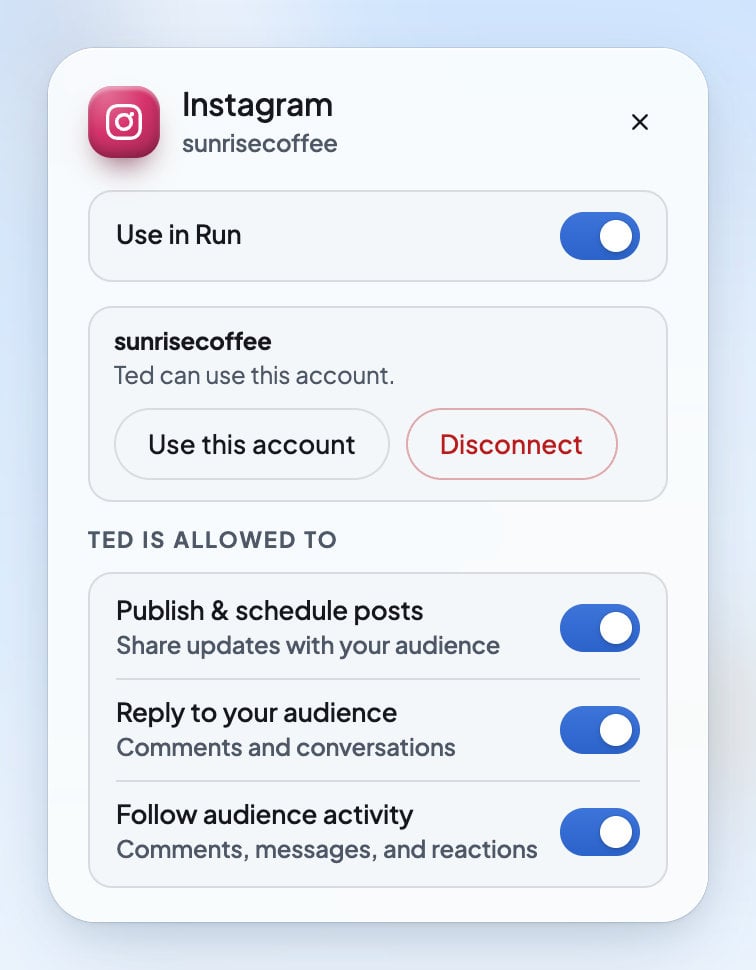
Press **Use this account** on the account Ted should use. It then says “Ted can use this account.”
Make sure **Use in Run** is on at the top, and set the switches under **Ted is allowed to**.
You can also start from the [Library](/run/posts-and-library): its **Connect your channels** or **Connect more channels** row lists the networks you haven’t connected yet.
## Which networks Ted uses
| Network | What Ted does there |
| - | - |
| Instagram, Facebook, LinkedIn, X and Threads, in the **Social** box | Writes, posts and schedules posts for you. |
| TikTok, YouTube, Reddit and Google Business, in the **Social** box | You can connect them, but Ted doesn’t post there. |
| WhatsApp, in the **Outreach** box | You can connect it, but Ted doesn’t send messages there. |
## What Ted is allowed to do
Open a network on the canvas to see its switches under **Ted is allowed to**:
| Switch | What it lets Ted do |
| - | - |
| **Publish & schedule posts** (“Share updates with your audience”) | Post and schedule posts on this network. With **Ask first**, each post still waits for your OK. With **Runs on its own**, Ted posts himself. |
| **Reply to your audience** (“Comments and conversations”) | Draft replies to comments and messages. Each reply waits for the owner or an admin to send it. |
| **Follow audience activity** (“Comments, messages, and reactions”) | Read new comments, messages and reactions as he works. |
**Reply to your audience** and **Follow audience activity** show only on networks whose messages and comments come into Foundable. See [Social messages and comments](/inbox/social-messages).
**Email**, in the **Outreach** box, has switches of its own: **Send outreach emails** (“Start conversations with new customers”) and **Reply to emails** (“Continue conversations in your inbox”). It uses your foundable’s own address. See [Your email address](/inbox/email-address).
To decide how much Ted does without asking, see [Ask first or Runs on its own](/run/ask-first-or-on-its-own).
## Use in Run and your accounts
* **Use in Run**, at the top of a network, puts it in Run. Turn it off, and Ted leaves that network alone, even while it’s connected.
* When a network has more than one account, Ted uses only the ones you pick with **Use this account**. The others say “Ted does not use this account yet.”
* There’s no refresh button. Foundable keeps your accounts in step with the network by itself.
## Disconnect an account
Open the network on the canvas and press **Disconnect** on the account. Foundable asks first: “Disconnect … from Run? You can reconnect anytime.” Once you confirm, Ted stops using that account.
If the network hasn’t confirmed it yet, you see “The provider has not confirmed the disconnect.”
## What you’ll see
| What you see | What it means | What to do |
| - | - | - |
| “Connect Instagram before Ted can use it.” | The network isn’t connected yet. | Press **Connect Instagram**. |
| “Connecting Instagram is still finishing.” | The network is still confirming. | Wait. It finishes by itself. |
| “Instagram did not grant access.” | Access wasn’t allowed. | Press **Connect** again and allow access. |
| “This Instagram connection expired.” | The connection took too long. | Start again from the network in Run. |
| “The connection could not be finished. Start it again from the channel.” | Something interrupted it. | Start again from the network in Run. |
| “Connecting accounts needs an active plan.” | Your foundable has no paid plan. | Choose a plan. See [Plans and credits](/account/plans-and-credits). |
| “The social provider is unavailable. Try again shortly.” | The service that connects networks isn’t answering. | Try again in a little while. |
| “No longer available at the provider.” | The network no longer offers this account to Foundable. | Check the account on the network, then connect it again. |
## FAQ
Instagram, Facebook, LinkedIn, X and Threads. You can also connect TikTok, YouTube, Reddit, Google Business and WhatsApp, but Ted doesn’t post or send there.
Not without you. With **Ask first**, every post waits for your OK. With **Runs on its own**, Ted posts himself only where **Publish & schedule posts** is on.
Only the owner or an admin can connect accounts, and connecting needs a paid plan. Ask the owner, or see [Invite your team](/account/team) for what each role can do.
In your Inbox, under **Social**. See [Social messages and comments](/inbox/social-messages).
Open the network in Run and turn off **Publish & schedule posts**, or turn off **Use in Run** to keep Ted away from it altogether.
## Related
See Ted’s posts and how they’re doing.
Read and answer what people send you.
Choose whether each post waits for your OK.
Connecting accounts needs a paid plan.
This documentation is built and hosted on [Mintlify](https://mintlify.com), a developer documentation platform.
## Before you start
* **A paid plan.** Connecting accounts needs an active plan, whoever connects them. See [Plans and credits](/account/plans-and-credits).
* **The right role.** The owner or an admin connects accounts. Members don’t see **Connect**.
* **Your login for the network.** You sign in to the network yourself to allow access.
## Connect a network
Press **Run** at the top of the screen.
**Instagram** is in the **Social** box already. For another network, press **+** on the **Social** box, then **+** beside the network to add it.
Press the network on the canvas to open it, then press **Connect Instagram** (or the network you picked). You leave Foundable to sign in to the network.
Sign in and allow access. You come back to the network in Run, with “Instagram is connected. Choose the accounts Ted may use.”
Press **Use this account** on the account Ted should use. It then says “Ted can use this account.”
Make sure **Use in Run** is on at the top, and set the switches under **Ted is allowed to**.
You can also start from the [Library](/run/posts-and-library): its **Connect your channels** or **Connect more channels** row lists the networks you haven’t connected yet.
## Which networks Ted uses
| Network | What Ted does there |
| - | - |
| Instagram, Facebook, LinkedIn, X and Threads, in the **Social** box | Writes, posts and schedules posts for you. |
| TikTok, YouTube, Reddit and Google Business, in the **Social** box | You can connect them, but Ted doesn’t post there. |
| WhatsApp, in the **Outreach** box | You can connect it, but Ted doesn’t send messages there. |
## What Ted is allowed to do
Open a network on the canvas to see its switches under **Ted is allowed to**:
| Switch | What it lets Ted do |
| - | - |
| **Publish & schedule posts** (“Share updates with your audience”) | Post and schedule posts on this network. With **Ask first**, each post still waits for your OK. With **Runs on its own**, Ted posts himself. |
| **Reply to your audience** (“Comments and conversations”) | Draft replies to comments and messages. Each reply waits for the owner or an admin to send it. |
| **Follow audience activity** (“Comments, messages, and reactions”) | Read new comments, messages and reactions as he works. |
**Reply to your audience** and **Follow audience activity** show only on networks whose messages and comments come into Foundable. See [Social messages and comments](/inbox/social-messages).
**Email**, in the **Outreach** box, has switches of its own: **Send outreach emails** (“Start conversations with new customers”) and **Reply to emails** (“Continue conversations in your inbox”). It uses your foundable’s own address. See [Your email address](/inbox/email-address).
To decide how much Ted does without asking, see [Ask first or Runs on its own](/run/ask-first-or-on-its-own).
## Use in Run and your accounts
* **Use in Run**, at the top of a network, puts it in Run. Turn it off, and Ted leaves that network alone, even while it’s connected.
* When a network has more than one account, Ted uses only the ones you pick with **Use this account**. The others say “Ted does not use this account yet.”
* There’s no refresh button. Foundable keeps your accounts in step with the network by itself.
## Disconnect an account
Open the network on the canvas and press **Disconnect** on the account. Foundable asks first: “Disconnect … from Run? You can reconnect anytime.” Once you confirm, Ted stops using that account.
If the network hasn’t confirmed it yet, you see “The provider has not confirmed the disconnect.”
## What you’ll see
| What you see | What it means | What to do |
| - | - | - |
| “Connect Instagram before Ted can use it.” | The network isn’t connected yet. | Press **Connect Instagram**. |
| “Connecting Instagram is still finishing.” | The network is still confirming. | Wait. It finishes by itself. |
| “Instagram did not grant access.” | Access wasn’t allowed. | Press **Connect** again and allow access. |
| “This Instagram connection expired.” | The connection took too long. | Start again from the network in Run. |
| “The connection could not be finished. Start it again from the channel.” | Something interrupted it. | Start again from the network in Run. |
| “Connecting accounts needs an active plan.” | Your foundable has no paid plan. | Choose a plan. See [Plans and credits](/account/plans-and-credits). |
| “The social provider is unavailable. Try again shortly.” | The service that connects networks isn’t answering. | Try again in a little while. |
| “No longer available at the provider.” | The network no longer offers this account to Foundable. | Check the account on the network, then connect it again. |
## FAQ
Instagram, Facebook, LinkedIn, X and Threads. You can also connect TikTok, YouTube, Reddit, Google Business and WhatsApp, but Ted doesn’t post or send there.
Not without you. With **Ask first**, every post waits for your OK. With **Runs on its own**, Ted posts himself only where **Publish & schedule posts** is on.
Only the owner or an admin can connect accounts, and connecting needs a paid plan. Ask the owner, or see [Invite your team](/account/team) for what each role can do.
In your Inbox, under **Social**. See [Social messages and comments](/inbox/social-messages).
Open the network in Run and turn off **Publish & schedule posts**, or turn off **Use in Run** to keep Ted away from it altogether.
## Related
See Ted’s posts and how they’re doing.
Read and answer what people send you.
Choose whether each post waits for your OK.
Connecting accounts needs a paid plan.
This documentation is built and hosted on [Mintlify](https://mintlify.com), a developer documentation platform.