> ## Documentation Index
> Fetch the complete documentation index at: https://docs.foundable.com/llms.txt
> Use this file to discover all available pages before exploring further.
# Approve Ted’s work
> What waits for your OK before Ted sends, posts, publishes or buys, where his drafts wait, how to decide, and who on your team can.
Ted does most of the work by himself. But what he writes to go out in your business’s name, like an email or a post, waits as a [draft](/help/glossary#draft) for you to check. Press **Approve** and it goes out. Press **Decline** and it doesn’t.
Ted skips the draft in only two cases. One is when the owner or an admin tells him to send or post something. The other is when [Run](/run/overview) is set to **Runs on its own**, where you allow it. You can also answer a draft in your own words.
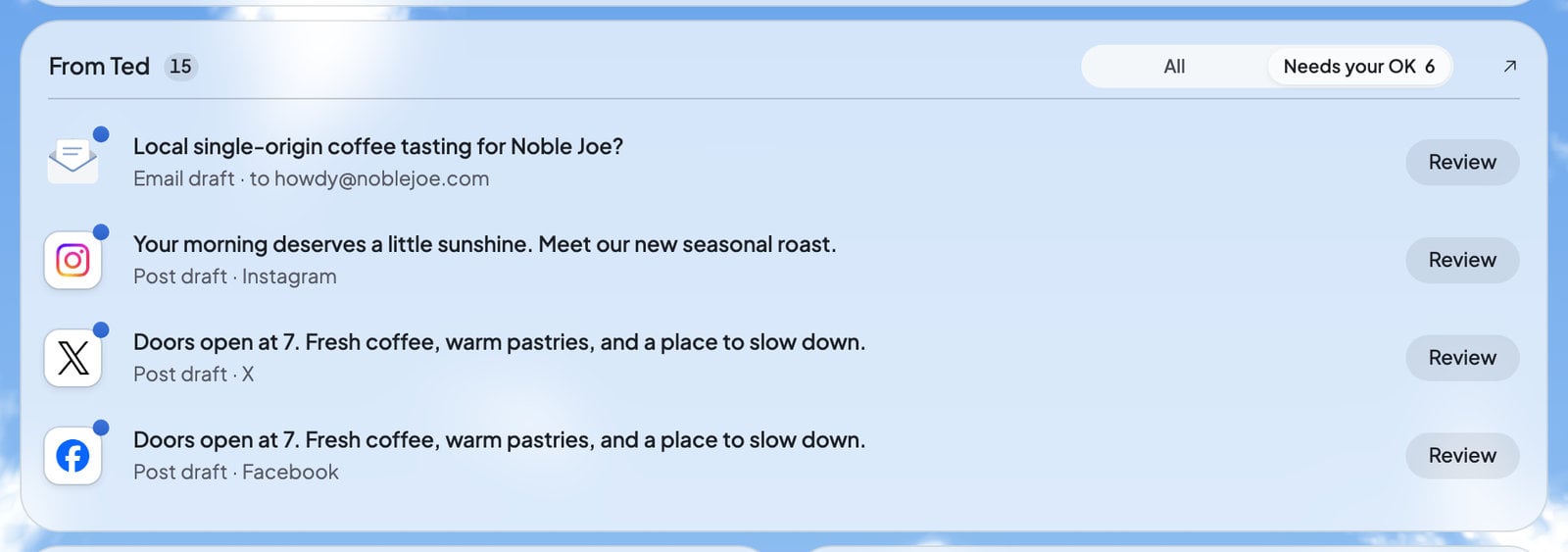 On [Home](/get-started/home), press **Needs your OK** in the From Ted card. The bell at the top right opens the same list.
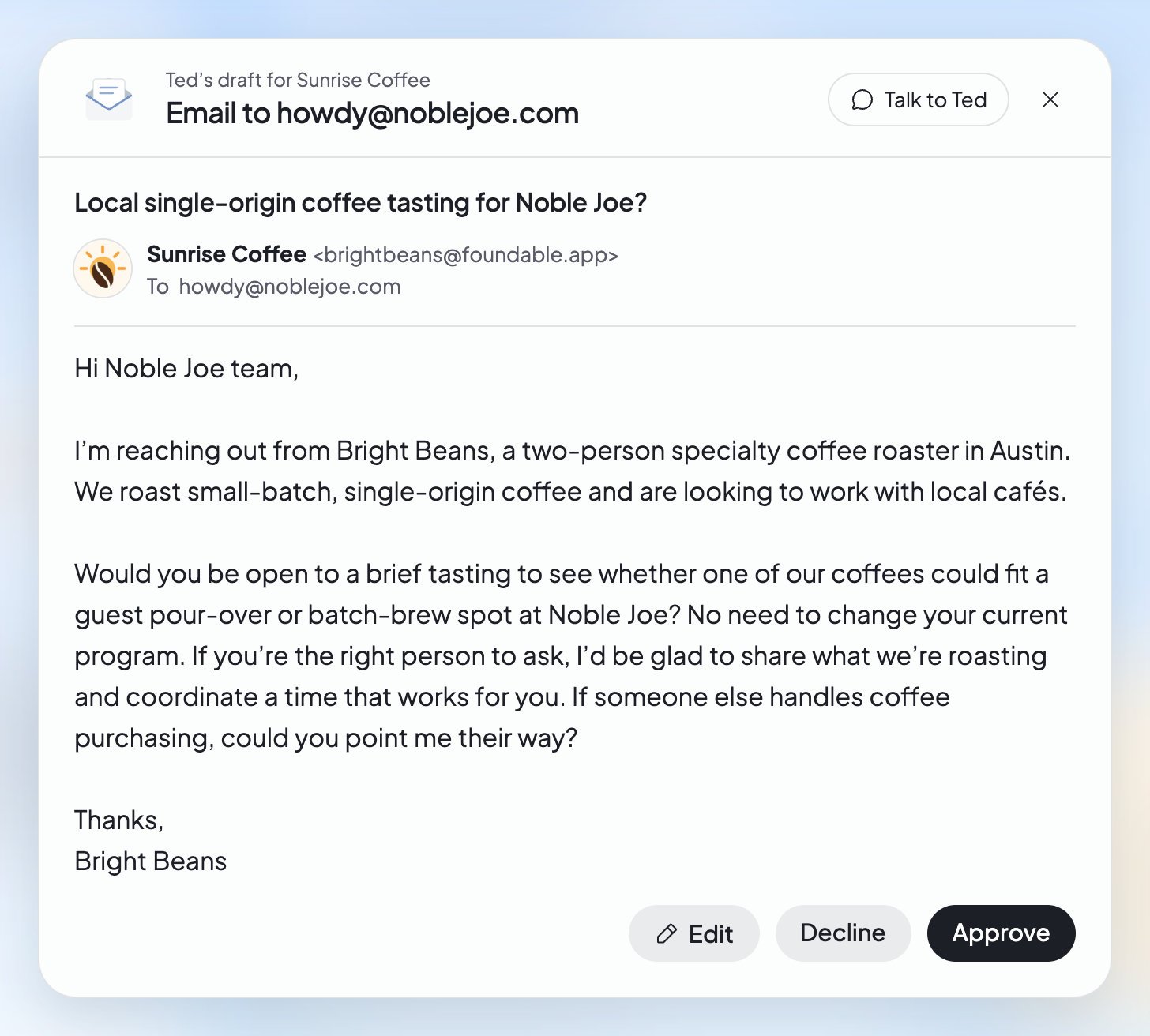
Press **Review**. The draft opens the way it will look when it goes out.
Press **Edit** to change the words yourself, or to ask Ted for another version.
Press **Approve** to send or post it, or **Decline** so it doesn’t go out.
On [Home](/get-started/home), press **Needs your OK** in the From Ted card. The bell at the top right opens the same list.
Press **Review**. The draft opens the way it will look when it goes out.
Press **Edit** to change the words yourself, or to ask Ted for another version.
Press **Approve** to send or post it, or **Decline** so it doesn’t go out.
 ## What waits for your OK
| What Ted prepares | What you press | Learn more |
| - | - | - |
| An email or a reply to an email | **Approve** sends that exact email. **Decline** keeps it from going. | [Emails Ted writes for you](/inbox/teds-emails) |
| A social post | **Approve** posts it now, **Schedule** picks a time, **Decline** sets it aside. | [Posts and the Library](/run/posts-and-library) |
| A reply to a message or comment on social media | Send it, or decline it. | [Social messages and comments](/inbox/social-messages) |
| A newsletter to your website’s subscribers | **Approve** or **Decline**. | [Your website’s emails](/build/website-emails) |
| A change in one of your connected apps | **Approve** or **Decline** on “… change Ted drafted”. A change runs only once. | [Connect your apps](/account/integrations) |
| A change to your live website, made while Run is on | **Approve** publishes it, **Deny** keeps your website as it is. | [Decisions and website changes](/run/decisions) |
| Something new to sell on your website | **Create product**. | [Sell on your website](/payments/sell-on-your-website) |
| A refund | Ted finds the sale on a card, and you confirm the refund. | [Sales and refunds](/payments/sales-and-refunds) |
| A web address | Ted suggests names. Only your press of **Buy** buys one. | [Buy a domain](/domains/buy-a-domain) |
If approving a change in an app would delete something, its card says so first: “Approving this deletes something in” and the app’s name. Ted may also show a new name or logo for your foundable on a card. Nothing on that card changes your foundable until you press its button, like **Use this logo**.
## Answer in your own words
You don’t have to press a button. Reply to a card in your next message, with words like “yes”, “no” or “the second one”. This works for email and post drafts, replies, app changes, new products, refunds, settings, a new name or logo, and web addresses. The card then says what happened, like “Sent from your reply.” or “Approved from your reply.” For an email you turn down, it says “Declined in your reply. This email won’t be sent.” A newsletter or a website change needs its button.
* **A “yes” to a web address doesn’t buy it.** It opens that name’s **Buy** step, and only **Buy** buys it.
* **A changed draft waits.** If the draft changed after your reply, nothing goes: “This email changed after your reply, so it wasn’t sent. Check the new version, then approve it.”
* **A text doesn’t answer a card.** When you [text Ted](/ted/text-ted), he sends a link to anything you need to decide, and you decide in Foundable.
## Change a draft first
In the review, press **Edit**. You can change the words yourself, or choose **Ask Ted** for a quick rewrite, like “Make it shorter” or “Make it friendlier”. The editor tells you: “Credits are used when a new version is saved. Editing the caption yourself is free.” A new version needs your OK again.
To talk it over first, press **Talk to Ted** in the review, and he picks it up in the chat.
## What Ted does without asking
Some things Ted does straight away, with no draft or card:
* **What you tell him to do.** If the owner or an admin tells Ted to send an email or publish a post, he does it right away. The same goes for changing a setting or making a change in a connected app. This works in the chat and by text. Drafts he made on his own still wait.
* **Publishing, when you ask.** Ted publishes your website when you ask him to, without asking again. He never publishes on his own.
* **Website controls, when you ask.** Ask him to take your website offline, or to copy or delete a website, and he does it.
* **Scheduled tasks.** Ted can set up a task to run on a schedule by himself. It shows in [Schedule](/schedule/overview) as “Set up by Ted”. Anything a task drafts waits for you. With **Runs on its own**, Ted can also send or post in a task where you allow it, as he does in Run.
* **His work.** Ted’s work uses [credits](/help/glossary#credit) as he goes, without asking each time. Buying a domain always waits for your **Buy**.
## While Run is on
When Run is on, your choice of mode decides what waits:
* **Ask first**: “Ted waits for your approval before anything goes public”. Each email, post and website change waits for you, and the run pauses until you decide.
* **Runs on its own**: Ted sends emails and publishes posts by himself, where you allow it, and the rest waits for your review. It needs a paid plan.
In both modes, every change to your live website waits for your **Approve** or **Deny**. Replies to people’s messages and comments wait for you too. Your free first run sends nothing and publishes nothing: its email waits for your OK. See [Ask first or Runs on its own](/run/ask-first-or-on-its-own).
## Who can approve
| Decision | Who can make it |
| - | - |
| Approve or send emails, posts, replies and newsletters | The owner or an admin |
| Approve website changes and connected-app changes | The owner or an admin |
| Create a product, or refund a sale | The owner or an admin |
| Start the first build, or change the foundable’s email address | Only the owner |
Teammates who can’t decide see the same drafts under “Waiting for approval” instead of “Needs your OK”. The card says who can decide, like “Only the owner or an admin can send email.” A view-only teammate sees the cards with no buttons. See [Invite your team](/account/team).
## What you’ll see
| What you see | What it means | What to do |
| - | - | - |
| “Needs your OK” | Drafts waiting for you to decide. | Press **Review** on each. |
| “Waiting for approval” | Drafts waiting for the owner or an admin. | Ask one of them to decide. |
| “Approved · Publishing” | You approved it, and it’s going out. | Nothing. |
| “Declined” | You declined it. Nothing went out. | Nothing. |
| “Can’t be sent” | Someone on this email can’t receive email. | Edit the email, or decline it. See [Emails Ted writes for you](/inbox/teds-emails). |
| “This email changed after your reply, so it wasn’t sent. Check the new version, then approve it.” | The draft changed after your “yes”. | Review the new version, then approve it. |
## FAQ
Only in two cases. One is when the owner or an admin tells him to. The other is when Run is set to **Runs on its own** and you’ve let him post and send. Then he can do it in Run and in his scheduled tasks. Everything else he drafts waits for your OK.
Nothing goes out. The draft waits under “Needs your OK” until someone decides. In **Ask first**, Run waits for you too.
Ted sets it aside, and the review tells you for how long you can bring it back. See [Posts and the Library](/run/posts-and-library).
Yes. While the change is live, its card offers **Undo**. See [Decisions and website changes](/run/decisions).
An admin can. A member sees drafts under “Waiting for approval” and can’t send them. See [Invite your team](/account/team).
## Related
What Run hands you to decide.
Choose how much Ted does alone in Run.
Review, edit and send Ted’s email drafts.
Talk to Ted, and answer his cards.
This documentation is built and hosted on [Mintlify](https://mintlify.com), a developer documentation platform.
## What waits for your OK
| What Ted prepares | What you press | Learn more |
| - | - | - |
| An email or a reply to an email | **Approve** sends that exact email. **Decline** keeps it from going. | [Emails Ted writes for you](/inbox/teds-emails) |
| A social post | **Approve** posts it now, **Schedule** picks a time, **Decline** sets it aside. | [Posts and the Library](/run/posts-and-library) |
| A reply to a message or comment on social media | Send it, or decline it. | [Social messages and comments](/inbox/social-messages) |
| A newsletter to your website’s subscribers | **Approve** or **Decline**. | [Your website’s emails](/build/website-emails) |
| A change in one of your connected apps | **Approve** or **Decline** on “… change Ted drafted”. A change runs only once. | [Connect your apps](/account/integrations) |
| A change to your live website, made while Run is on | **Approve** publishes it, **Deny** keeps your website as it is. | [Decisions and website changes](/run/decisions) |
| Something new to sell on your website | **Create product**. | [Sell on your website](/payments/sell-on-your-website) |
| A refund | Ted finds the sale on a card, and you confirm the refund. | [Sales and refunds](/payments/sales-and-refunds) |
| A web address | Ted suggests names. Only your press of **Buy** buys one. | [Buy a domain](/domains/buy-a-domain) |
If approving a change in an app would delete something, its card says so first: “Approving this deletes something in” and the app’s name. Ted may also show a new name or logo for your foundable on a card. Nothing on that card changes your foundable until you press its button, like **Use this logo**.
## Answer in your own words
You don’t have to press a button. Reply to a card in your next message, with words like “yes”, “no” or “the second one”. This works for email and post drafts, replies, app changes, new products, refunds, settings, a new name or logo, and web addresses. The card then says what happened, like “Sent from your reply.” or “Approved from your reply.” For an email you turn down, it says “Declined in your reply. This email won’t be sent.” A newsletter or a website change needs its button.
* **A “yes” to a web address doesn’t buy it.** It opens that name’s **Buy** step, and only **Buy** buys it.
* **A changed draft waits.** If the draft changed after your reply, nothing goes: “This email changed after your reply, so it wasn’t sent. Check the new version, then approve it.”
* **A text doesn’t answer a card.** When you [text Ted](/ted/text-ted), he sends a link to anything you need to decide, and you decide in Foundable.
## Change a draft first
In the review, press **Edit**. You can change the words yourself, or choose **Ask Ted** for a quick rewrite, like “Make it shorter” or “Make it friendlier”. The editor tells you: “Credits are used when a new version is saved. Editing the caption yourself is free.” A new version needs your OK again.
To talk it over first, press **Talk to Ted** in the review, and he picks it up in the chat.
## What Ted does without asking
Some things Ted does straight away, with no draft or card:
* **What you tell him to do.** If the owner or an admin tells Ted to send an email or publish a post, he does it right away. The same goes for changing a setting or making a change in a connected app. This works in the chat and by text. Drafts he made on his own still wait.
* **Publishing, when you ask.** Ted publishes your website when you ask him to, without asking again. He never publishes on his own.
* **Website controls, when you ask.** Ask him to take your website offline, or to copy or delete a website, and he does it.
* **Scheduled tasks.** Ted can set up a task to run on a schedule by himself. It shows in [Schedule](/schedule/overview) as “Set up by Ted”. Anything a task drafts waits for you. With **Runs on its own**, Ted can also send or post in a task where you allow it, as he does in Run.
* **His work.** Ted’s work uses [credits](/help/glossary#credit) as he goes, without asking each time. Buying a domain always waits for your **Buy**.
## While Run is on
When Run is on, your choice of mode decides what waits:
* **Ask first**: “Ted waits for your approval before anything goes public”. Each email, post and website change waits for you, and the run pauses until you decide.
* **Runs on its own**: Ted sends emails and publishes posts by himself, where you allow it, and the rest waits for your review. It needs a paid plan.
In both modes, every change to your live website waits for your **Approve** or **Deny**. Replies to people’s messages and comments wait for you too. Your free first run sends nothing and publishes nothing: its email waits for your OK. See [Ask first or Runs on its own](/run/ask-first-or-on-its-own).
## Who can approve
| Decision | Who can make it |
| - | - |
| Approve or send emails, posts, replies and newsletters | The owner or an admin |
| Approve website changes and connected-app changes | The owner or an admin |
| Create a product, or refund a sale | The owner or an admin |
| Start the first build, or change the foundable’s email address | Only the owner |
Teammates who can’t decide see the same drafts under “Waiting for approval” instead of “Needs your OK”. The card says who can decide, like “Only the owner or an admin can send email.” A view-only teammate sees the cards with no buttons. See [Invite your team](/account/team).
## What you’ll see
| What you see | What it means | What to do |
| - | - | - |
| “Needs your OK” | Drafts waiting for you to decide. | Press **Review** on each. |
| “Waiting for approval” | Drafts waiting for the owner or an admin. | Ask one of them to decide. |
| “Approved · Publishing” | You approved it, and it’s going out. | Nothing. |
| “Declined” | You declined it. Nothing went out. | Nothing. |
| “Can’t be sent” | Someone on this email can’t receive email. | Edit the email, or decline it. See [Emails Ted writes for you](/inbox/teds-emails). |
| “This email changed after your reply, so it wasn’t sent. Check the new version, then approve it.” | The draft changed after your “yes”. | Review the new version, then approve it. |
## FAQ
Only in two cases. One is when the owner or an admin tells him to. The other is when Run is set to **Runs on its own** and you’ve let him post and send. Then he can do it in Run and in his scheduled tasks. Everything else he drafts waits for your OK.
Nothing goes out. The draft waits under “Needs your OK” until someone decides. In **Ask first**, Run waits for you too.
Ted sets it aside, and the review tells you for how long you can bring it back. See [Posts and the Library](/run/posts-and-library).
Yes. While the change is live, its card offers **Undo**. See [Decisions and website changes](/run/decisions).
An admin can. A member sees drafts under “Waiting for approval” and can’t send them. See [Invite your team](/account/team).
## Related
What Run hands you to decide.
Choose how much Ted does alone in Run.
Review, edit and send Ted’s email drafts.
Talk to Ted, and answer his cards.
This documentation is built and hosted on [Mintlify](https://mintlify.com), a developer documentation platform.