

Switch to another foundable
- Computer
- Phone
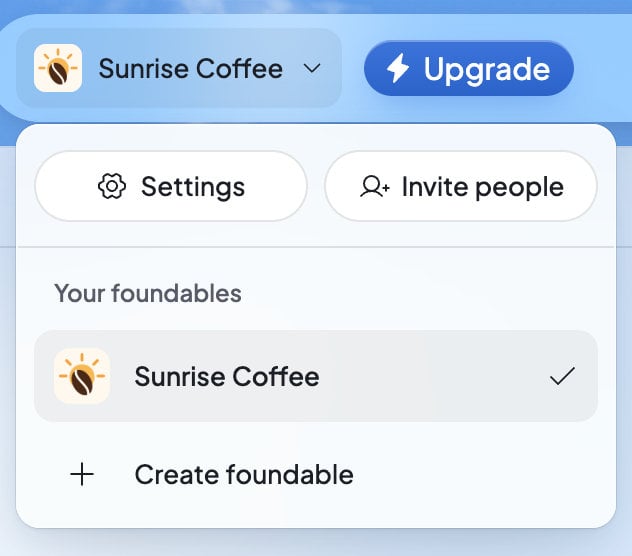
Press your foundable’s name at the top left. Under “Your foundables”, pick the one you want. A check marks the one you have open.
Start another foundable
1
Open the switcher
Press your foundable’s name at the top left.
2
Press Create foundable
It’s at the bottom of the menu. If you have no foundable yet, it reads Create your first foundable.
3
Tell Ted about the business
The new foundable is called “New foundable” until it has a name. Tell Ted about the business, and he names it when he saves its plan. See Start your business with Ted.
After you buy a plan for it, the welcome window for your new plan offers Start your new foundable.
Change the name or tagline
1
Open General
Press your foundable’s name at the top left, then Settings.
2
Change the words
Type a new Name, or a Tagline: “One line about this foundable”. A foundable can’t be left without a name.
3
Save
Press Save changes. You’ll see “Foundable details saved.”
Change the logo
Your first logo is made for you once your business has a name. To change it, open Settings, then General, and press the logo.- Upload a logo (or Upload a new logo): choose a PNG, JPEG, WebP, HEIC or SVG picture. Crop your logo opens. Drag it and use Zoom until it looks right, then press Save.
- Saved logos: the logos you’ve chosen or uploaded, and the ones Ted made. “Switch logos across your websites. Your other changes stay as they are.” The logo you use now is marked In use. Pick another, then press Use this logo. Load earlier logos shows older ones.
- Remove logo: takes the logo off.
Set the foundable’s time zone
Foundable time in General is “The local time for this foundable’s briefs and schedules.” Choose Automatic or a time zone, then press Save changes. Only the owner can change it. It isn’t the same as Your local time in your own account settings. See Your local time and Foundable time.Delete a foundable
1
Open General
Press your foundable’s name at the top left, then Settings.
2
Press Delete foundable
It’s under Danger zone, at the bottom of General.
3
Confirm
The window “Delete foundable?” says “Its site goes offline, its scheduled posts are cancelled and it is gone for good. This can’t be undone.” Type the foundable’s name, then press Delete foundable.
- Its website goes offline, and any checkout a customer still has open closes.
- Its scheduled posts are cancelled.
- Its mailbox, the phones linked to Ted for it, its connected social accounts and apps, and its website’s database are shut down. Then its data is erased.
- A domain you bought for it stays registered to you. It shows under All domains, and you can move it to another foundable. See Manage your domains.
Leave a foundable you don’t own
If you were invited to someone else’s foundable, you can leave it instead. Open Settings, then Team. Press … on your own row, then Leave foundable…. See Invite your team.Who can do what
If something goes wrong
FAQ
Why is my foundable called “New foundable”?
Why is my foundable called “New foundable”?
A foundable has no name until Ted saves its plan with you, or until you type one in Settings › General › Name.
Does renaming change my website or email address?
Does renaming change my website or email address?
No. Your website’s address and your email address stay as they are. After a rename in the chat, Ted’s card offers Change email address if you want a new one.
Can I have more than one foundable?
Can I have more than one foundable?
Yes, on a plan with room for more. The Free plan includes one. Press Create foundable in the switcher, and Foundable shows you the plans if yours is full.
Can I get a deleted foundable back?
Can I get a deleted foundable back?
No. Deleting a foundable can’t be undone, so take a moment before you confirm.
Can my teammates delete the foundable?
Can my teammates delete the foundable?
No. Only the owner can delete it or change its time zone. Admins and members can change its name, tagline and logo.
Related

Settings
Everything you can change, and where to find it.

Invite your team
Bring in people to work on this foundable with you and Ted.

Plans and credits
See which plans have room for more foundables.

Start your business with Ted
What happens in a new foundable’s first minutes.