

Before you start
- A paid plan. “Buying and renewing domains needs an active plan.” On the Free plan, pressing Buy shows the plans instead.
- The owner or an admin. Members see the names and prices, with “Only the owner or an admin can buy domains.”
- Enough credits for the name you choose. Its price shows before you buy.
Buy a domain in Settings
1
Open Settings › Domains
Open the account menu (your initial or photo at the top right), choose Settings, then Domains. On a phone, tap More, then Settings.
2
Search for a name
Under Buy a domain, type the name you want where it says “Search a name, like sunroomstudio”, then press Search. Each available name shows its price in credits for the first year. Press View more endings to see more.
3
Press Buy
Press Buy next to the domain you want. A short summary opens with the name and its price. Nothing is charged yet, and Cancel takes you back.
4
Confirm
Press the Buy for button. It names the credits it spends. Under it, Foundable reminds you: “By buying, you agree to the Domain Holding Agreement.” and “It renews yearly until you turn it off.”
5
Let it go live
You see “Setting up” with your new domain: “Usually ready in 5–15 minutes. It goes live on its own, and Your domains says when.”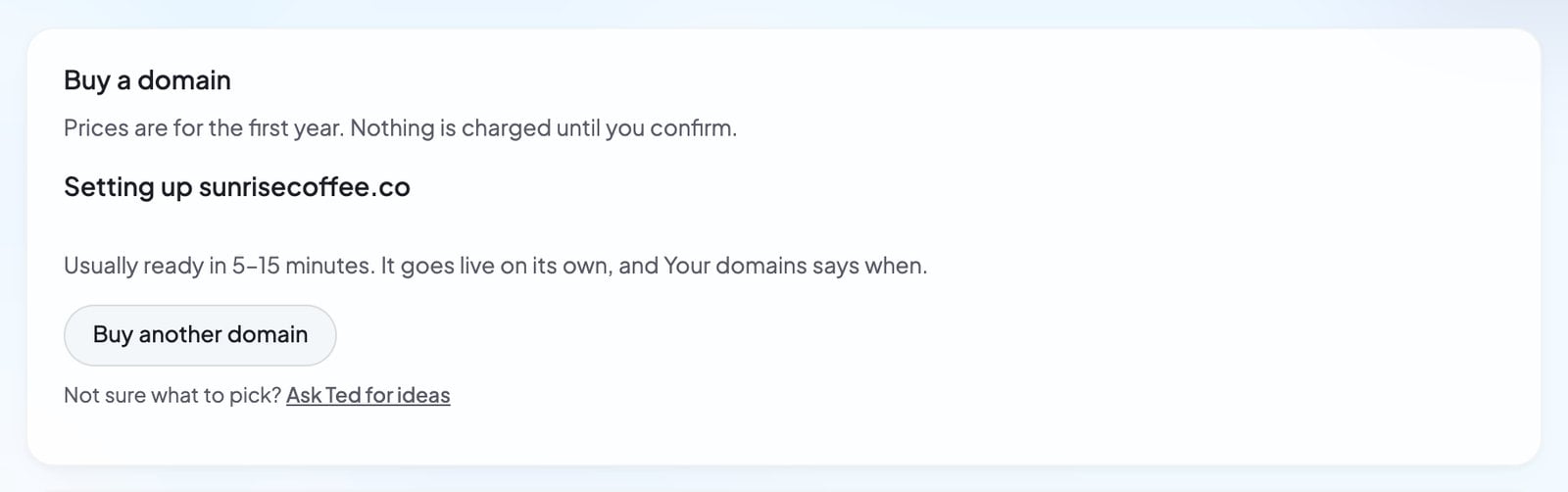
What the search shows
Ask Ted to find a domain
Not sure what to choose? Ted can suggest names that fit your business.- Press Ask Ted for ideas under the search, or Add your own domain in Your next steps on Home.
- Build opens with “Find me a domain for” and your foundable’s name in Ted’s message box. Add anything you have in mind, then send it.
- Ted answers with a card titled “Domains”. His picks come first, each with its price, and the first is marked “Recommended”.
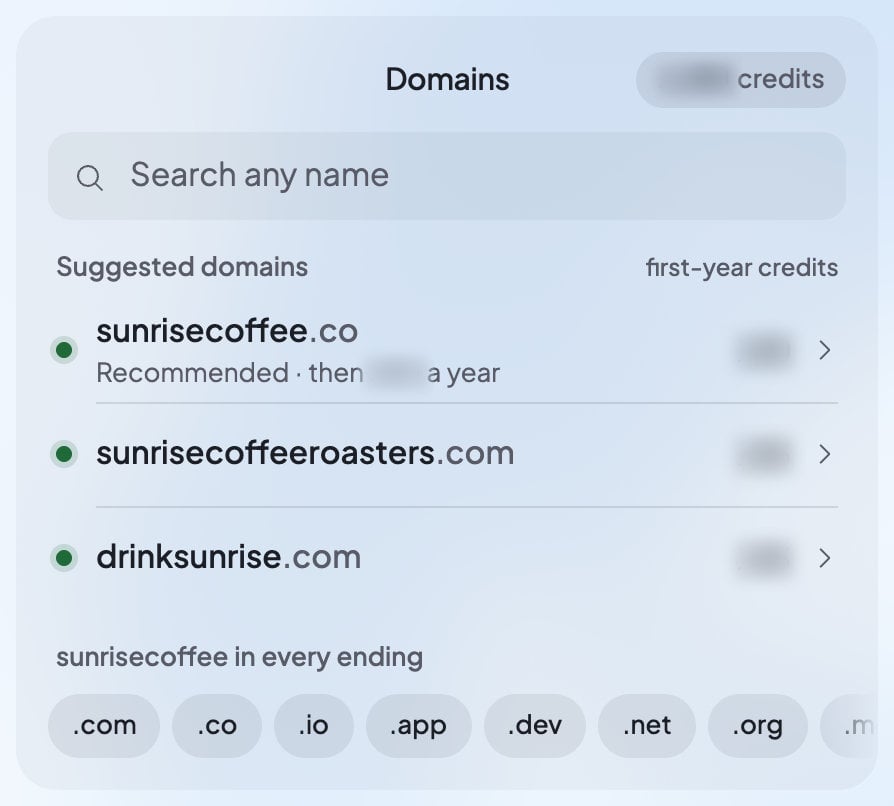
- Type in Search any name to check your own idea, or press an ending to try your business’s name with it.
- Press All to see every result, or the other filter to see only the less expensive names.
- Press More endings for more choices. Names nobody can buy here gather on one line: “Not available: …”.
- Tap a name to open its Buy step. You see “Checking price…”, then the Buy for button with the same two lines under it as in Settings. Back returns to the list.
Ted never buys a domain for you. If you type “yes” or “the second one” in the chat, the card opens that name’s Buy step. Nothing is bought until you press Buy for yourself.
After you buy
Your domain appears under Your domains in Settings › Domains, newest first.
Once your domain is set up, its row shows the day it renews from your credits, with its Auto-renew switch at the end.
If buying doesn’t work
Who owns the domain
Foundable registers the domain and holds it in trust for your foundable. When you buy, you agree to the Domain Holding Agreement, which explains the details.- Renewal: while Auto-renew is on, Foundable renews the domain from your credits before its year ends.
- Running short: if your credits can’t cover a renewal, the domain isn’t renewed. Foundable doesn’t renew a domain after it expires.
- Leaving later: you can move the domain to another registrar. New domains are locked for a while first: “ICANN requires a 60-day lock on new domains, which Foundable can’t override.”
FAQ
Do I need to add DNS records?
Do I need to add DNS records?
No. Foundable points a domain you buy at your website for you. If you want to connect other services to it later, like a shop or Google’s site check, add records on the domain’s page. See DNS records.
How long until my domain works?
How long until my domain works?
“Usually ready in 5–15 minutes.” It goes live on its own, and Your domains says when.
Can I pay for a domain with a card?
Can I pay for a domain with a card?
No. Domains are paid for with credits. If you don’t have enough, upgrade your plan for more credits. See Plans and credits.
Am I charged if the purchase fails?
Am I charged if the purchase fails?
No. If someone takes the name first, you see “You weren’t charged.” If the order is turned down later, your credits come back. Pressing Buy twice never charges you twice.
Can a teammate buy a domain?
Can a teammate buy a domain?
An admin can. Members see the names and prices, but only the owner or an admin can buy. Like all work in your foundable, a purchase uses the owner’s credits.
What happens to my domain if I delete my foundable?
What happens to my domain if I delete my foundable?
It stays registered, and All domains lists it marked deleted: “This domain isn’t renewed or connected to a site until you move it to one of your foundables.” See Move a domain to another foundable.
Related

Manage your domains
Auto-renew, renewals, DNS records and moves.

Connect a domain you own
Already have a domain? Connect it instead.

Plans and credits
How credits work and how to get more.

Use your own domain
Buying, connecting and your primary domain.