

Before you start
- A paid plan. Inviting people needs one, and every paid plan includes it. See Plans and credits.
- The right role. The owner and admins can invite people. Admins can invite members and viewers; only the owner can invite admins.
Invite people by email
1
Open Team
Open Settings, then Team. Or press your foundable’s name at the top left, then Invite people.
2
Press Invite people
It’s at the top of Team, beside Invite link.
3
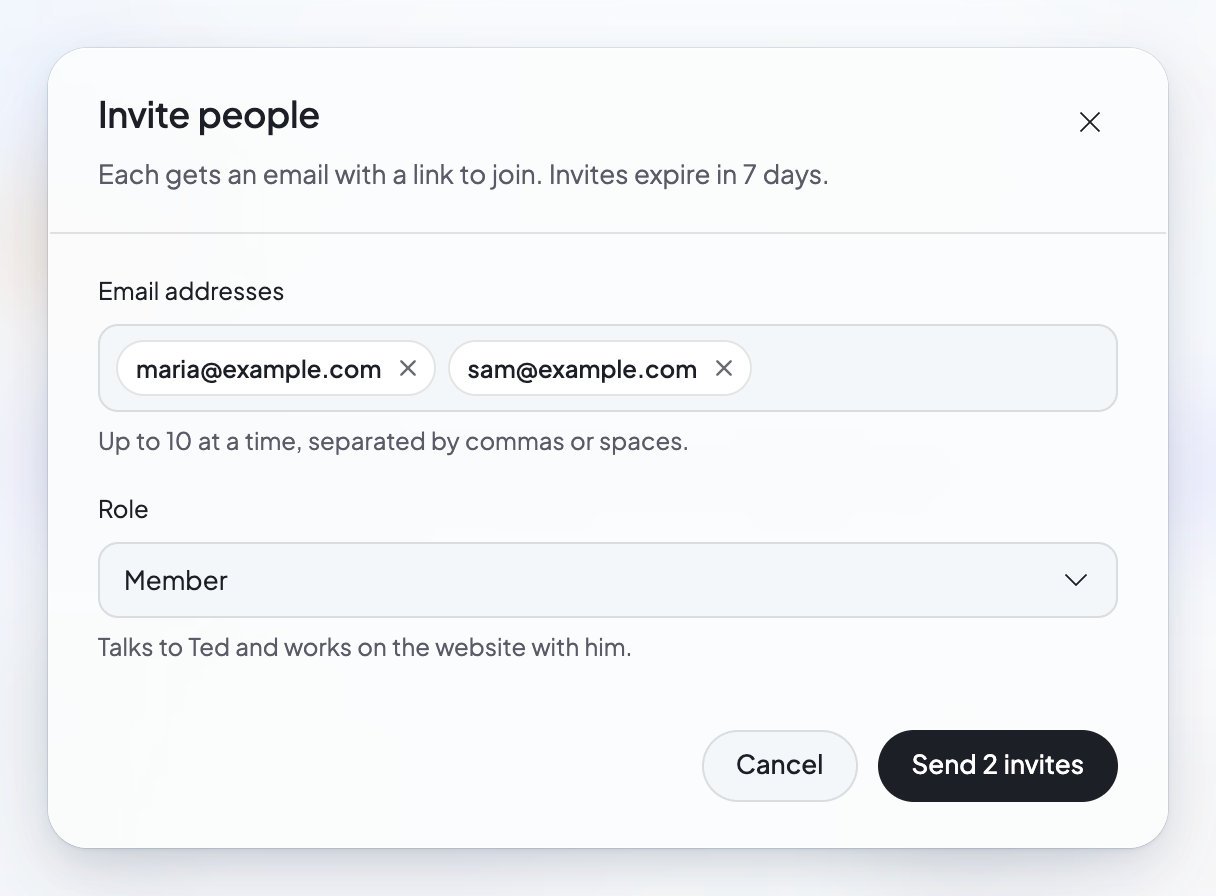
Add their email addresses
Type them under Email addresses: “Up to 10 at a time, separated by commas or spaces.”
4
Pick a role
Choose their Role. A new invitation starts on Member. See Roles.
5
Send it
Press Send invite. With several addresses, the button counts the invites for you. You’ll see “Invitation sent to” and their addresses.
Share an invite link
An invite link is handy when you’d rather send a message than an email. “Anyone who opens it can join this foundable with the role you pick, so you can send it in a chat or by text.”1
Press Invite link
It’s at the top of Team.
2
Pick the role
Each role has its own link.
3
Create the link
Press Create invite link. “Make one to send in a chat. It works for 7 days.”
4
Send it
Press Copy link, or Share on a phone, and send it in a chat or a text.
Roles
Team lists what each role can do under What each role can do: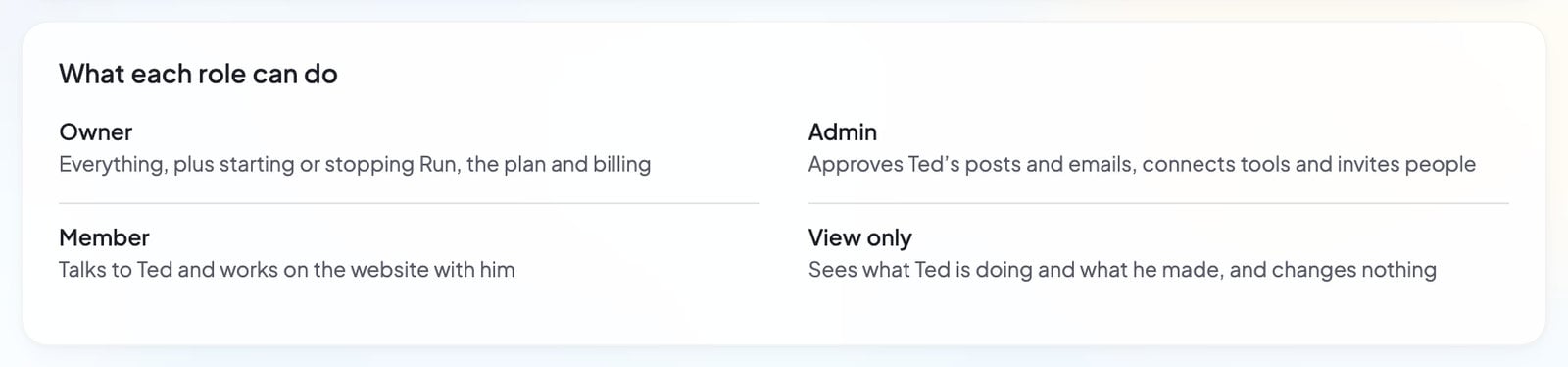
Ted leads the list, as your “Employee” with the tag “AI”: “Runs this foundable with you.” For what each role can do in Build, see Build your website.
What your teammate sees
An email invite. Its subject says that you invited them to your foundable on Foundable. The email has an Accept invite button and asks them to log in with their address to accept. “The invite expires in 7 days.” It works only for the email address you sent it to. The join page. The invite opens a page that says “You’re invited”.- If they aren’t logged in, they press Log in or Create an account. “If your invite came by email, use that address.”
- Once they’re logged in, the page says which role they’ll join with, like “You’ll join as a member”. They press the Join button, which names your foundable, and the foundable opens.
Manage your team
Everyone in the foundable shows in Team, after Ted. Use Search people to find someone. An invitation that’s waiting reads “Invited · expires in” and the time left, or “Invited · expired”. Press … at the end of a row for:- Resend invite: sends the invitation again.
- Cancel invite…: asks “Cancel invite?” first, then stops the invitation.
- Remove from foundable…: asks “Remove from foundable?” first. The person loses access at once. “Their own chats, texts and files in it are deleted; the work they saved stays.” Any invite links stop working too, so they can’t rejoin with one.
- Leave foundable…: on your own row. See Leave a foundable.
Change someone’s role
Only the owner can change roles. Pick a new one in the person’s Role list, and Team confirms it, for example “… is now an admin.” Making someone view-only asks first. They’ll still see the foundable, but they “can’t change anything or ask Ted for work. Their phone stops texting Ted, and invite links for members and admins stop working, so they can’t rejoin with more.” Press Make view-only to go ahead.Leave a foundable
If you’re on someone else’s team, open Settings, then Team, and press … on your own row. Choose Leave foundable…. “You’ll lose access to this foundable at once. Your own chats, texts and files in it are deleted; the work you saved stays.” The owner can’t leave their own foundable.Credits and your team
Your teammates spend your credits. There are no separate budgets. As the owner, you see each person’s Credits this month in Team. Under This month, you also see where the month’s credits went: Asked by your team, Ted on his own, and Domains and apps. Ted can also invite people and make invite links for you, with the same rules as everyone else. If your paid plan ends, your team ends with it: after a grace period, teammates are removed, and invitations and links are cancelled.If something goes wrong
FAQ
Do my teammates need their own plan?
Do my teammates need their own plan?
No. They need a Foundable account to log in, but the work they ask Ted for uses the owner’s credits.
Can I limit how much a teammate spends?
Can I limit how much a teammate spends?
There are no per-person budgets. As the owner, you can see what each person used this month in Team, under Credits this month.
How many people can I add?
How many people can I add?
Up to 50 people beside the owner, counting invitations that are still waiting. When you reach it, Team says “This foundable is full”.
I invited the wrong email address. What now?
I invited the wrong email address. What now?
Press … on the invitation, then Cancel invite…. Then invite the right address.
My teammate says the invite was sent to another email.
My teammate says the invite was sent to another email.
An email invite works only for the address it was sent to. They should log in with that address. The join page shows which address they’re logged in with, and a “Not you?” link to switch.
Can an admin make someone else an admin?
Can an admin make someone else an admin?
No. Admins can invite and remove members and viewers. Only the owner can invite admins or change anyone’s role.
Related

Plans and credits
Every paid plan lets you invite your team.

Approve Ted’s work
What the owner and admins approve before it goes out.

Your foundables
Switch between foundables, or leave one you don’t own.

Settings
Who can change what in Settings.