

Before you start
- Connect your social accounts in Run and choose the accounts Ted may use. See Connect your social accounts.
- A paid plan. Connecting social accounts needs one.
- The owner or an admin. Only they can connect accounts and reply here. Everyone in your foundable can read the messages.
Answer a message
1
Open Social
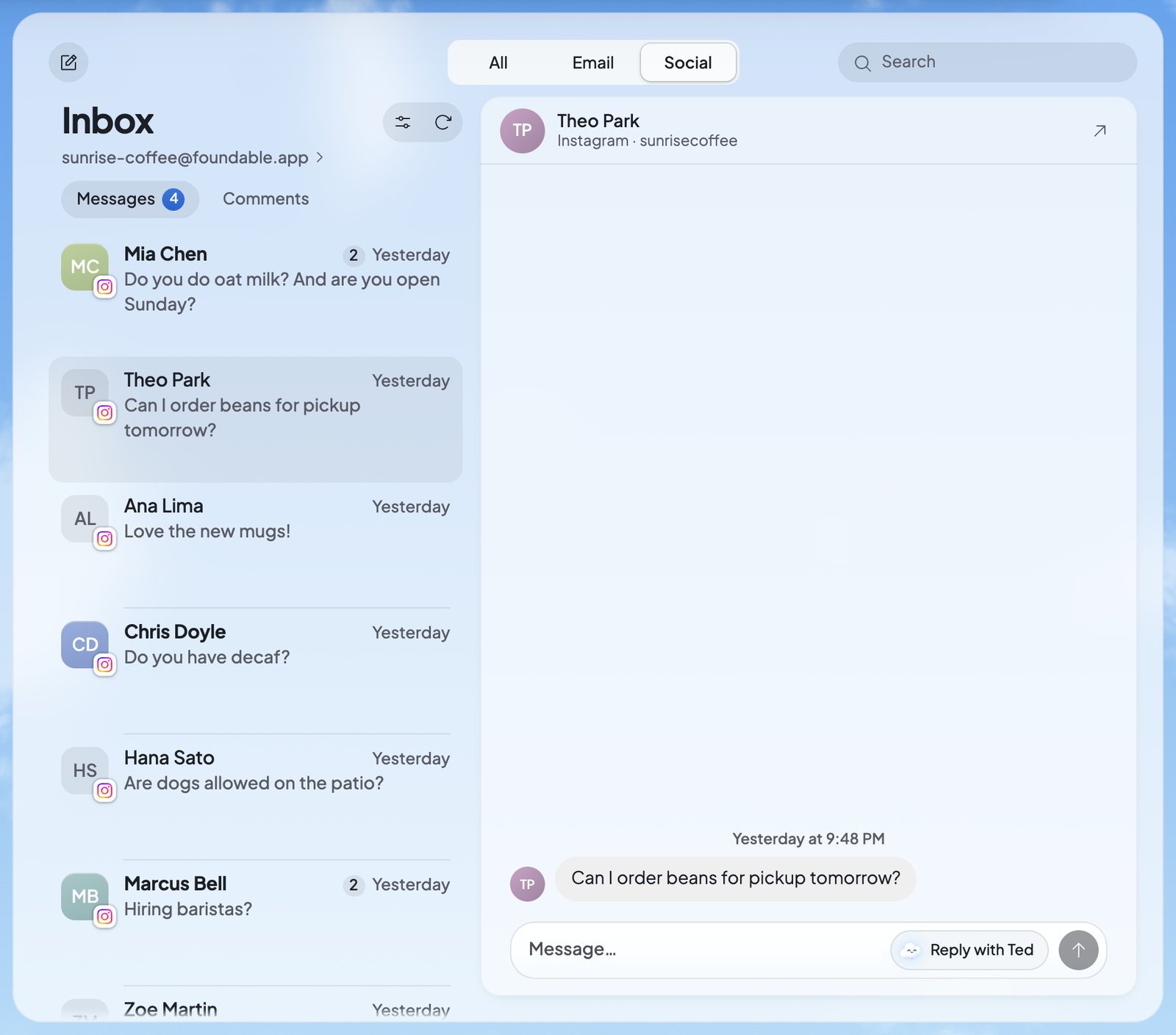
In the Inbox, press Social. Your social messages also show under All, beside your email.
2
Choose what to see
Press Messages, Comments or Reviews, whichever your accounts have. Messages counts your unread conversations, and Reviews counts the ones you haven’t answered.
3
Open the conversation
Press a row. The newest message is at the bottom.
4
Write your reply
Type your reply in the box at the bottom, or press Reply with Ted and Ted fills in the box for you. Change his words if you like.
5
Press Send
Your reply shows in the conversation with “Sending…”, then “Sent” or “Delivered”.
The 24-hour rule
Instagram and Facebook let a business answer a conversation only within 24 hours of the person’s last message. After that, the reply box gives way to “Instagram only lets businesses answer within 24 hours of the person’s last message.” Press Open in Instagram to answer there instead. When they write again, you can reply in the Inbox again. Comments and reviews don’t have this limit.React to a message
Press the heart (React) beside one of their messages and pick a reaction. It shows on the message as “Your reaction …”. Press your reaction to take it off. Reactions follow the same 24-hour rule.What you’ll see
If a reply doesn’t go
A reply that didn’t go stays in the conversation, marked with why, with Try again or Remove. The words name the network, like Instagram:Let Ted help
- Reply with Ted writes a reply into the box. Nothing is sent until you press Send. While he works, it says “Ted is writing…”. Each reply he writes uses credits.
- While Ted runs your business, he reads your messages, comments and reviews when a network’s Follow audience activity or Reply to your audience is on in Run. With Reply to your audience on, he drafts replies. They wait under From Ted on Home, like his other drafts, for an owner or admin to send or decline them. Nothing replies by itself. See Approve Ted’s work.
When nothing shows
TikTok, YouTube, Reddit and WhatsApp can be connected in Run, but their messages don’t come to the Inbox.
FAQ
Why can’t I answer this Instagram message?
Why can’t I answer this Instagram message?
Instagram lets businesses answer only within 24 hours of the person’s last message. Press Open in Instagram to answer there.
Does Ted answer my DMs and comments by himself?
Does Ted answer my DMs and comments by himself?
No. Reply with Ted only fills in the box, and replies Ted drafts in Run wait for an owner or admin. Nothing replies by itself.
Who can reply from the Inbox?
Who can reply from the Inbox?
The owner or an admin. Everyone else in your foundable can read the messages.
Can I see one network at a time?
Can I see one network at a time?
Yes, when your accounts are on more than one network. Press Filter, then Channel, and pick the network. Unread shows only what’s new.
Related

Connect your social accounts
Connect your accounts in Run and choose the ones Ted may use.

Your Inbox
Your email and social messages in one place.

Posts and the Library
The posts Ted makes for your social accounts.

Approve Ted’s work
Ted’s reply drafts and everything else that waits for your OK.