


Your free first run
Foundable pays for your first run. See what Ted does in it.

Ask first or Runs on its own
Choose how much Ted does without asking you.

Decisions and website changes
Answer Ted’s questions and approve changes to your live website.
How a run works
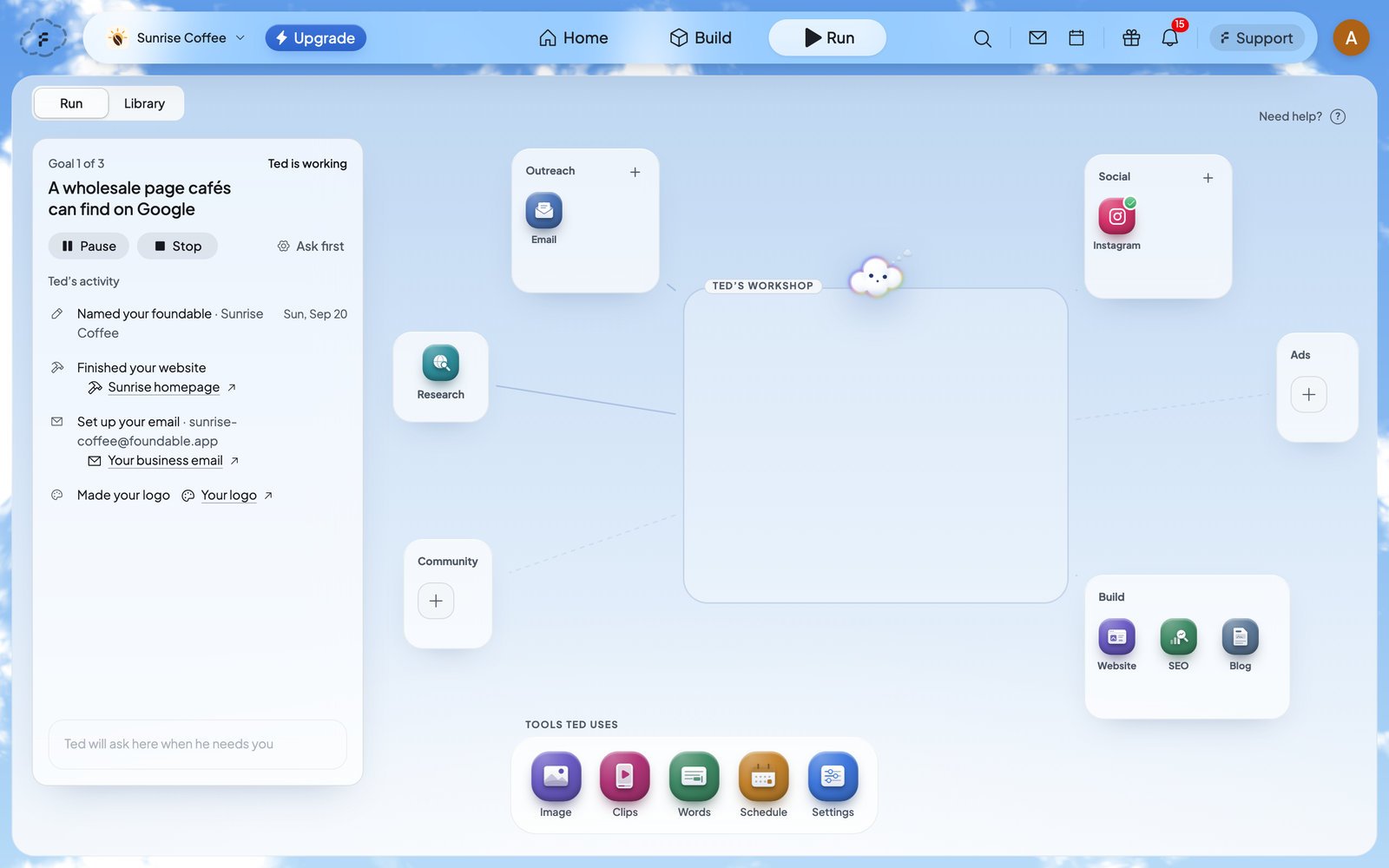
A run starts when you press Start Run. In each pass, Ted reads where things stand, works toward one of the goals he set for your business, and saves what he made. Then the next pass begins. Run’s card shows the goal he’s on, like “Goal 1 of 3”. A run keeps going until one of these happens:- you press Stop
- Ted has used the budget you set
- your credits run out
- billing needs attention
- several passes in a row run into problems
Start Run
1
Open Run
Press Run at the top of the screen.
2
Check the channels
The boxes on the canvas hold the channels Ted works on. A new Run starts with Website, Email, Instagram, SEO and Blog. To add another, press + on a box, then + beside the channel. To let Ted post, connect your social accounts.
3
Choose how Ted works
Press the gear on Run’s card to open Run settings. Pick how Ted runs: it saves as soon as you pick it. Then choose a tier and a budget, and press Save preferences. See Run settings.
4
Press Start Run
The card says “Ted is working”, and each step he takes appears under Ted’s activity.
The Run screen
When something waits for you, the Run tab at the top shows a dot, so you can see it from anywhere. When Ted finishes something, a note pops up: “I made something for you.” Press Open to see it.
Run settings
Open Run settings with the gear on Run’s card, or with Settings under Tools Ted uses. While a run is on, the button shows its mode, like Ask first.
Press Save preferences when you’re done. The Image tool under Tools Ted uses has a setting of its own, Picture quality, for the pictures Ted makes for posts. Pick Low (the default), Medium or High.
Pause, resume or stop
- Pause holds the run. Press Resume to carry on from where Ted stopped.
- Stop ends the run. The next time you press Start Run, Ted carries on from the goals he set.
When a run ends
Ted’s Run summary opens by itself once, on whatever page you’re on. To open it again, find its row under From Ted on Home. The summary starts with how the run ended, the days it covered and the credits it used. Then it counts what Ted did, what he sent or published, what’s scheduled and what’s waiting on you. Under Needs you are the drafts still waiting for you (press Review), and under What I made is everything he made. Press Talk to Ted to ask him about the run, or Done to close it.
If you stop a run before Ted spent or made anything, there’s no summary. A run that made nothing shows what Ted was working toward, where he got to and what’s up next, with Keep going.
If Run won’t start
Who can do what
To add people, see Invite your team.
Plans and credits
Run works on every plan. Foundable pays for your first run. After that, Ted’s work in a run uses your credits, up to the budget you set. A paid plan adds Runs on its own, Ted’s posts, and connecting the social accounts he posts to. Without an active plan, Ted asks before he posts or sends anything. See Plans and credits.FAQ
Do I need to keep Foundable open while Run works?
Do I need to keep Foundable open while Run works?
No. Run works in the background, whether or not you’re looking. Come back any time and Ted’s activity shows what he did.
Why is Run paused when I didn’t pause it?
Why is Run paused when I didn’t pause it?
With Ask first, a run waits whenever Ted has something for you to decide. The card says “Waiting for you” and names what waits, like “Paused until you decide a website change.” Decide it, and the next pass starts. See Decisions and website changes.
Will Ted change my live website by himself?
Will Ted change my live website by himself?
No. Ted can work on your website in a run, but he never publishes it himself. Each change to your live website waits for you to approve or deny it. See Approve a change to your website.
How do I keep a run from using too many credits?
How do I keep a run from using too many credits?
Set a budget under Credits in Run settings before you start. The run ends when Ted has used it. Standard makes your credits go furthest, and you can press Pause or Stop at any time.
Can people on my team use Run?
Can people on my team use Run?
Yes. Everyone in your foundable can see Run, and their role decides what they can change. See Who can do what.
How do I see the Run tour again?
How do I see the Run tour again?
Press Need help? at the top right of the Run canvas. Ted shows you around again.
Related

Connect your social accounts
Let Ted post to Instagram, Facebook, LinkedIn, X and Threads.

Posts and the Library
Everything Ted made, and how your posts are doing.

Approve Ted’s work
Review the emails and posts Ted drafts for you.

Plans and credits
What a paid plan adds, and how credits work.