

- Domains shows the foundable you have open: the names you bought, under Your domains, and the ones you connected, under Custom domains.
- All domains is your own list of every domain across the foundables you own: “Every domain across your foundables.” Open a domain there to renew it, change its DNS settings or move it.
All domains
All domains lists your domains newest first, each with its foundable, its status and the day it was added. Type in “Search your domains” to find one by its name or its foundable’s. Press a domain to open its page, and Back to all domains to return.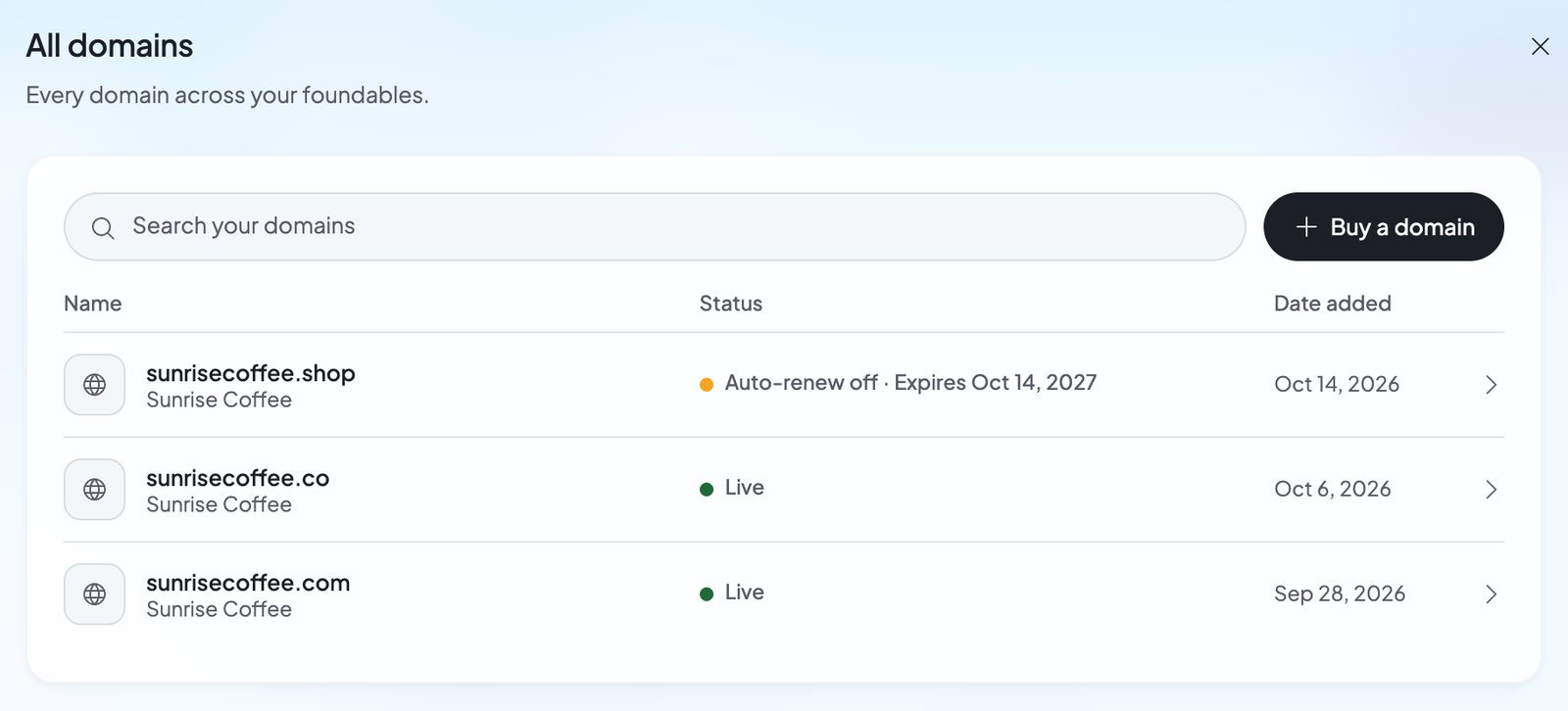
A domain you bought through Foundable has a page with its Registration card (“Foundable manages registration” / “Foundable holds this domain for you.”), then DNS records and Nameservers. The Registration card shows when the domain was registered, when it renews or expires, its yearly price and its Auto-renew switch. Its … menu, More domain actions, holds Renew domain, Move domain and Transfer out.
A domain you connected shows the same card it has in Custom domains. See Connect a domain you own.
Keep your domain renewing
Auto-renew is on for every domain you buy. While it’s on, Foundable renews the domain for one more year before it expires, using your credits. Its row in Your domains shows the day it renews from your credits. To stop renewing, turn off the Auto-renew switch next to the domain in Your domains, or on its page in All domains. The domain then expires at the end of the year you paid for.Renew early
1
Open the domain’s page
In All domains, press the domain.
2
Choose Renew domain
On the Registration card, open the … menu and choose Renew domain: “Add one more year to” your domain. It shows the price and the date the domain will stay registered until.
3
Confirm
Press the Renew for button, which names the credits it spends. Under it, Foundable notes that you agree to the Domain Holding Agreement and that “Renewals are non-refundable.”
DNS records
A domain you bought through Foundable uses Foundable’s DNS, so you change its records on its page. The DNS records card says what they’re for: “Point parts of your domain at other services, like a shop, a calendar or Google’s site check.”- Press Add record, fill in Type, Host, Value, TTL and, for MX and SRV records, Priority, then press Save. You can add A, AAAA, CNAME, MX, TXT, SRV and NS records.
- Records with a lock are Foundable’s, like “Foundable manages this record so your site loads on this domain.” Records for email on your domain are locked too. Point at a lock to see why it’s there.
- To change or delete one of your own records, open its ⋮ menu. Deleting asks “Delete this record?” first.
Nameservers
Nameservers decide which company runs a domain’s DNS. The Nameservers card shows Foundable or Custom, with the nameservers in use. Keep Foundable unless you want another DNS company to run your domain. To use another company, press Edit on the Nameservers card. The Edit nameservers dialog warns: “Foundable will stop managing this domain’s DNS”. Enter the nameservers that company gives you (press Add nameserver for more), then press Save nameservers. While the nameservers are custom, the domain reads “Custom nameservers”, and its DNS records are listed here but can’t be changed. Press Reset on the card, or Reset to Foundable in the dialog, to bring them back. If the registry turns your nameservers down, you see “The registry refused the nameservers you entered. Check them with your DNS provider, then edit them again.”Move a domain to another foundable
On a domain’s page in All domains, the … menu has Move domain. Its dialog says your domain “and its renewal move to another of your foundables”. You pick the foundable under Move to, then press Move domain. Read the dialog’s warning first. Moving “disconnects it from” the foundable it’s in now: “its site and its email there stop at once.”Transfer a domain to another registrar
To move a domain away from Foundable, open its page, then the … menu, and choose Transfer out.- A new domain can’t leave yet: “ICANN requires a 60-day lock on new domains, which Foundable can’t override. Transfers will be available once the period ends.”
- After that, turn off Lock domain transfers.
- Press Reveal authorization code and copy the code. The button waits until the lock is off: “Transfer lock needs to be disabled to reveal.”
- Give the code to your new registrar, which starts the transfer from its side.
If you delete your foundable or account
- Deleting a foundable keeps its domains registered. All domains lists them marked “Deleted”: “This domain isn’t renewed or connected to a site until you move it to one of your foundables.” Moving it is the only thing you can do with it.
- Deleting your account stops every domain renewing: “A domain you bought through Foundable stays registered until the year you paid for ends, then lapses.” See Privacy and deleting your data.
FAQ
What if I run out of credits when my domain renews?
What if I run out of credits when my domain renews?
The domain isn’t renewed. All domains shows “Payment failed”, and the domain’s page says “Auto-renew failed”. Once you have enough credits again, use Renew domain before the domain expires. See Plans and credits.
Can I renew for more than one year?
Can I renew for more than one year?
Each Renew domain adds one year, and you can renew again. When the domain is registered as far ahead as the registry allows, you see “Already registered for the maximum period”.
How do I add a record for Google or another service?
How do I add a record for Google or another service?
Open the domain’s page in All domains, press Add record in DNS records, and copy in the type, host and value the service gives you.
Why can’t I change my DNS records here?
Why can’t I change my DNS records here?
Its nameservers may point to another DNS company, so the records live there. Change them at that company, or press Reset to Foundable to manage them here again. A domain you connected, rather than bought, keeps its records at your domain company too.
Can my teammates manage my domains?
Can my teammates manage my domains?
All domains shows only the foundables you own, so renewing, DNS records, nameservers, moves and transfers are yours. Teammates see a foundable’s domains in its Domains section, and admins can buy new ones there.
Related

Buy a domain
Find a name and buy it with credits.

Connect a domain you own
Add the DNS records and go live on it.

Plans and credits
Keep enough credits for renewals.

Use your own domain
Buying, connecting and your primary domain.