

How credits work
What uses credits
- Ted’s work, including the pictures he makes and the searches he runs
- Building and changing your websites in Build
- Running your business in Run
- Drafting and rewriting replies in the Inbox
- Buying and renewing domains
- The AI your websites use. See Your website’s AI.
Where credits come from
- Daily free credits: on the Free plan, every day. They don’t carry over to the next day. They refill at midnight UTC, up to a monthly cap, and once you reach it, they start again on the 1st.
- Welcome credits: once, as a welcome. They never expire.
- Monthly plan credits: every month on a paid plan. “Unused credits roll over a month.”
- Friend joined: when a friend joins the waitlist with your link. They never expire. See Earn credits.
- From the Foundable team: credits the team adds to your account.
Your plan and credits
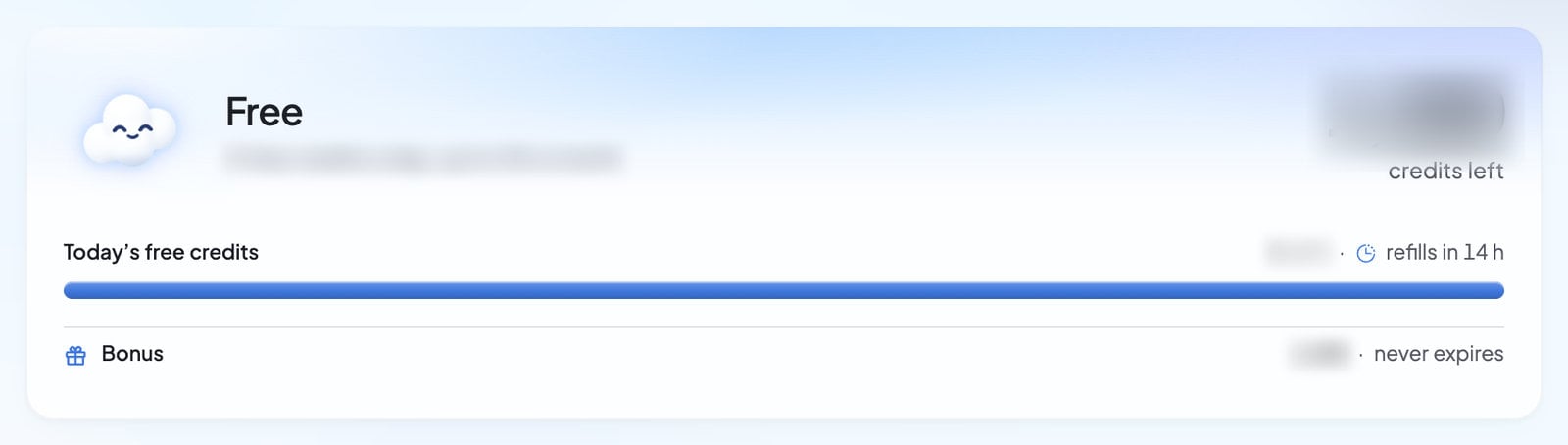
Open Settings, then Plans & credit usage. You can also press the Available credits card in the account menu. The card at the top shows:- Your credits: the credits you have left.
- A bar for Today’s free credits on Free, or This month’s credits on a paid plan, with how many are left and when they refill.
- Lines for Daily, Carried over and Bonus credits, each with the day it expires, or “never expires”.
- Your plan’s name, with “Renews”, “Ends” or “Changes to” another plan, and a date.
Manage billing opens Stripe’s billing page, where you update your payment method or cancel. It shows once you’ve paid for a plan.
See what you spent
Usage shows the credits used each day, split into Ted, Build, Run, Inbox, Domains, Website AI and Other. Pick 7d, 30d or 90d for the time range, and use Filter by category to see one kind of work. A quiet stretch reads “No credits used in this window.” Press View account activity to open Credit activity: “All activity in your account’s credit pool.” Each line says what added or used credits, like “Daily free credits”, “Welcome credits”, “Monthly plan credits” or “Friend joined”. Others read “From the Foundable team”, “Removed by the Foundable team”, “Credits added”, “Refund”, or “AI on” one of your websites. Everything else reads “Credits used”.The plans
There’s the Free plan and three paid plans:- Standard: “One idea, ready to run.”
- Pro: “More room to run.” It’s marked Most popular.
- Max: comes in more than one size, each with a different number of credits a month.
“Ted builds your websites” and “Text Ted from your phone” are on the Free plan too.
What needs a paid plan
- Connecting your social accounts, and Ted making social posts for you
- Runs on its own in Run
- Hiding the Foundable badge
- Your website on your own domain, and buying a domain
- Email on your own domain
- Your website emailing your customers
- Inviting your team
- Downloading your website’s code
- Bigger files for Ted
- More foundables
Buy a plan
1
Open the plans
Press Upgrade after your foundable’s name at the top. Or open Settings › Plans & credit usage and press Compare plans.
2
Choose how to pay
Pick Monthly or Yearly.
3
Press Subscribe
Press Subscribe on the plan you want. You’ll see “Opening checkout…”.
4
Pay on Stripe’s page
Foundable’s plans are sold through Link, Stripe’s merchant of record. Enter your payment details on Stripe’s checkout page.
5
Start using your plan
Back in Foundable, you’ll see “Your plan is active.”, then a welcome window that lists what’s Included in your plan.
Change your plan
Open Settings › Plans & credit usage and press Compare plans. Your plan is marked Current plan.- Upgrade: more credits a month, or a switch to yearly billing. You confirm on Stripe’s page and pay today. The new plan starts today, and “The credits you have stay.”
- Downgrade: fewer credits a month, or a switch back to monthly. Foundable asks you to confirm: you keep your current plan until a date, “when this one starts. Nothing is charged today.” Until then, the new plan’s card reads “Starts” and the date. To change your mind, press the Keep button on your current plan’s card.
Cancel your plan
1
Open Manage billing
Open Settings › Plans & credit usage and press Manage billing.
2
Cancel on Stripe’s page
Cancel your plan on Stripe’s billing page. You can also cancel at link.com.
If a payment fails
If a payment doesn’t go through, Stripe tries again for a while, and your plan keeps working. If it’s still not paid, the plan’s paid features stop until it is. The chat may show “Billing needs attention before Ted can run.”, and the plans window may show Billing needs attention with Open billing. Either way, press Manage billing (or Open billing) and update your payment method.When you run out of credits
On Free, the Upgrade button in Ted’s message box turns blue when you’re running low. It shows the credits you have left, then “Out of credits · Upgrade now”. At zero, a card above the message box says Keep building with Foundable: “More credits are needed to keep building.” It offers one button, such as Upgrade now, Get more credits, Update payment or View usage. On Free, it also says when your free credits come back. A message Ted couldn’t take stays in the box, so you can send it later.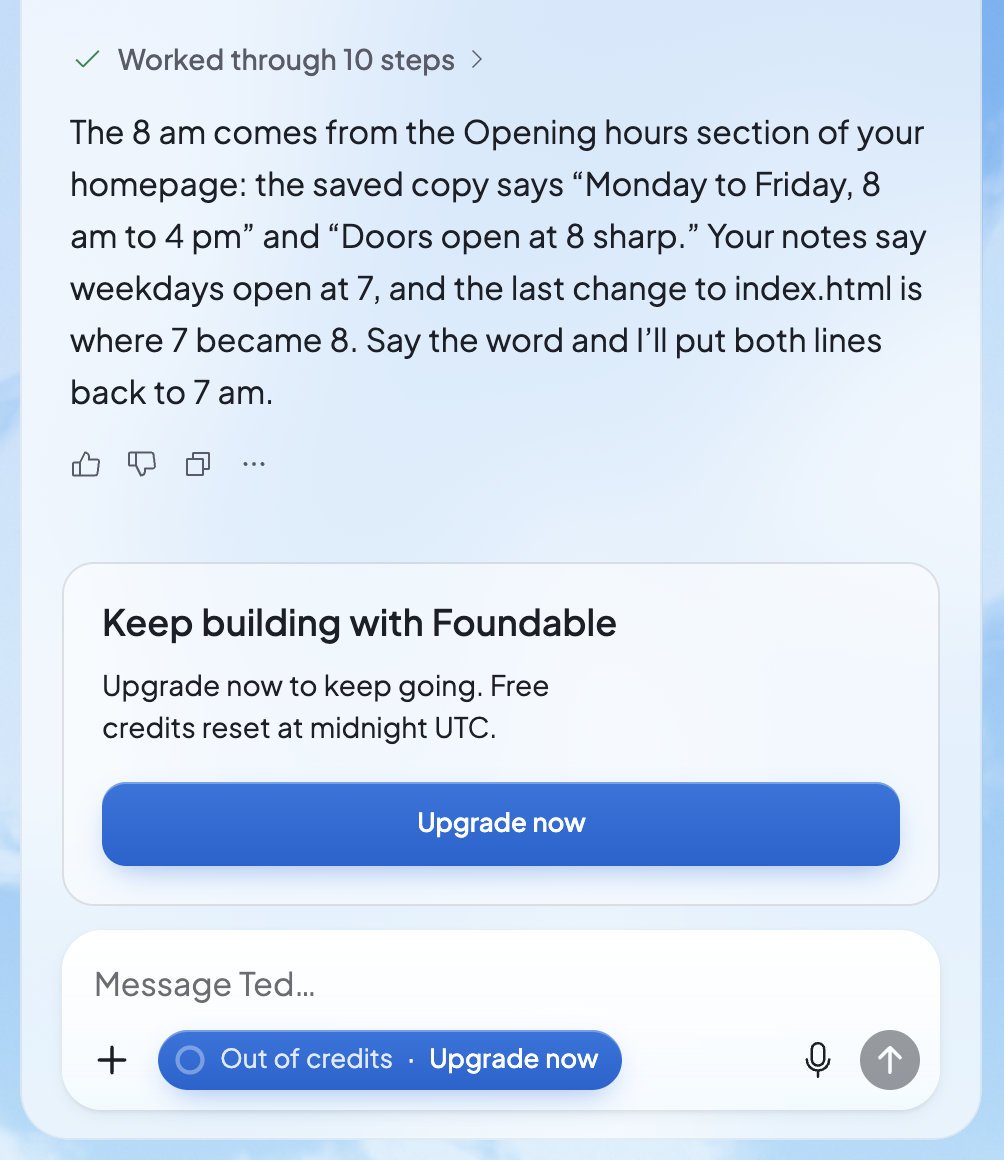
Who handles the plan
Your plan and credits belong to your account, and only you can change your plan. In a foundable you own, your credits pay for all the work, whoever asks Ted for it.FAQ
How much does a plan cost?
How much does a plan cost?
Each plan’s price shows on its card when you press Compare plans or Upgrade. You can also ask Ted in the chat.
Do my credits expire?
Do my credits expire?
It depends on the kind. Daily free credits last until the end of the day. Plan credits carry over for one month. Welcome credits and credits you earn from friends never expire.
Is there a free trial?
Is there a free trial?
No. You can stay on the Free plan, which gives you free credits each day, and choose a paid plan when you’re ready.
Can I switch to yearly billing?
Can I switch to yearly billing?
Yes. Open Compare plans, pick Yearly and choose your plan. Switching to yearly is an upgrade, so you confirm it on Stripe’s page and pay today.
Do I get a refund if I cancel?
Do I get a refund if I cancel?
Your plan keeps working until the end of the time you paid for. For anything about refunds, see the Refund & Dispute Policy.
Do my teammates have their own credits?
Do my teammates have their own credits?
No. Everyone in your foundable uses the owner’s credits.
Related

Earn credits
Invite friends and earn credits that never expire.

Invite your team
Every paid plan lets you bring in your team.

Ask first or Runs on its own
Choose how much Ted does without asking.

Get help
Questions about billing? The Foundable team can help.