

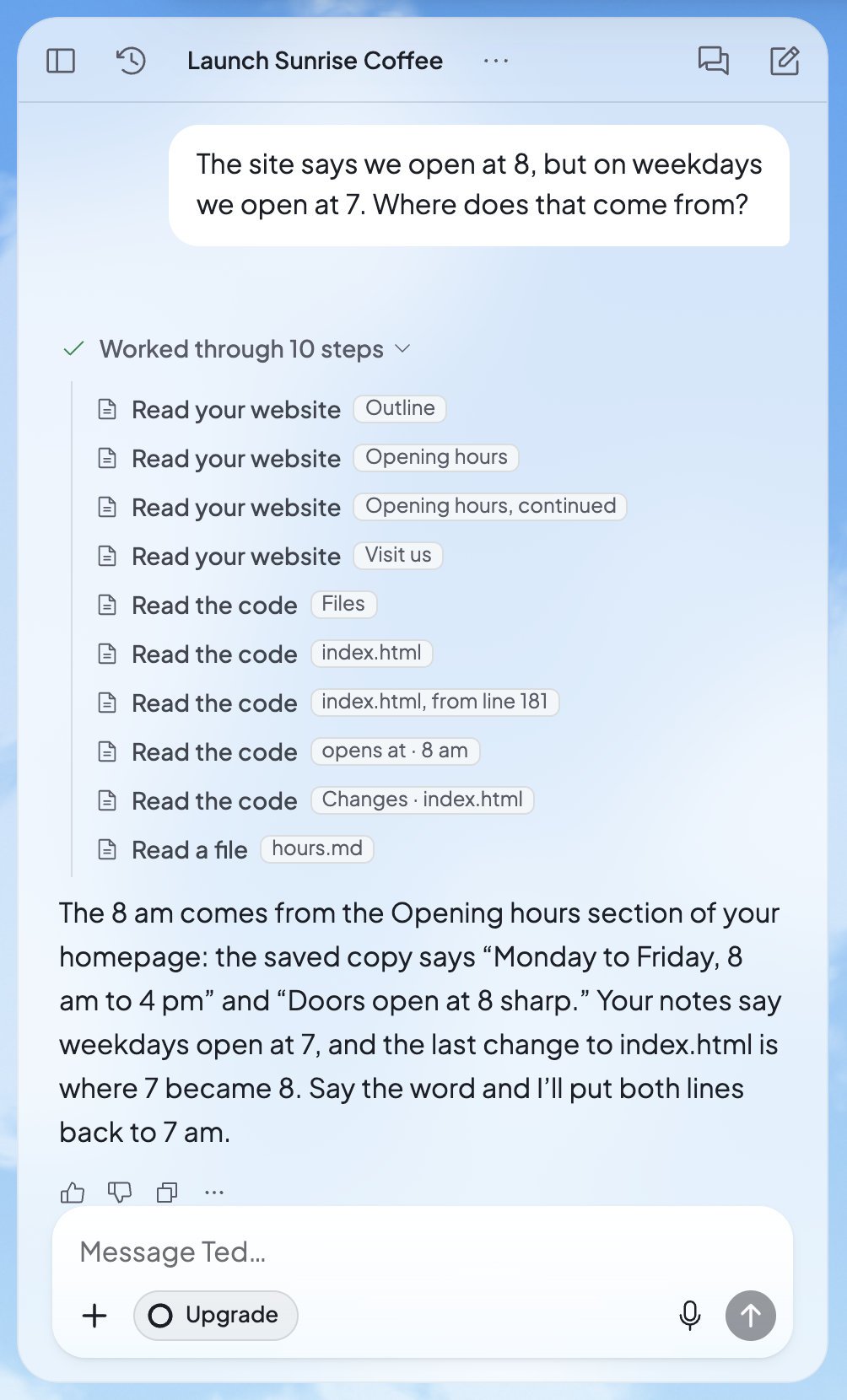
Under Ted’s reply, his steps open to show how he found the answer

Chat with Ted
Ask for anything in the chat beside your work.

Tips for asking
Get what you want sooner, with examples.

Text Ted
Message Ted from your phone, wherever you are.
What you can ask Ted to do
Ask Ted for whatever your business needs. Here are some of the jobs he does, each with a message you could send him:
For more ways to put a request, see Tips for asking Ted.
How Ted works
He shows his work
Every reply shows what Ted did. While he works, you see “Thinking”, then “Working” with a clock. When he’s done, the row says how many steps he took, like “Worked through 10 steps”. Press it to see each step in plain words, such as “Searched the web” or “Drafting an email”. When he reads the web, “Sources” lists what he read.He asks when he needs you
When Ted needs a choice or a fact from you, he asks on a card in the chat. He shows one question at a time, like “1 of 3”, and marks his own suggestion “Recommended”. Pick an answer, or write your own. If he needs one of your apps connected, or a secret key for your website, he asks on a card for that too.He keeps notes
Tell Ted something that matters, and he keeps a note of it for later. You’ll see “Noted” among his steps when he saves one.He keeps working while you’re away
With Run on, Ted works on your business by himself, pass after pass. Scheduled tasks run at their set times, whether you’re there or not. And when you’re out, you can text him from your phone.His work uses credits
Ted’s work is paid for with credits, from the owner’s account, whoever asked him. Each reply’s … menu shows the “Credits used”. Ted knows Foundable’s plans and their prices, so you can ask him. See Plans and credits.Where you’ll find Ted
- The chat, on the left of every page except Run on a computer, or the Chat tab on a phone. See Chat with Ted.
- Ted at work, at the top of Home: his live line, like “Lining up my next step…”. Press Show Ted’s activity to see his log.
- From Ted: the bell at the top right, and the From Ted card on Home, collect what Ted makes for you. A red badge counts what you haven’t opened yet.
- Run: Ted’s workshop, where you watch him work. A short line over his head says what he’s thinking.
- Your phone: text Ted from Messages. See Text Ted from your phone.
What you decide
Ted does the work, and some decisions stay with you:- Emails, posts and replies Ted drafts wait for your OK, or an admin’s.
- Ted never buys a domain himself. Only your press of Buy buys one.
- While Run is on, each change to your live website waits for you to approve or deny it.
Who can work with Ted
What each person can do with Ted depends on their role. These are Foundable’s own words, from Settings › Team:
Ted has a row in Team too, at the top, as your “Employee”. A view-only teammate can read the chats but can’t send Ted anything. Their message box says “View only: you can read chats with Ted, not send them.” Inviting people needs a paid plan. See Invite your team.
FAQ
Is Ted a real person?
Is Ted a real person?
No. Ted is an AI employee that Foundable made to run your business with you. When you want a person, press Support at the top right to reach the Foundable team, or see Get help.
Does Ted remember what I tell him?
Does Ted remember what I tell him?
Yes. Ted keeps notes of what matters, and you see “Noted” among his steps when he saves one. The notes themselves aren’t shown to you. If something changes, tell him.
What if Ted gets something wrong?
What if Ted gets something wrong?
Tell him in the chat what to fix. To take back a website change, press Undo latest edit under his reply. To ask again in other words, use Edit message on your own message. To tell Foundable, press Not helpful, or choose Report a problem in the reply’s … menu.
Can Ted read my photos and files?
Can Ted read my photos and files?
In the chat, yes. Press +, then Add photos & files, to add pictures, PDFs and documents for Ted to read. By text message, Ted reads text only.
How do I stop Ted?
How do I stop Ted?
In the chat, press Stop response, or press Esc twice. This also stops a website build the chat started. To stop Run, the owner presses Stop on Run’s card.
How much does Ted cost?
How much does Ted cost?
Ted’s work uses credits, and every plan comes with credits. Ask Ted what each plan costs: he knows Foundable’s plans and prices. See Plans and credits.
Related
Chat with Ted
The message box, his replies and your chat history.

Approve Ted’s work
What waits for your OK, and who can give it.
Tips for asking Ted
Ways to ask that get you what you want sooner.

Run: Ted runs your business
Let Ted work on your business by himself.