

What waits for you
When several things wait, the box shows one at a time, with arrows and a count like “1 of 2”. With Ask first, the run pauses until you decide. With Runs on its own, it keeps working. See Ask first or Runs on its own.
Answer Ted’s questions
Ted asks when he needs something only you can give him, like a choice, a fact, a link, a file or a connection. Each question says which goal it’s for (“Ted asks · Goal 1”) and why he asks.
For most questions, you can also type your own answer in “Or tell him…”. If your answer is long, add it as a file.
- Later sets the question aside for now. It stays in the box.
- Skip leaves it to Ted: “Skipped. Ted decides himself.”
- After you send an answer, the box says “Sent. Ted reads it next.”
Pick the work Ted plans
In a run you start, Ted may show you a card for a piece of work he plans, with his reason. Press Explore this to have him take it on, or Not now to leave it. The run keeps working while a card waits, and the same card shows on Home. Only the owner can answer these cards. Your free first run asks this way too. See Pick where Ted goes next.Approve a change to your website
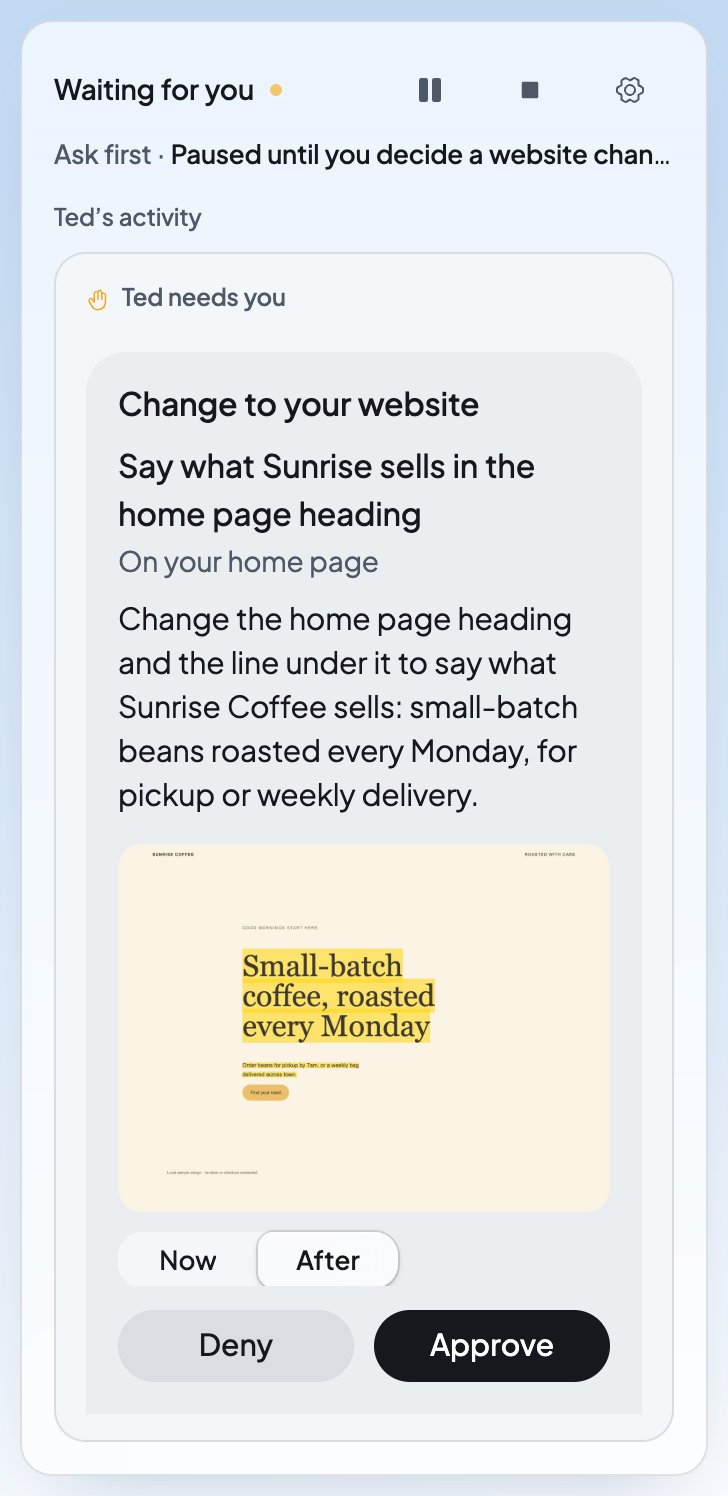
Your website is in Run unless you take it out. Ted checks your live website as he works, and he can change it, for example to make a heading say what you sell. He never publishes the change himself. He saves it and hands it to you to approve or deny.1
Open the change
In Run, it’s under Ted needs you. You can also press Review beside “Suggested a website change” in Ted’s activity, or open it under From Ted on Home.
2
Compare before and after
The card says “Change to your website”, what Ted changed and on which page, like “On your home page”. Switch the picture between Now and After, and read What changes for the exact words. Open your home page shows the page in Build.
3
Decide
Press Approve to put the change live, or Deny to leave your website as it is.
After you decide
How Ted treats your website
- He waits his turn. While a change waits for you, or while your website has changes you haven’t published, Ted leaves your live website alone.
- New things stay unpublished. A new page or website Ted makes is saved for you to look at. Publish it yourself when you’re ready. See Publish your website.
- It comes from your budget. Ted’s website work in a run is paid from your Run budget.
When an answer doesn’t go through
FAQ
Does Ted publish website changes by himself?
Does Ted publish website changes by himself?
No. In both modes, Ted hands each change to your live website to you. It goes live only when you press Approve.
Can I undo a change after I approve it?
Can I undo a change after I approve it?
Yes. While the change is live, press Undo. You can also go back to any earlier version in Version history.
What if I don’t answer a question?
What if I don’t answer a question?
With Ask first, the run waits until you answer. With Runs on its own, Ted works on his other goals meanwhile. Press Skip if you’d rather Ted decide himself.
Why can’t I approve a website change?
Why can’t I approve a website change?
Only the owner or an admin can approve, deny or undo website changes. Ask one of them, or see Invite your team for what each role can do.
Related

Approve Ted’s work
Review the emails and posts Ted drafts.

Publish your website
Put the new pages Ted makes online.

Version history
Look at any earlier version and go back to it.

Ask first or Runs on its own
Choose when a run waits for you.