

Get more credits
1
Press the card’s button
At zero, a card above Ted’s message box says “Keep building with Foundable”. It offers one button: Upgrade now on Free, or Get more credits on a paid plan. With no plan to move to, it offers View usage, which opens your plan and credits.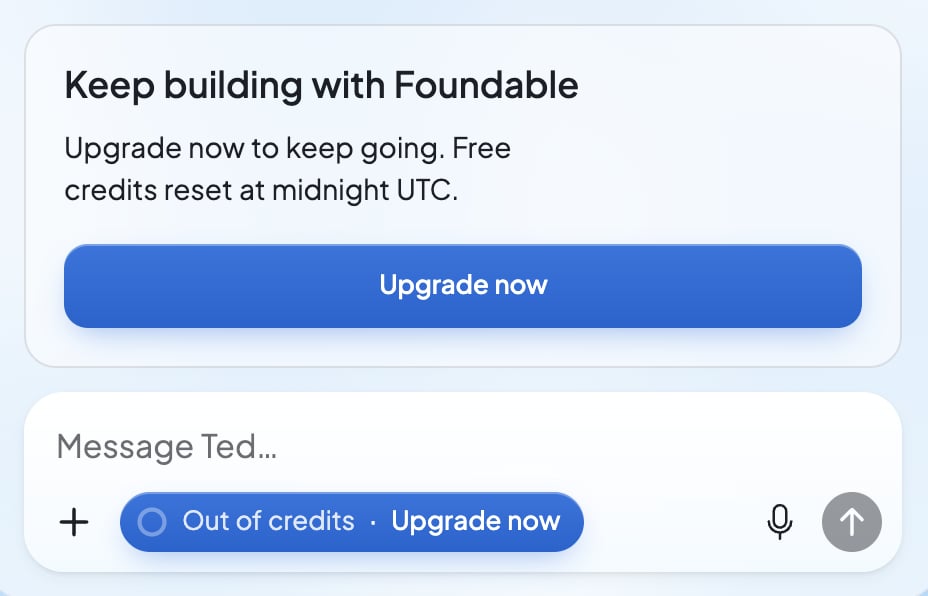
2
Choose a plan with more credits
On Free, press Subscribe on a plan. On a paid plan, press Upgrade on a plan with more credits a month. Then pay on Stripe’s page. See Choose, change or cancel your plan.
3
Pick up where you left off
Send your message. If a reply stopped partway, press Continue under it.
If something goes wrong
“You’re out of credits. See your plan in Settings to keep talking to Ted.”
“You’re out of credits. See your plan in Settings to keep talking to Ted.”
Your credits ran out, and your message stays in Ted’s message box. Press the button on the card above it, like Get more credits or Upgrade now. On the Free plan, the card says when free credits come back.
“Ted stopped here: you’re out of credits. See your plan in Settings to keep talking to Ted.”
“Ted stopped here: you’re out of credits. See your plan in Settings to keep talking to Ted.”
Your credits ran out during Ted’s reply. Get more credits. When you see “You have credits again, so Ted can pick up where he left off.”, press Continue.
“Paused — out of credits”
“Paused — out of credits”
A change to your website in Build paused, and Build keeps your progress. Press Get credits. Once you have credits, press Continue, and Ted finishes it.
“Your latest payment didn’t go through. Update your payment details to keep building.”
“Your latest payment didn’t go through. Update your payment details to keep building.”
Stripe couldn’t take your plan’s last payment, so its new credits wait until it’s paid. Press Update payment, then Open billing, and update your payment method on Stripe’s page.
FAQ
Can I buy credits without changing my plan?
Can I buy credits without changing my plan?
No. Foundable doesn’t sell credits on their own. To get more each month, move to a plan with more. See Change your plan.
Does my website stop working?
Does my website stop working?
No. Your websites keep working, and only their AI answers pause until you have credits. See Your website’s AI. A domain you bought renews with credits too, so add some before it’s due. See Manage your domains.
Related

How credits work
Where credits come from, and what you spent.

Choose, change or cancel your plan
Pick a plan with more credits each month.

Earn credits
Invite friends and earn credits that never expire.