

1
Keep Get found on Google in Run
On Home, press Build in Ted’s apps. On a phone, press Apps & settings first. Get found on Google starts in Run. If it’s under Not in Run, press + beside it.
2
Connect Google Business
Press Social in Ted’s apps, then Connect beside Google Business. See Connect your social accounts.
3
Take the steps only you can
Some listings, like Yelp, Apple Business and Bing Places, need you once to make the account. Ted asks under Only you can do this: press the button that opens the page, take the step, then press Done.
What Ted does
- What Google shows. Ask him whether Google lists your live website and how it shows in searches, with no app to connect. On your own domain, he needs your own Google Search Console connected. Google alone decides when to list it.
- Your listings. He picks the few your kind of business needs, and keeps one set of facts for them in a document called Your listings, with what each still needs. While Run runs, he looks again about once a month, and when a fact changes.
- Review asks. With Email new people on and a review link from Google, he emails each new Payments buyer once, naming what they bought. He skips anyone you already write with. Everyone gets the same ask, with no reward and no asking for kind words.
- Replies to reviews. With Reply to your audience on, he drafts them, and each waits for the owner or an admin.
- Press and partners. With Email new people on, he may also write to reporters, partners and communities who could mention your business or send you customers.
Let Ted post his replies
In Social, press Google Business, then turn on Post replies for me. With On its own, Ted then posts his replies to reviews himself. It stays off until you or an admin turns it on, and Ted can’t turn it on.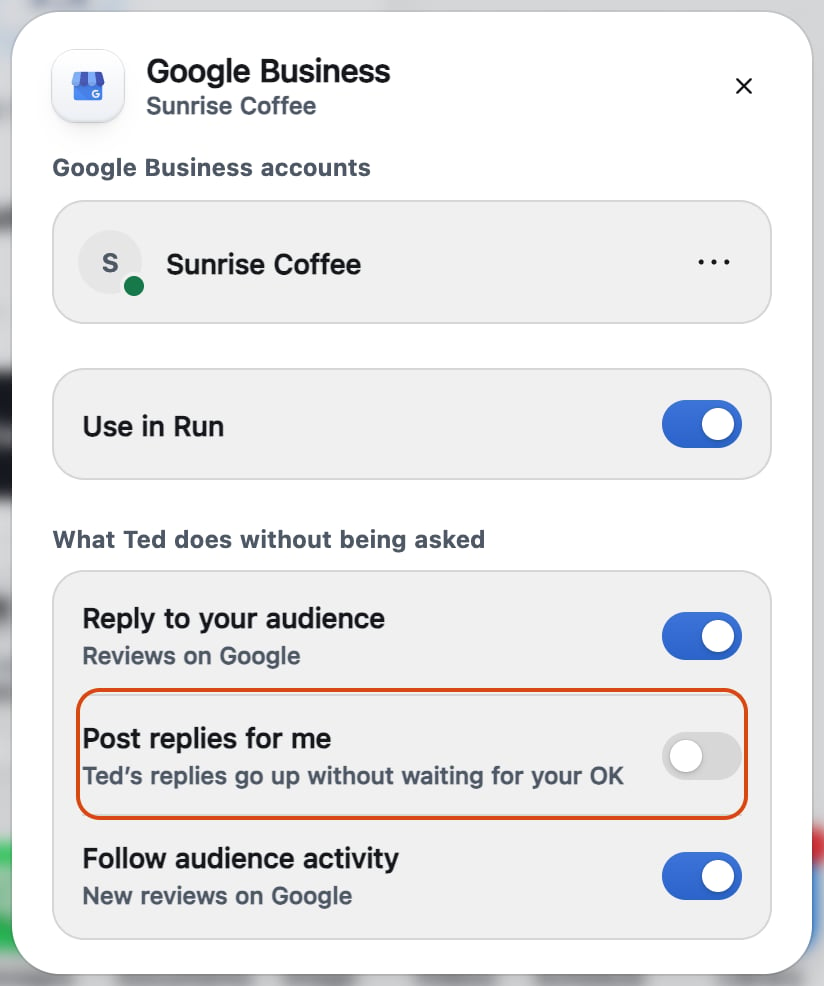
Check that it worked
Your listings is in the Library’s Documents. On a phone, a review ask’s card in Needs your OK says it’s asking for a review.If something goes wrong
Ted isn’t asking buyers for reviews
Ted isn’t asking buyers for reviews
He needs Google Business connected, Email in Run with Email new people on, and a sale through Payments. He also needs a review link, which Google gives once it has verified your profile. Verify it on Google. He then asks after new sales, never past customers.
Related

Connect your social accounts
Connect Google Business, and what each switch does.

Let Ted answer your social messages
Send or change the replies he drafts.

Ask first or On its own
Choose what waits for your OK.