

1
Open Image
On Home, press Image in Ted’s apps. On a phone, press Apps & settings, or Apps while he works.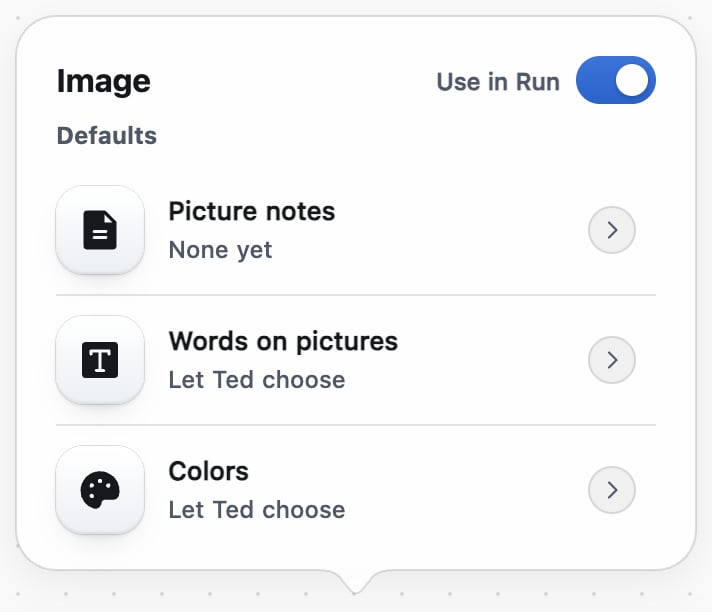
2
Add your picture notes
Press Picture notes, and type what his pictures should follow, like no people. Ted follows them in each picture he draws without being asked.
3
Choose the words
Under Words on pictures, Let Ted choose adds a headline when the post needs one. No words makes product photos with no words, and your caption does the talking.
4
Choose the colors
Under Colors, Let Ted choose takes whatever suits the picture. Use my brand colors puts every post and ad picture he makes without being asked in your brand’s colors.
5
Save your choices
In a wide window, each choice saves as you pick it, and Save keeps your notes. Otherwise, press Save preferences.
Check that it worked
Each row shows your choice, and the next picture Ted draws without being asked follows it.Turn off AI pictures
In Image, turn off Use in Run. The posts Ted makes without being asked then use your own photos, or words alone where the network takes them. Ask in the chat or by text, and he still draws one. Logos, decks, videos and your website aren’t affected.Set how he writes and how often
In Documents, pick his Tone, Voice and Length. In Schedule, pick Repeat (Only when I press Start, Daily or Weekly) and your Time zone, which starts on My local time. Ted reads these as notes while he works in Run. Repeat doesn’t start Run by itself: for work at set times, set up a scheduled task.FAQ
One of Ted’s steps says he’s keeping a reference picture. What’s that?
One of Ted’s steps says he’s keeping a reference picture. What’s that?
He found a strong post from another business and uses its picture as a model for the scene of one of your posts. Each one guides one post, and that post shows your own product, never theirs.
Can I change a picture Ted already made?
Can I change a picture Ted already made?
Yes, while the post waits for your OK: in its review, press More actions, then Edit. See Approve and schedule Ted’s posts.
Can Ted draw from my own photos or artwork?
Can Ted draw from my own photos or artwork?
Yes: attach them in the chat and ask him. He keeps what they show, your own characters included, rather than inventing it from words.
Related

Approve and schedule Ted’s posts
Post, schedule or decline what Ted writes.

Make videos with Ted
Choose how Ted makes videos.

Run: Ted runs your business
Ted’s apps, and how Run works.