

Before you start
- Stripe must have approved your account. See Get paid with Payments.
- Only the owner can send money or change payouts. Everyone else in your business reads the card.
1
Open Payments
In Build, press Tools (under More actions on a phone), then Payments.
2
Read the payout card
Find Manage your payout account, above Dashboard. Its line says how your sales reach your bank. See what the card says.
3
Send what’s ready
If the card has Pay out, press it. Your Stripe balance opens in a new tab. Send the money to your bank there.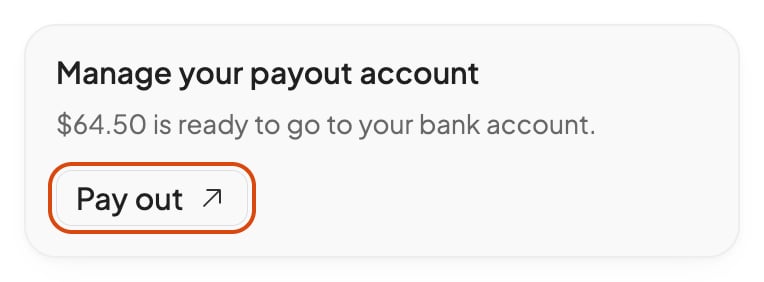
4
Change your bank account or schedule
Press Manage payouts. Stripe’s payout settings open in a new tab. If the card has Pay out instead, press Open in Stripe at the top of Payments.
Check that it worked
Open Payments again. The card’s line says what’s ready now.What the card says
“Stripe sends your sales to your bank account every week.”
“Stripe sends your sales to your bank account every week.”
Stripe pays out by itself, every day, week or month, as the line says. You have nothing to do.
“… is ready to go to your bank account.”
“… is ready to go to your bank account.”
Your Stripe account pays out only when you ask, and this much is ready. It stays in Stripe until you send it: press Pay out.
“Stripe keeps your sales until you send them to your bank account.”
“Stripe keeps your sales until you send them to your bank account.”
Your Stripe account pays out only when you ask, and nothing is ready now. Pay out shows once money is ready.
“Make sure your bank account details are up to date to receive payouts.”
“Make sure your bank account details are up to date to receive payouts.”
Payments hasn’t read Stripe’s answer yet, or couldn’t. Open Payments again in a moment.
FAQ
Why is a payout less than my sales?
Why is a payout less than my sales?
Stripe takes its fees and any refunds from your balance. Net in Payments takes off refunds only. See Track your sales and give refunds.
Where do I see past payouts?
Where do I see past payouts?
In your Stripe Dashboard: the owner presses Open in Stripe. Payments shows your sales, not each payout.
Related

Get paid with Payments
Set up Payments with Stripe.

Track your sales and give refunds
See what sold and refund a sale.